33
8 Setup with smartphone/tablet (Bluetooth)
VEGAPOINT 21 • Transistor (NPN/PNP)
56623-EN-210210
If the Bluetooth connection is interrupted, e.g. due to a too large
distance between the two devices, this is displayed on the adjustment
tool. The message disappears when the connection is restored.
Parameter adjustment of the device is only possible if the parameter
protection is deactivated. When delivered, parameter protection is
deactivated by default and can be activated at any time.
It is recommended to enter a personal 6-digit device code. To do this,
go to menu " Extended functions", " Access protection", menu item "
Protection of the parameter adjustment".
8.3 Sensor parameter adjustment
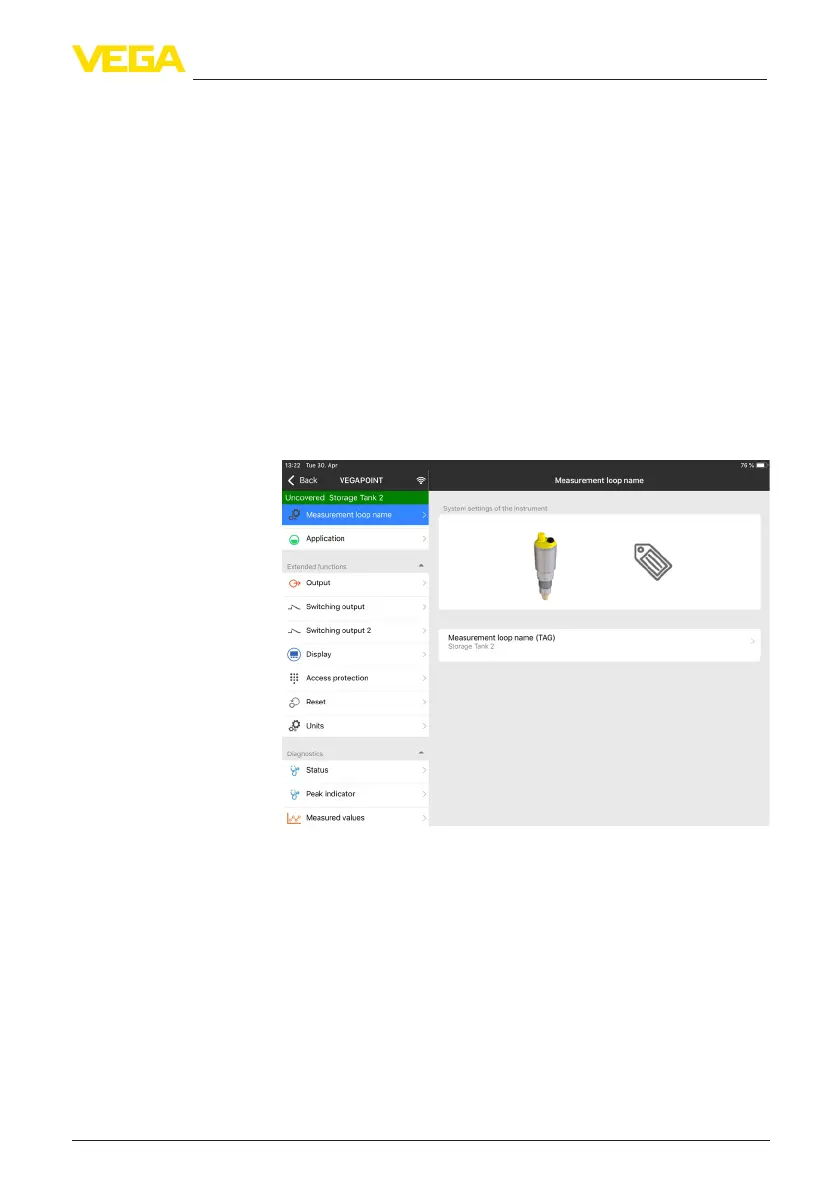
The sensor adjustment menu is divided into two halves:
Ontheleftyou'llndthenavigationsectionwiththemenus"Setup", "
Diagnosis" and others.
The selected menu item, recognisable by the colour change, is dis-
played in the right half.
Fig. 16: Example of an app view - Setup
Change device code
Enter parameters


 To Next Page