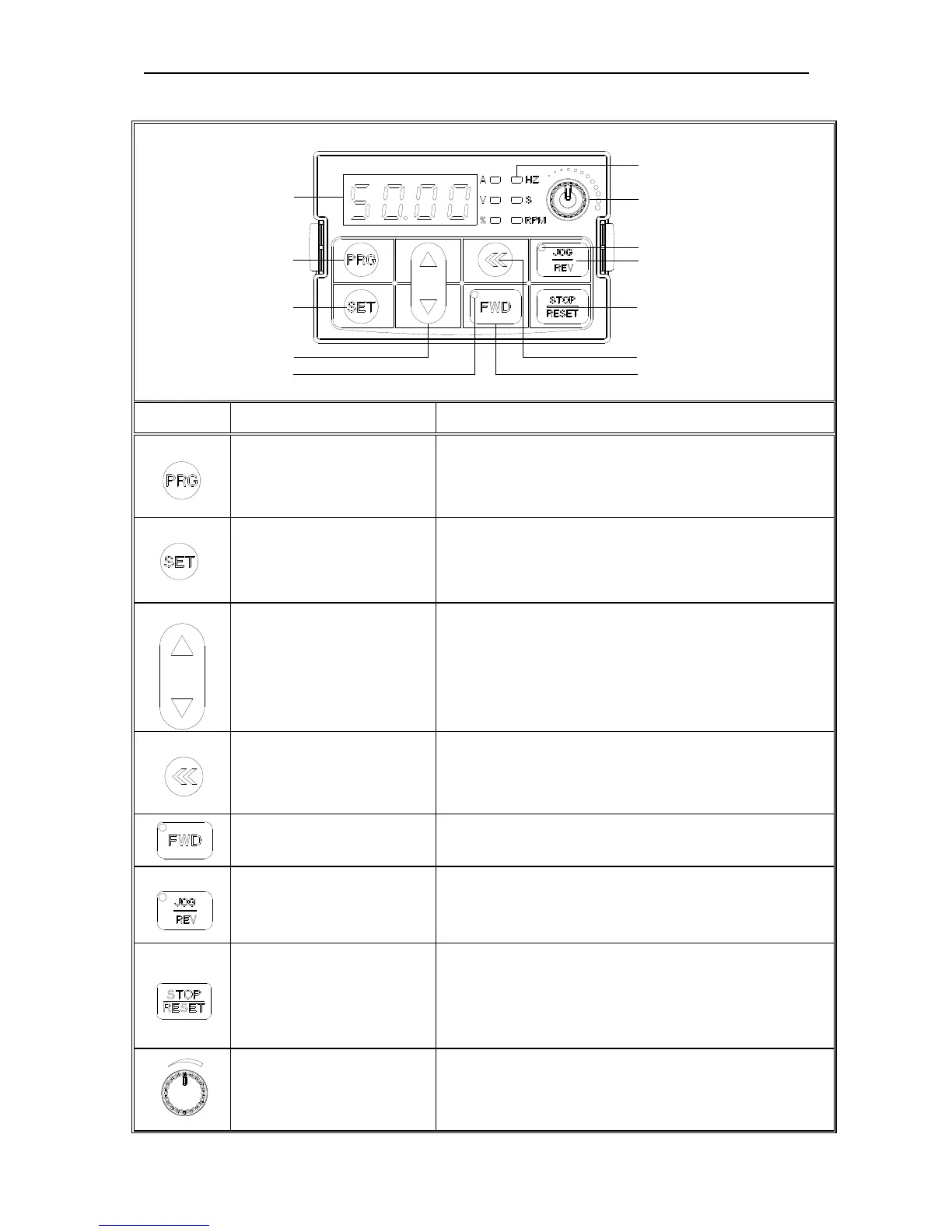
Key Key name Key functions
Menu key
Enter menu while standby or running. Press this key to
return while modify parameter. While standby or
running, press for 1 sec to enter monitor interface.
Confirm/modify key
Press to modify parameter while in menu interface.
Press again to confirm after modify. While standby or
running, press to change LED monitoring items at stop
Up/down key
Select parameter group in menu interface. Modify
parameter while in modify interface. Modify given
frequency or PID or given torque while at standby or
monitoring state(While given frequency or PID or given
torque are set by keyboard)
Shift key
Select digit of function no modified by up/down key,
Select parameter digits modified by up/down key.
Change LED monitoring items while standby or running
Forward key
While run/stop is controlled by keyboard, press this key,
the inverter forward rotate.
Jog/Reverse key
While run/stop is controlled by keyboard, press it,
machine will reverse if this key is defined as REVERSE
and machine will jog if this key is defined as JOG.
Stop/Reset key
Machine stops if press it while run/stop is controlled by
keyboard. Its efficiency range is defined via function no
F-07. Inverter reset if press it in fault state(no reset if
fault is not solved)
Potentiometer
It is used to adjust the frequency while potentiometer
adjust speed.



 To Next Page