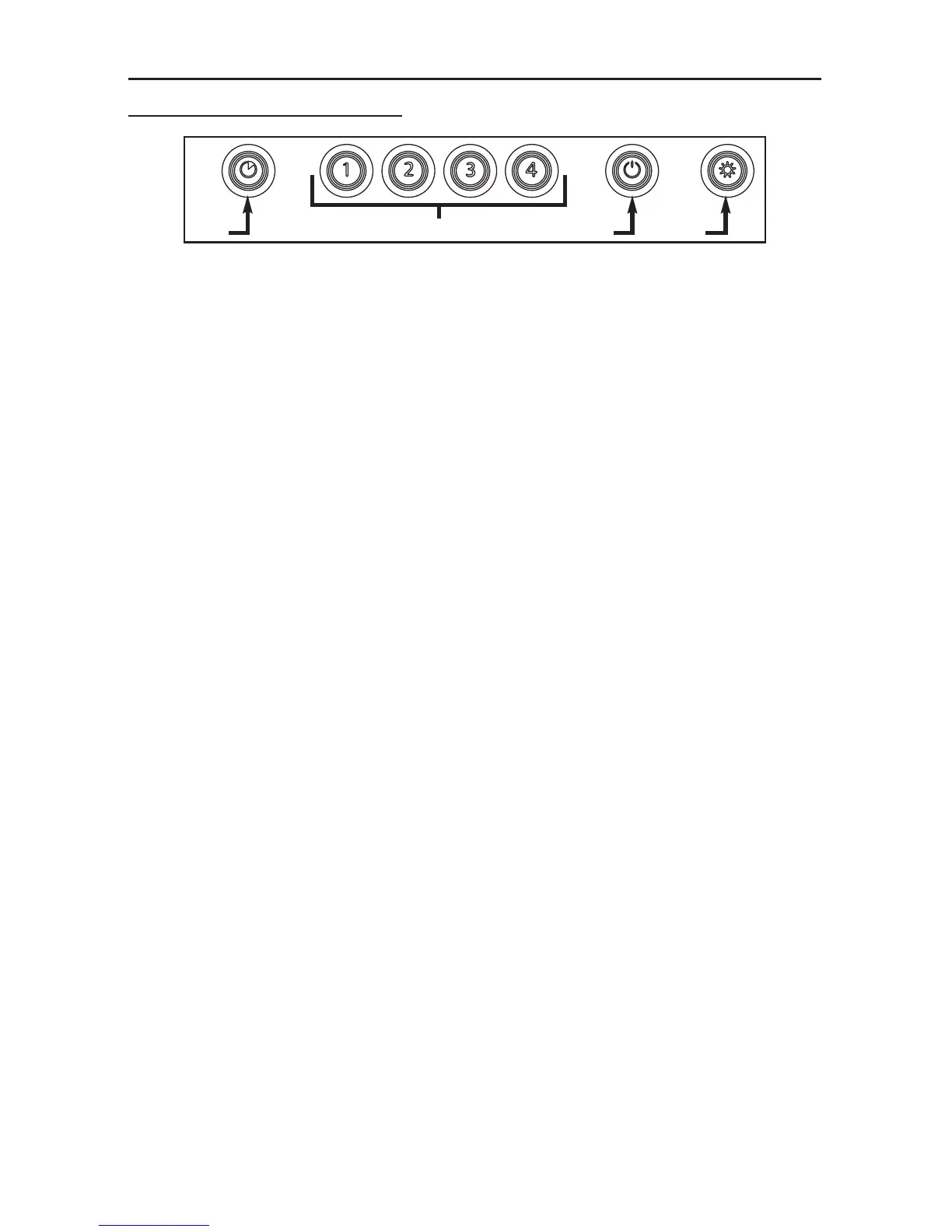
ROUND ELECTRONIC CONTROL
A. DELAY SWITCH:
When a blower speed is selected, press this switch to activate the delay function. The
corresponding blower speed switch will flash to indicate this function is activated. The blower
will continue to operate for 5 minutes and will stop automatically. To cancel the delay function,
press the delay switch once again.
B. START/STOP/SPEED SELECTION SWITCHES:
Press the switch corresponding to the desired blower speed (from 1 for low speed to 4 for high
speed). The chosen switch will light. To turn off the blower, press once more on the
corresponding blower speed switch; the switch light will shut off.
NOTE: When blower is off, pressing on blower speed 1 switch will cause the blower to start on
high speed for a very short lapse of time, and then resume on speed 1.
C. MASTER OFF/FILTER MAINTENANCE/HEAT SENTRY (TRIPLE FUNCTION SWITCH):
i. To turn off the blower and the light simultaneously, press this switch once.
ii. After 25 hours of operation, this switch will light to indicate the filters and the blower wheel(s)
need to be cleaned in order to maintain efficient operation of the unit. The switch light will
stay on until the function is reset by pressing this switch for 3 seconds.
iii. The light indicator is used for the Heat Sentry function as well (NOT AVAILABLE ON ALL HOOD
MODELS).
H
EAT SENTRY™:The hood is equipped with a protective device that activates when excessive
heat is detected inside the hood and when it is set on speed 4. This device
takes control of the blower and deactivates speed 4 for a 10-minute period and
sets it on speed 3. During the Heat Sentry activation, only speed 3 can be
used; the Heat Sentry button (C) will flash while the speed 3 button will light.
The hood can also be turned OFF.
D. L
IGHT SWITCH:
This switch allows three different lighting levels according to your needs. Press once for
nightlight, twice for normal or three times to obtain full intensity. To shut off the lights without
turning off the blower, press once more.



 To Next Page