6. INSTALL THE HOOD
Run power cable to installation location.
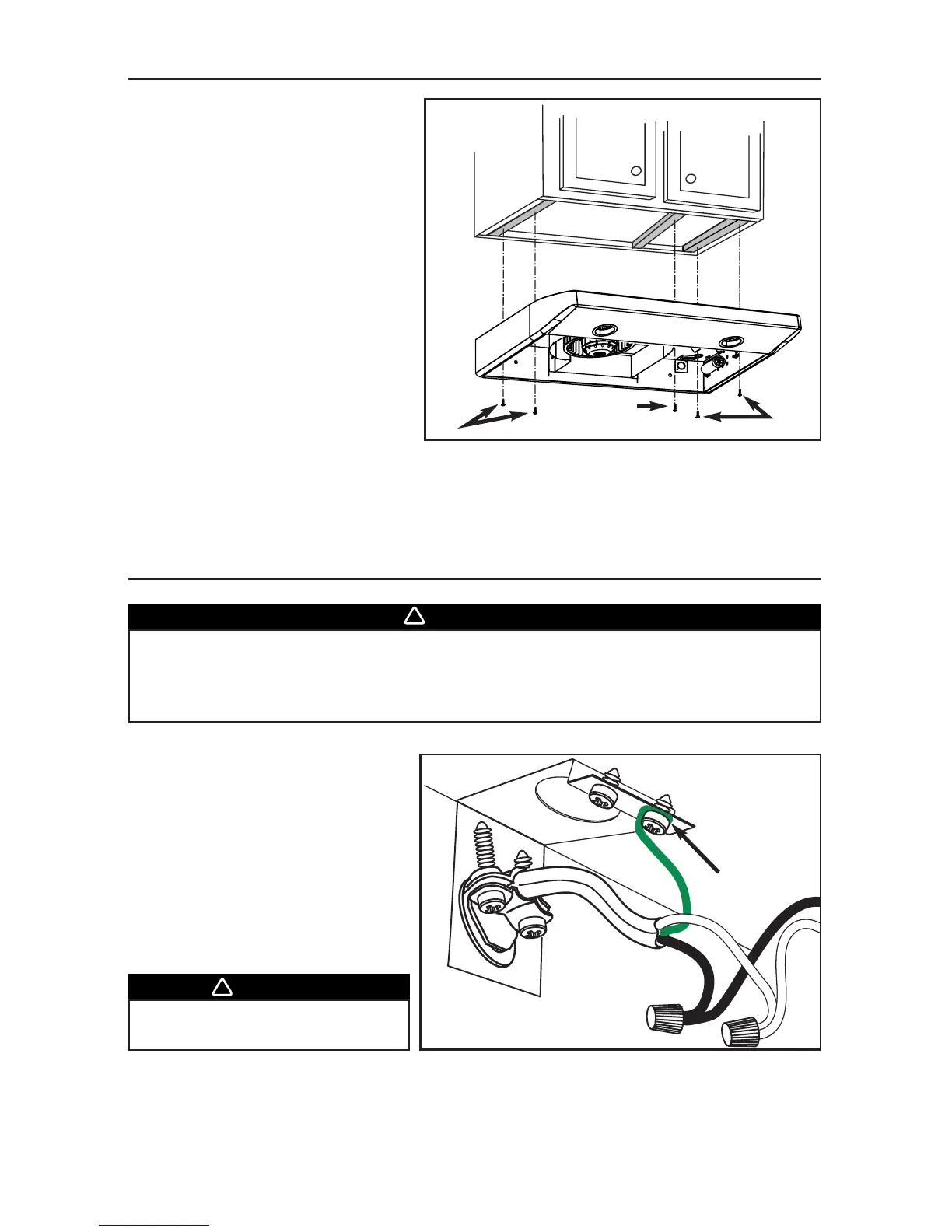
Place the hood at its location. Using a
pen, mark the position of the screws
(smaller part of the embossed
keyholes). Remove the hood and install
(4) 1/2” double thread screws at sides
locations (A), leaving a 1/8” gap. Place
the wire clamp, insert the cable in the
hood and tighten the wire clamp to
secure the cable. Place the hood under
the cabinet and slide it in position. Make
sure the adapter/damper assembly
enters the ducting and the damper
opens freely. Secure the hood by
tightening the screws completely. Install
the last 1/2” double thread screw (B) in
the remaining embossed hole.
A
A
B
WARNING
Risk of electrical shock. Electrical wiring must be done by qualified personnel in
accordance with all applicable codes and standards. Before connecting wires,
switch power off at service panel and lock service disconnecting means to
prevent power to be switched on accidentally.
7. CONNECT WIRING
- 8 -
Connect cable to range hood wiring
using included wire connectors.
Connect BLACK to BLACK, WHITE to
WHITE and GREEN or BARE WIRE to
GREEN ground screw (1).



 To Next Page