Troubleshooting - 71
Electrical Troubleshooting Guide (TCM)
1. Always ensure that there is power supplied to the computer (TCM). With the key turned to the o position,
check to ensure the LED light for the power input (J) is turned on. If the light is not on:
a. Check the battery disconnect switch to ensure that it is turned on.
b. Check the 15 amp fuse in the TCM 2 slot of the front fuse panel. Replace this fuse, if necessary.
2. Turn the key to the run position and check to see if any other lights turn on. If no other lights turn on,
check the 5 amp fuse in the TCM 1 slot of the front fuse panel. Replace this fuse, if necessary. If any other
lights turn on, you can begin troubleshooting the rest of the TCM functions.
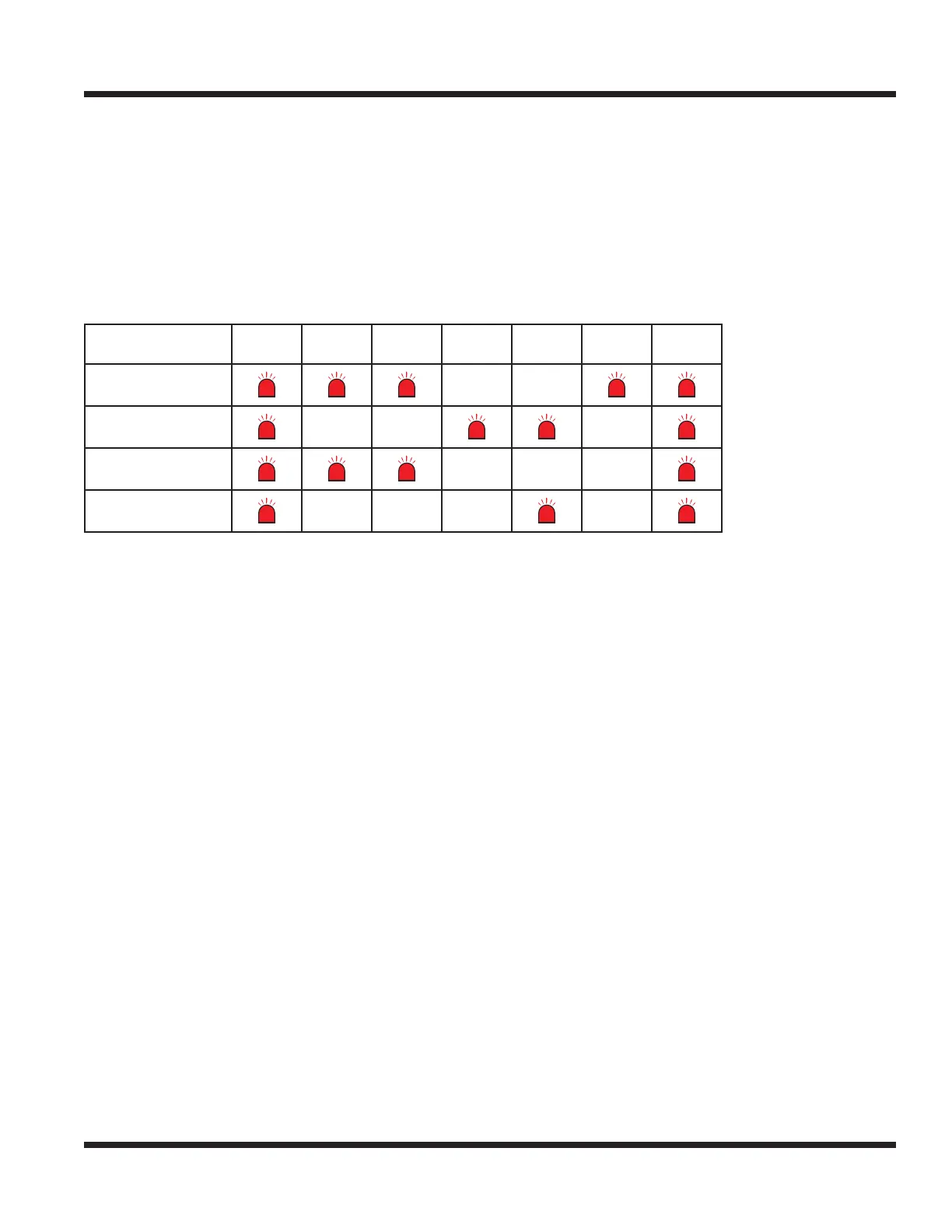
3. To troubleshoot the circuits in the chart below, the corresponding LED lights must be On for the circuit to
function. If any required LED lights are not on, refer to the troubleshooting section in the following pages.
Circuit Power
Brake
Switch
Neutral
Switch
PTO
Switch
Seat
Switch
Engine
Starter
Key
Switch
Starter
PTO
Engine + 12V Run
w/o Operator
Engine + 12V Run
with Operator
TROUBLESHOOTING



 To Next Page