10
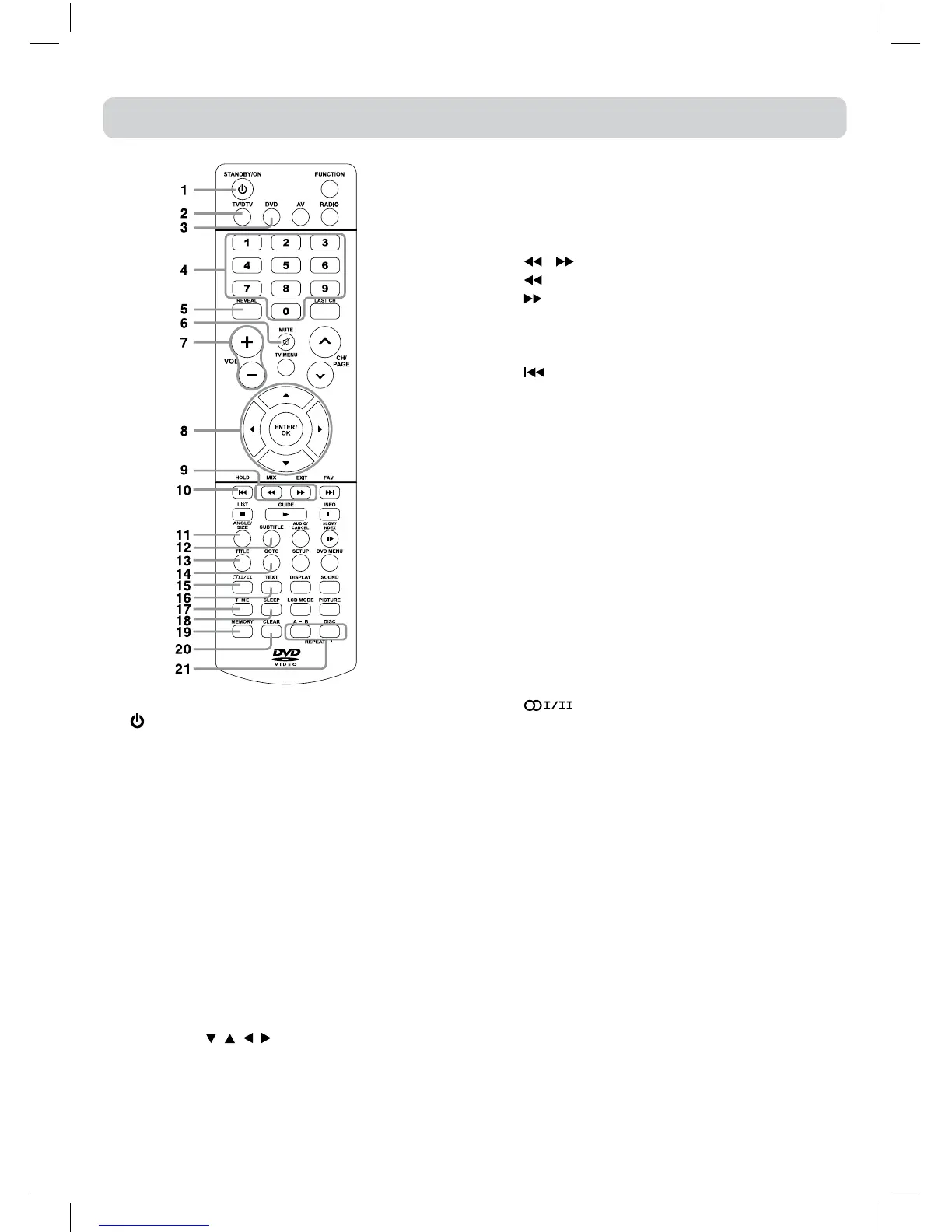
REMOTE CONTROL REFERENCE GUIDE
1) STANDBY/ON button
PresstoturnONtheunitorputitinSTANDBY
(OFF)mode.
2) TV/DTV button
PresstoswitchtoATV/DTVmode.
3) DVD button
PresstoselectDVDmode.
4) Number (0 - 9) buttons
UsetochangetheATV/DTVchannels.
5) REVEAL button
Presstorevealanswersonaquizorgamepages
fromTeletext.
6) MUTE button
Presstomutethesound.
Pressagaintocancelmute.
7) VOLUME (–/+) buttons
Presstoadjustthevolumelevel.
8) CURSOR ( , , , ) buttons
Presstohighlightselectionsonamenuscreenand
makeadjustcertainsettings.
ENTER/OK button
Presstoconrmselectionsonamenuscreen.
9) MIX button
PresstoselectTeletextwithaATVprogramme.
EXIT button
Presstoexitthemenuandreturndirectlytonormal
viewing.
/ buttons
:Fastreverseplayback.
:Fastforwardplayback.
10) HOLD button
Press to stop the automatic page change from
Teletext.
PREV button
Presstoselectprevioustitles,chaptersortracks
onadisc.
11) ANGLE button
Press to switch the camera angle of the video
presentationwhensceneswithmultiplecamera
anglesarerecordedonaDVD.
SIZE button
Press to set the letters size of teletext on the
screen.
12) SUBTITLE button
Press to select one of the subtitle languages
programmedonaDVD.
13) TITLE Button
Presstoselectthetitlemenuscreen.
14) GOTO button
Presstoskipdirectlytoaspeciclocationona
DVD/CD.
15) button
PresstodirectlyselectSTEREO/MONO/DualI/
DualII/DualI+IIinATVmode.
EnterAudioLanguagemenuinDTVmode.
16) TEXT button
PresstodirectlyselectsTeletextmode.
17) TIME button
EnterandexittheTIMEmenu.
18) SLEEP button
PresstosettheSLEEPtimer.Theunitwillremain
ONforthetimethatisset,andwillautomatically
shutoffafterwards.
19) MEMORY button
In stop mode, press to enter the number of a
selectedchapterortrack.
20) CLEAR button
Presstoclearinputselectionsandcancelcertain
playbackfunctions.
21) REPEAT A-B button
Presstoperformpoint-to-point repeat playback
onaDVDorCD.
REPEAT DISC button
RepeatchapterofaDVD.
RepeatsingletrackorwholeCD.



 To Next Page