22
CONNECTIONS
Note:
When connectingaDVD player to the television, the picture resolution isdependent uponthe
resolutionofboththeDVDplayerandtheTV.Forbestresults,selectthehighestresolutionofthe
DVDuptotheTVmaximumof1080i.
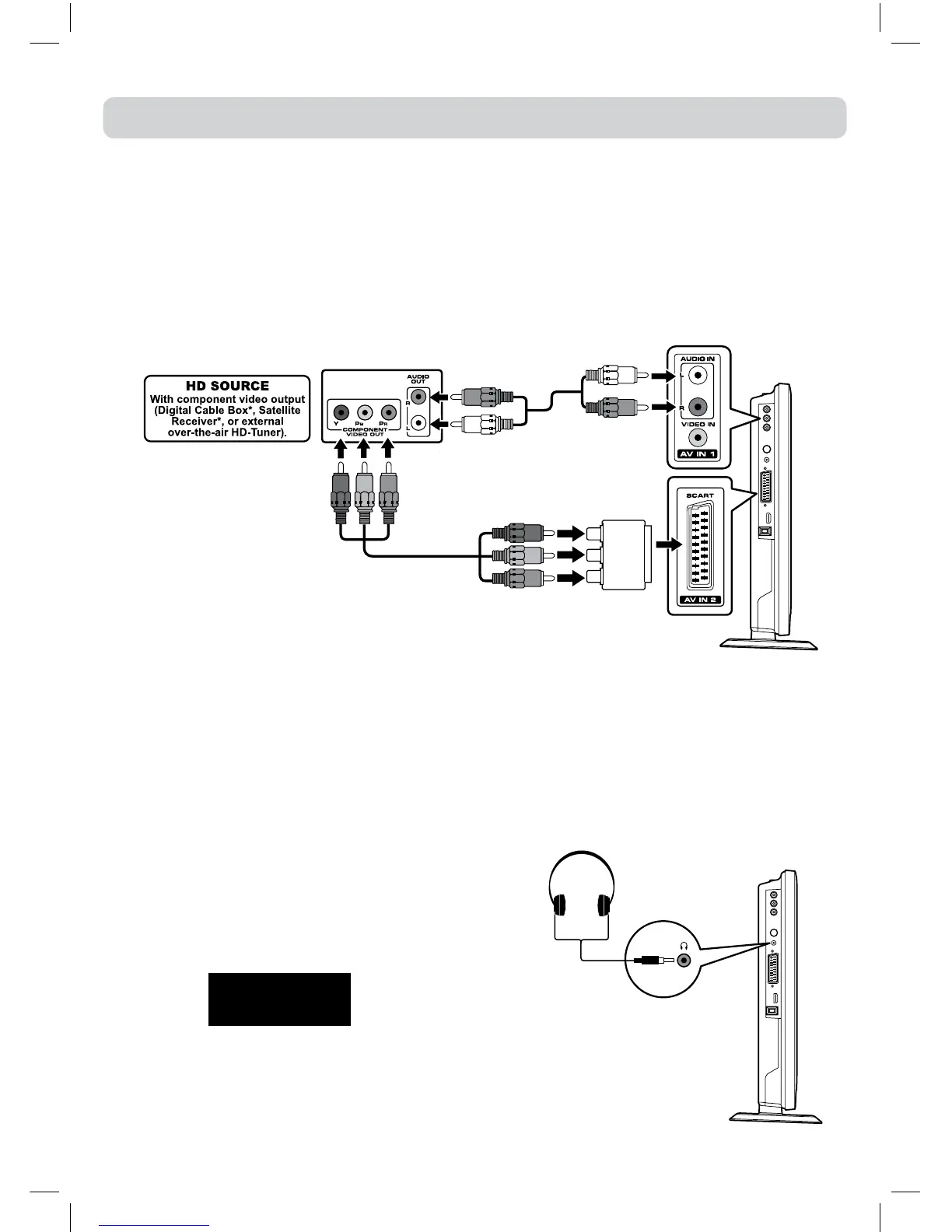
CONNECTING A HIGH-DEFINITION (HD) SOURCE (YUV)
High-Denition(HD)DeviceswithcomponentvideooutputmustbeconnectedtotheYUVinput.
Connectthecomponentvideocableandaudiocable(notincluded)asshown.
MakesureyouconnecttheYUVScartadaptortothisunit,thenconnectcomponentvideocableand
audiocablefromtheotherequipment(COMPONENT VIDEO OUT and AUDIO OUT)tothisunit
(SCARTandAUDIO IN).
Tooperatetheconnecteddeviceandplaythesource,rstpresstheFUNCTIONbuttontoselectthe
YUV/SCARTmode.
USING HEADPHONES
•Turndownthevolumebeforeconnectingheadphones
totheunit,thenadjustthevolumetoyourdesired
level.
•When headphones are connected, no sound will
comefromthefrontspeakers.
Maximum output
voltage ≤150mV
CAUTION:
Excessive sound pressure from earphones and
headphonescancausehearingloss.
*Mayrequireasubscriptionforreceiving
HD channels. Check with yourcable/
satelliteserviceproviderfordetails.
ToAUDIO
INjacks
ToAUDIO
OUTjacks
YUVSCARTadaptor
(included)
To
COMPONENT
VIDEOOUT
jacks
ToSCARTjacks
Earphones /
Headphones
(1/8”[3.5mm]
diameterplug)


 To Next Page