15
UNIT OPERATION
AUDIO LANGUAGE FOR DTV
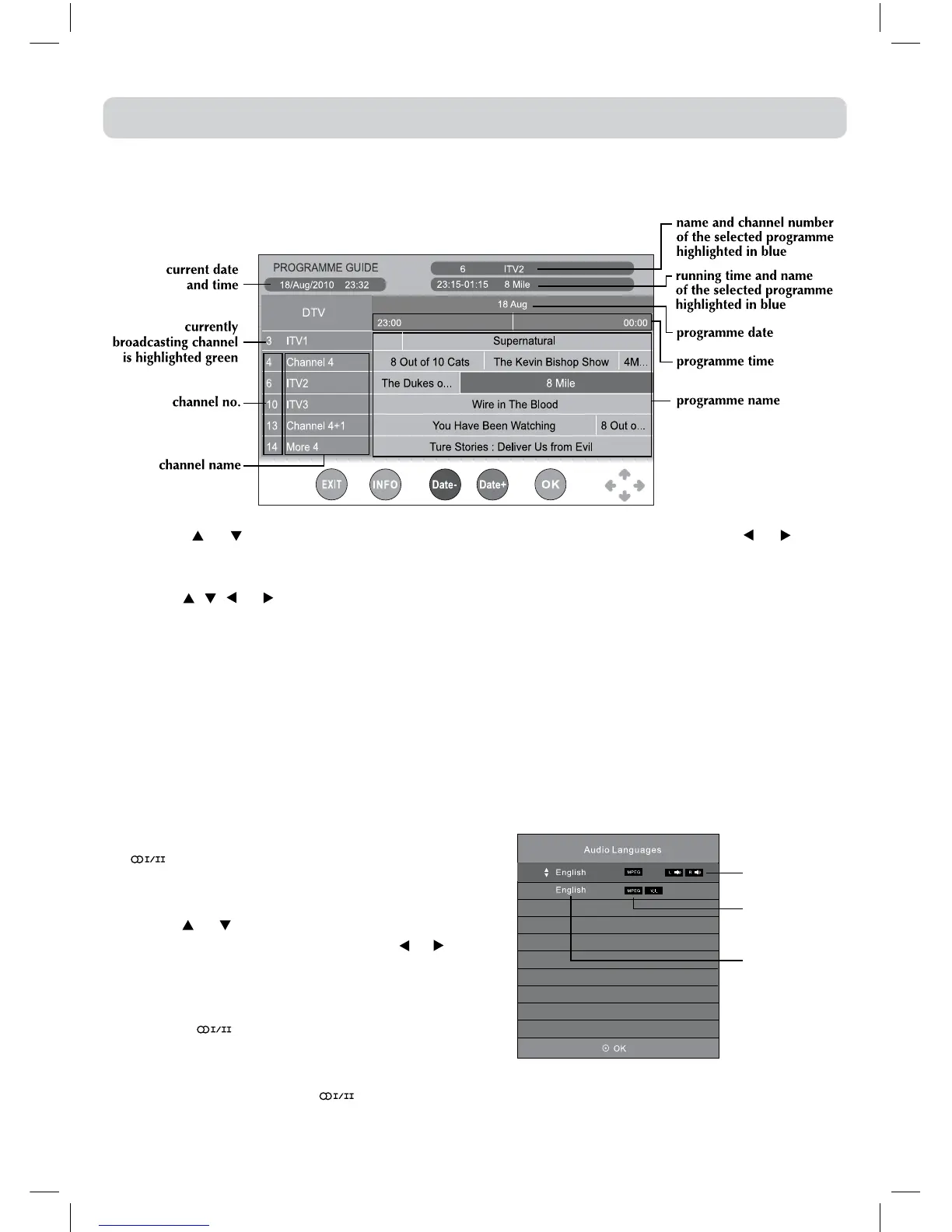
While watching a DTV programme, you can press
the buttontodisplaytheAudioLanguagemenu,
andselectaudiolanguage,audioformatandsound
track.
•Usethe
or buttontoselectanaudiolanguage
oraudioformatifavailable,pressthe or button
toselectsoudtrackbetweenL/R(Stereo),L/L(Mono
Left) and R/R (Mono Right). Press the ENTER/OK
buttontoconfrim.
•Press the or EXIT button to exit the Audio
Languagemenu.
Note:
For analogueTV, press the
button repeatedly
to select STEREO/MONO/Dual I/Dual II/Dual I+II
directly.
sound track
audio format
audio language
ELECTRONIC PROGRAMME GUIDE (EPG) FOR DTV
WhilewatchingaDTVprogramme,youcanpresstheGUIDEbuttontodisplaythePROGRAMME
GUIDEmenu.
•Pressthe
or toscrollthroughtheprogrammesofdifferentchannels.Pressthe or toskip
totheprogrammesofdifferentperiods.(Note:ProgrammenamesinGREENindicatesthatthese
programmesarenowbroadcastingondifferentchannels.)
•Usethe , , or orbuttontoselectaprogramme,presstheINFObuttontodisplaydetailed
informationifavailable.PresstheINFObuttonagaintoreturn.
•PresstheYELLOWbuttontoviewtheprogrammelistofthenextdate;presstheGREENbuttonto
viewtheprogrammelistofthepreviousdate.
•PresstheENTER/OKbuttontowatchtheselectedchannel.
•PresstheEXITbuttontoexitthePROGRAMMEGUIDEmenu.
Note:
GuideinformationdisplaymaybedifferentaccordingtotheDTVprogrammes.



 To Next Page