21
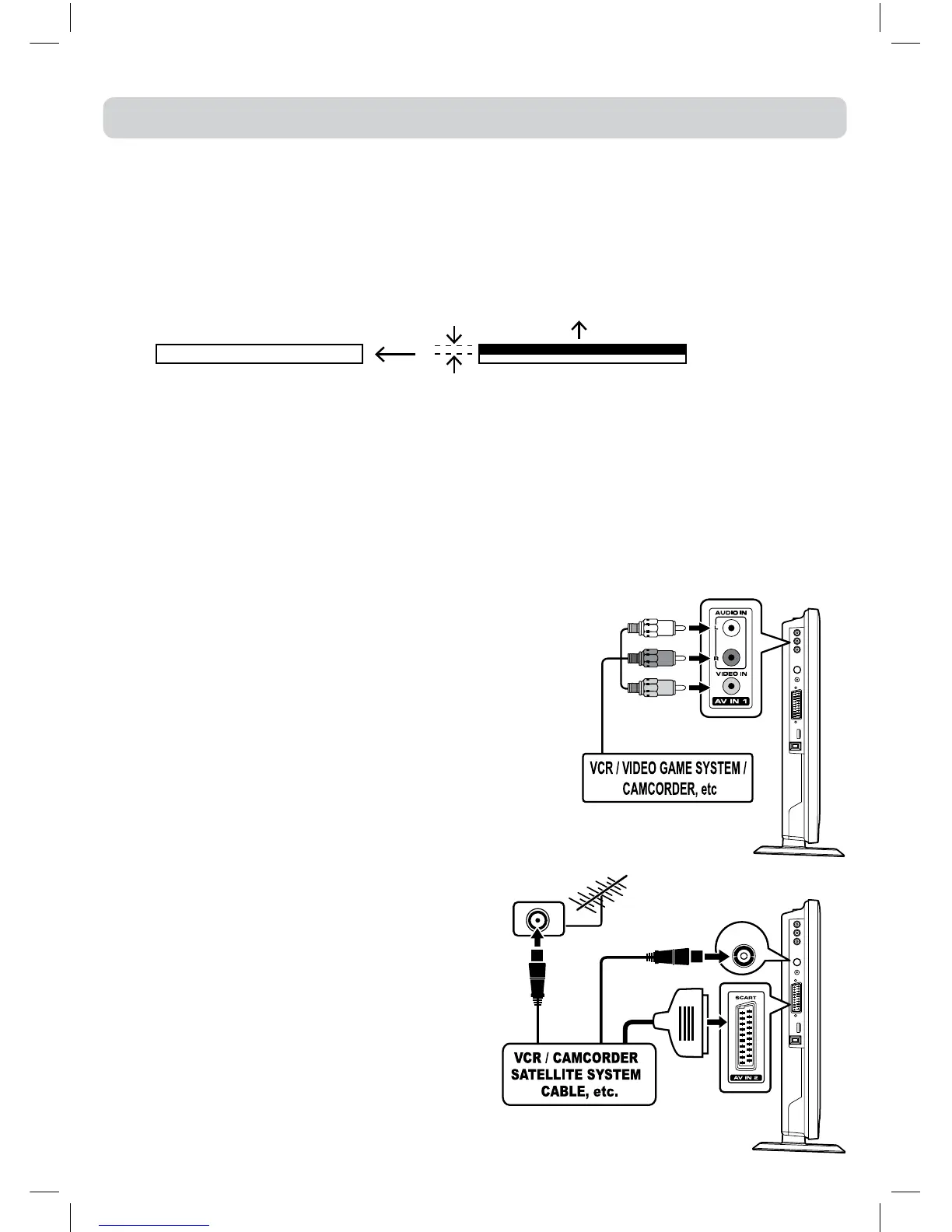
CONNECTING TO DEVICES WITH A COMPOSITE (YELLOW RCA-TYPE) VIDEO OUTPUT
ToconnecttoA/VdevicessuchasaVCR,camcorderorvideogamesystem.
- Connect to a VCR / Video Game System / Camcorder
ConnecttheAUDIO/VIDEOcable(notincluded)asshown.
Makesureyouconnectthecablefromtheotherequipment
(AUDIOandVIDEO OUT)tothisunit(AUDIOandVIDEO
IN). Press the FUNCTION or AV button to selectAV1
mode.
Note:
Pleaserefertotheusermanualfortheotherequipmentfor
moreinformation.
CONNECTIONS
CONNECTING TO SOURCES WITH SCART
DeviceswithRGBoutputmustbeconnectedto
theSCARTinput:
Connects the SCART from the source to the
correspondingSCARTonthisunit(SCARTcable
notincluded)asshown.
Make sure you connect both to SCART to
SCART.
Tooperatetheconnecteddeviceandplaythe
source,rstpresstheFUNCTIONorAV button
toselecttheAV2/SCARTmode.
ToAUDIO/
VIDEOINjacks
(AV IN 1)
ToAUDIO/VIDEOOUTjacks
COMMON INTERFACE
ThereisaCIslotattopcenterofthecabinetwhichallowsyoutoinsertaCAM(ConditionalAccess
Module)withanappropriateviewingcardforsomesubscriptionTVservices..
Youneedtosubscribetoapaychannelcompanywhoadministerthepaymentsandviewingcard
distributionfortheseservices.
FullyinserttheCAM(ConditionalAccessModule)intotheCI(CommonInterface)slotonthetopof
theunitwiththeserviceprovider’slabelfacingbackward.
Important notes:
•SwitchofftheTVandunplugfromtheACpowermainsbeforeinsertorremovetheCAM.
•TheCAMshouldbecorrectlyinserted,itisimpossibletoinsertfullyifreversed.TheCAMorthe
TV terminal may be damaged if the CAM is forcefully inserted.
•SomeCAMsmayrequiresettingup.Refertothemoduleinstructionmanualfordetailsofthe
settings.
•Ifyourviewingcardsubscriptionisnotvalidforthereceivedserviceyouwillseeamessagesuch
as ‘SCRAMBLED PROGRAM’...’You are not entitled to watch this program’.
COMMON INTERFACE
Thicker casing
Service provider’s label and gold contacts
of viewing card face backwards.
SCART
CABLE
If your VCR permits, then connect your
antenna to your VCR and VCR RF to your TV
TV
AERIAL



 To Next Page