29
LANGUAGE SETUP
1.InStopmode,presstheSETUPbutton.
2.Usethe
or buttontoselecttheoptionLanguageSetup,
thenpressthe
buttontomovethe highlight baronOSD
Language.
3.Usethe
buttontomovethehighlightbar,thenusethe
or
buttontoselectyourpreferredlanguage,andpressthe
ENTER/OKbuttontoconrm.
4.Pressthe
buttontogobacktothepreviousmenu.Repeat
steps2and3toadjustotheroptions.
5.ToexittheSETUPMENUandreturntothenormalscreen,highlighttheExitSetupMode(
)
andpresstheENTER/OKbutton.
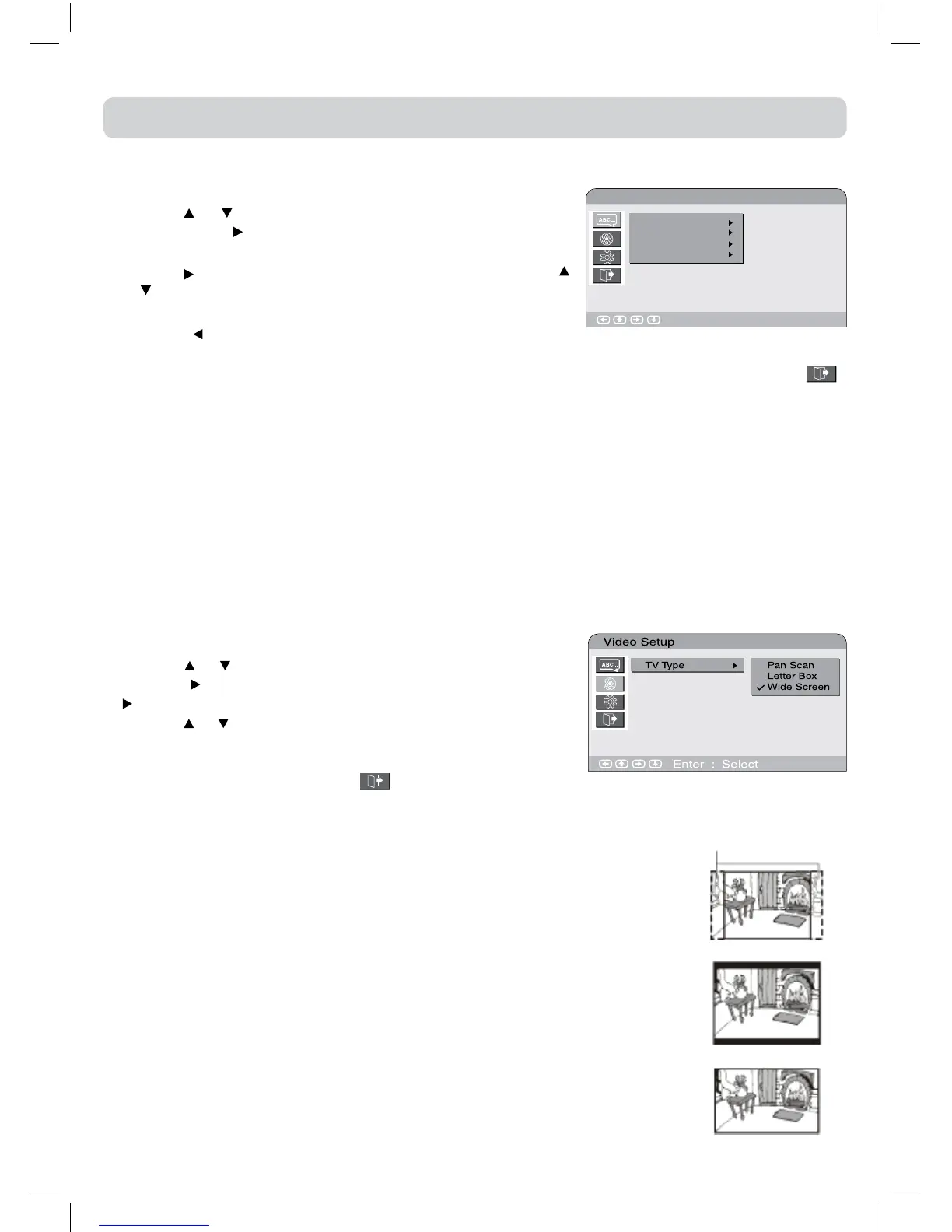
Language Setup
Enter : Select
OSD Language
Audio
Subtitle
DVD Menu
CUSTOMISING THE FUNCTION SETTINGS
VIDEO SETUP
1.InStopmode,presstheSETUPbutton.
2.Usethe
or buttontoselecttheVideoSetup.
3.Pressthe
buttontohighlighttheTVTYPEandthenpressthe
buttontoenterthedesiredTVtype.
4.Usethe
or buttontoselectthedesiredTVtypeandpress
theENTER/OKbuttontoconrm..
5.ToexittheSETUPMENUandreturntothenormalscreen,
highlighttheExitSetupMode(
)andpresstheENTER/
OKbutton.
Cutoffwhenawide-screen
videoimageisplayed.
Pan Scan
Letter Box
Wide-screen
TV Display
Pan Scan
•Whenwide-screenvideoisplayed,thismodeclipstherightandleftsidesof
theimagesothatitcanbeviewedonaconventionalscreen.
•Somewide-screenDVDsthatdonotpermitPanScanplaybackareautomatically
playedinLetterBoxmode(blackbandsattopandbottomofscreen).
Letter Box
•When wide-screen videoisplayedinthismodeonaconventionalscreen,
blackbandsappearatthetopandbottomofthescreen.
Wide-screen
•Thisisthecorrectmodeforplayingwide-screenvideosonawide-screen.
Note:
•ThedisplayablepicturesizeispresetontheDVDdiscs.Thereforetheplayback
pictureofsomeDVDsmaynotconformtothepicturesizeyouselect.
•WhenyouplayDVDsrecordedinthe4:3aspectratio,theplaybackpicture
willalwaysappearinthe4:3aspectratioregardlessoftheTVshapesetting.
Note:
•Some DVDs maynot play in the audio language you selected.A prior language maybe
programmedonthedisc.
•SomeDVDsmaybesettodisplaysubtitlesinalanguageotherthantheoneyouselected.Aprior
subtitlelanguagemaybeprogrammedonthedisc.
•SomeDVDsallowtochangesubtitleselectionsonlyviathediscmenu.Ifthisisthecase,press
theDVD MENUbuttonandchoosetheappropriatesubtitlefromtheselectiononthediscmenu.
•Some DVDs maynot included your pre-selected language. In this case, the DVD player
automaticallydisplaysdiscmenusconsistentwiththedisc’sinitiallanguagesetting.



 To Next Page