25
FAST FORWARD / FAST REVERSE
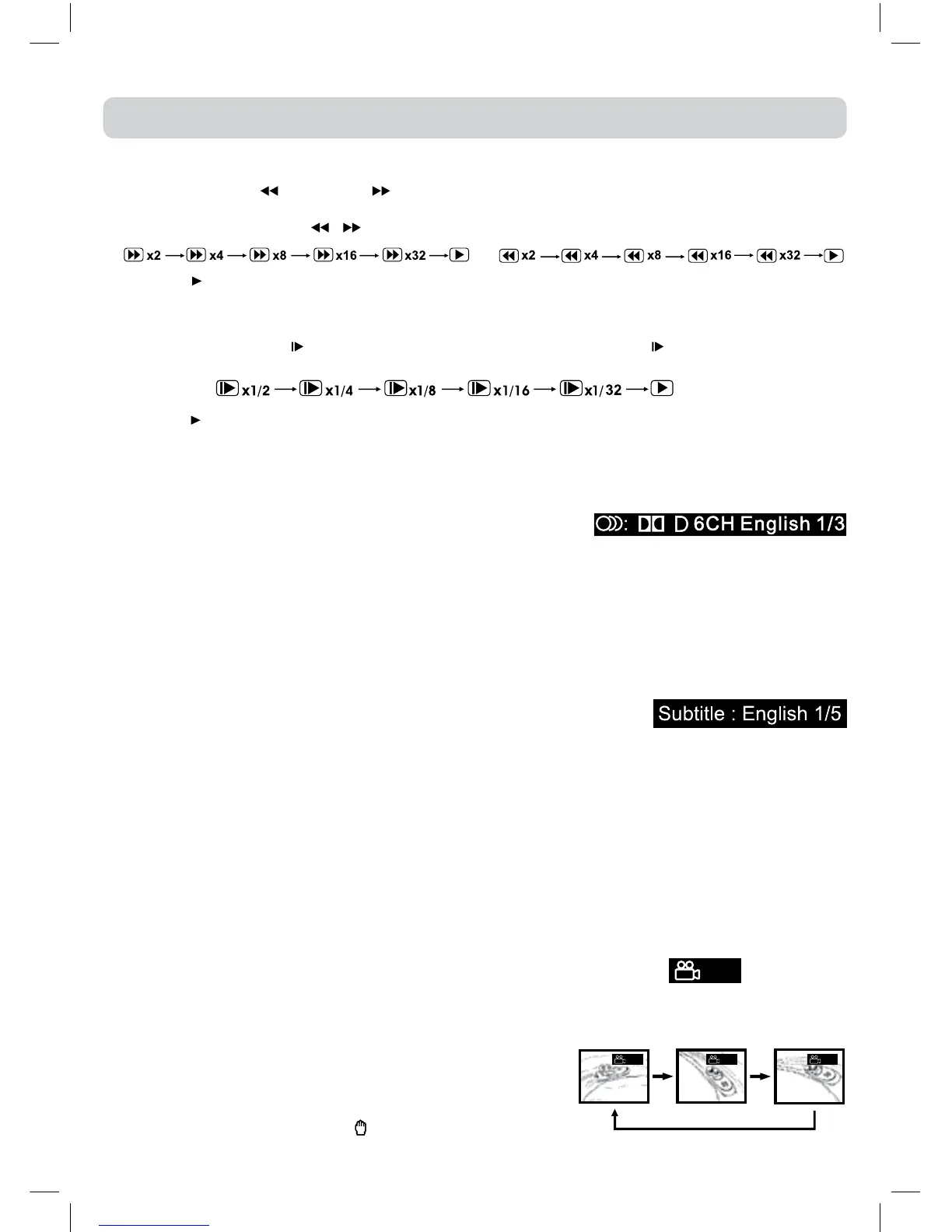
1.PresstheSEARCH orSEARCH buttonwhenadiscisplaying.
•Thediscbeginsafastscanattwotimesnormal(x2)speed.
•EachtimetheSEARCH
/ buttonispressed,thespeedofthefastscanchanges.
2.Pressthe
PLAYbuttonwhenyouhavereachedthedesiredpointtoresumeplaybackatnormal
speed.
SLOW-MOTION PLAY (DVD)
1.InPlaymode,pressthe SLOWbuttononremotecontrol.Eachtimethe SLOWbuttonispressed,
thespeedofslow-motionplaybackchangesinthefollowingsequence:
2.Pressthe
PLAYbuttontoreturntothenormalplaybackspeed.
AUDIO SELECTION (DVD)
Onsomediscs,thesoundisrecordedintwoormoreformats.Followthedirectionsbelowtoselect
thetypeofplayback.
1.Whileadiscisplaying,presstheAUDIObuttontoshowthe
currentaudioformatnumber.
2.PresstheAUDIObuttonrepeatedlytoselectthedesiredaudioformat.
Note:
•Ifonlyoneaudioformatisrecorded,thenumberdoesnotchange.
•Abouttwosecondslater,playbackcontinuesinthenewaudioformat.
SUBTITLE SELECTION (DVD)
1.WhileaDVDisplaying,presstheSUBTITLEbuttontodisplaythecurrentlanguagesetting.
2.PresstheSUBTITLEbuttonrepeatedlytoselectthedesiredsubtitlelanguage.
Note:
•Ifonlyonelanguageisrecorded,thelanguagedoesnotchange.
•Abouttwosecondslater,playbackcontinueswiththenewsubtitleyouselected.
•Thenumberoflanguagesrecordeddiffersdependingonthedisc.
•Ifnobuttonispressedwithinafewseconds,playbackcontinueswithoutchangingthecurrentsubtitle.
•Thisfunctioncanonlybeusedfordiscsonwhichsubtitleshavebeenrecordedinmultiplelanguages.
•OnsomeDVDs,subtitlesareactivatedfromthemainmenuoftheDVD.PresstheDVD MENU
buttontoactivatethemainmenu.
CD / DVD OPERATION
ANGLE SELECTION (DVD)
SomeDVDscontainsceneswhichhavebeenshotfromanumberofdifferentangles.Forthesediscs,
thesamescenecanbeviewedfromeachofthesedifferentangles.
1.WhileyouareplayingaDVDwithdifferentanglesrecorded,presstheANGLEbuttontoviewthe
numberofthecurrentangleavailable.
2.PresstheANGLE buttonrepeatedlytochangethesceneto
thenextangleinthoserecorded.
•Abouttwosecondslater,playbackcontinuesfromthenew
angleyouselected.
•If no button is pressed within 10 seconds, playback
continueswithoutchangingthecurrentangle.
Note:
•Thisfunctioncanonlybeusedfordiscsonwhichscenes
shotfrommultipleangleshavebeenrecorded.
•Ifonlyoneangleisrecorded,“
”isdisplayed.
Sequence of angle shots
(Example)
:1/3
:1/3 :2/3 :3/3



 To Next Page