14
TURNING THE UNIT ON
WhentheACpowercordisconnected,pressthe
/ I
buttonontheunittoturniton.Pressthe
FUNCTION buttontoselectthedesiredmode(DTV,ATV,AV1,AV2/SCART,YUV/SCART,DVDor
HDMI).
Note:
Whentheunitisnotgoingtobeusedforalongtime,disconnecttheACpowersupplycordfrom
walloutletandremovethebatteriesfromtheremotecontrol.
UNIT OPERATION
TURNING THE UNIT ON FOR THE FIRST TIME
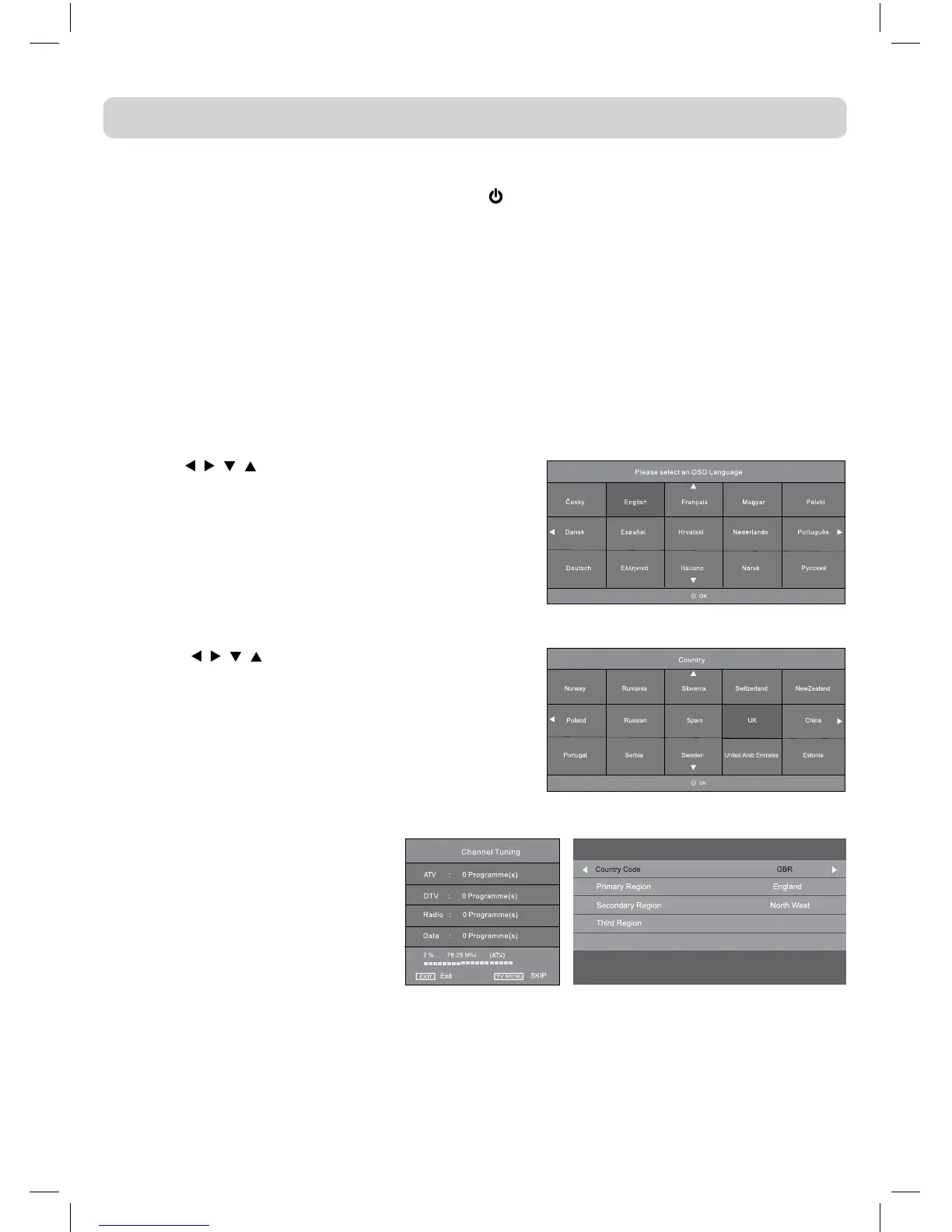
Thersttimeyouturntheuniton,itwillgostraightintostart-upscreen.Simplyfollowthescreen
promptsasbelowtotuneinthechannels.
Choose preferred country and regional options
You may receive signals from more than one region
Use </> to choose, then “OK” to select each option in turn
DTVregionmenu
4.AfterscanninghasnishedtheTVwilldisplaytherstprogramstored.
1.Usethe
, , , buttontoselectadesiredlanguage,
thenpresstheENTER/OKbuttontoconrm.
2.Usethe
, , , buttontoselectCountry,thenpress
theENTER/OKbuttontoconrm.
3.Thesystemwillautomaticallyscan
and store all available programs
which may take ve minutes or
more.
If the digital TV region choice
menuappears,pressENTER/OKto
conrmyourdigitalTVregions.



 To Next Page