16
1.Usethe or buttontoselectachannel.(PresstheCH/PAGE / buttontoskiptoprevious/
nextpage.)
2.PresstheRED/GREEN/YELLOW/BLUEbuttonortheFAVbuttontoeditthechannel.
• DELETE
PresstheREDbuttontodeletetheselectedchannel.Pressthe
TV MENUbuttontostopdelete.
• RENAME(forATVmodeonly)
PresstheGREENbuttontorenametheselectedchannel.Usethe
or buttontoselectthecharacterstorepresentthestation
name,usethe or buttontomovetothenextcharacter,press
theTV MENUbuttontoconrm.
• MOVE(forATVmodeonly)
PresstheYELLOWbuttonandusethe
or buttontomovethe
selectedchannel,thenpresstheTV MENUbuttontoconrm.
•SKIP
PresstheBLUEbuttontoskipornotskiptheselectedchannel.
•FAV(Favourite)
PresstheFAVbuttontosetorcanceltheselectedchannelasoneofthefavouriteprogrammes.
A“heart”
willappearalongsidetheprogramsetasafavourite.
ANALOGUE TV / DTV SETUP
TV SETTING (only in ATV or DTV mode)
1.PresstheTV MENUbutton.
2.Usethe
or buttontoselect .
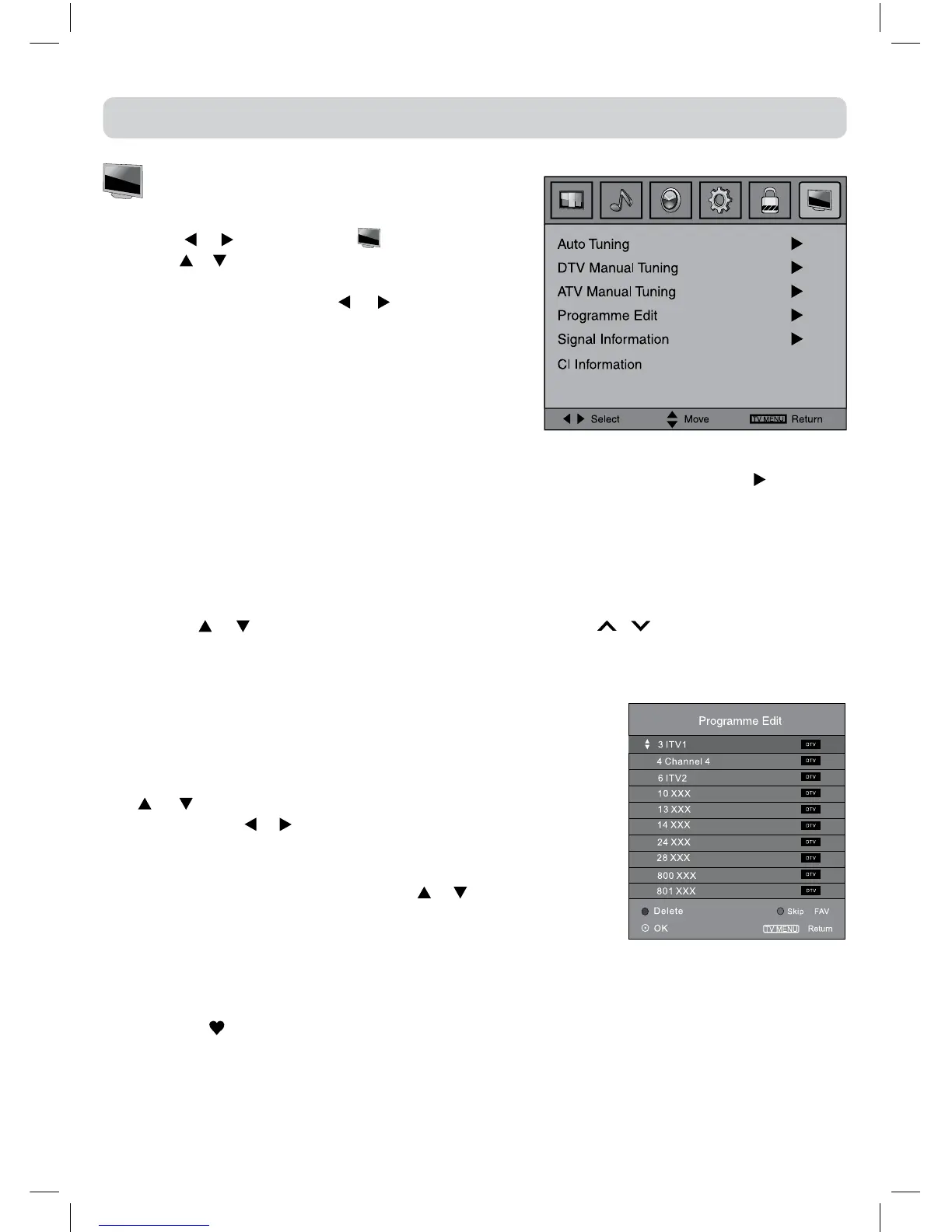
3.Usethe or buttontoselecttheoptions(Auto Tuning,
DTV Manual Tuning, ATV Manual Tuning, Programme
Edit),adjustthemusingthe or button.Common
InterfaceandSignal informationareonlyavailablein
DTVmode.
4.PresstheTV MENUbuttontoreturntopreviousmenu,
repeatstep2toadjustothersettings.
5.Toexitthesetupmenuandreturntothenormalscreen,
presstheEXITbutton.
• Auto Tuning : Automatically scan,sort andstore all available programmes. Press
to choose
DTV+ATV,DTVorATVonly.
• DTVManualTuning:PerformmanualsearchforDTV(DigitalTV)programmes.
• ATVManualTuning:PerformmanualsearchandnetuneforATV(AnalogTV)programmes.
• ProgrammeEdit:AllchannelsstoredarelistedintheProgrammeEditmenu,youcaneditthe
channelsbythefollowingsteps:
•SignalInformation
Displaythesignalinformation,suchaschannelname,network,modulation,qualityandstrength.
•CIInformation
DisplayCAMandSmartcardinformation;selectthelanguageifavailable.
DTVsetupmenu



 To Next Page