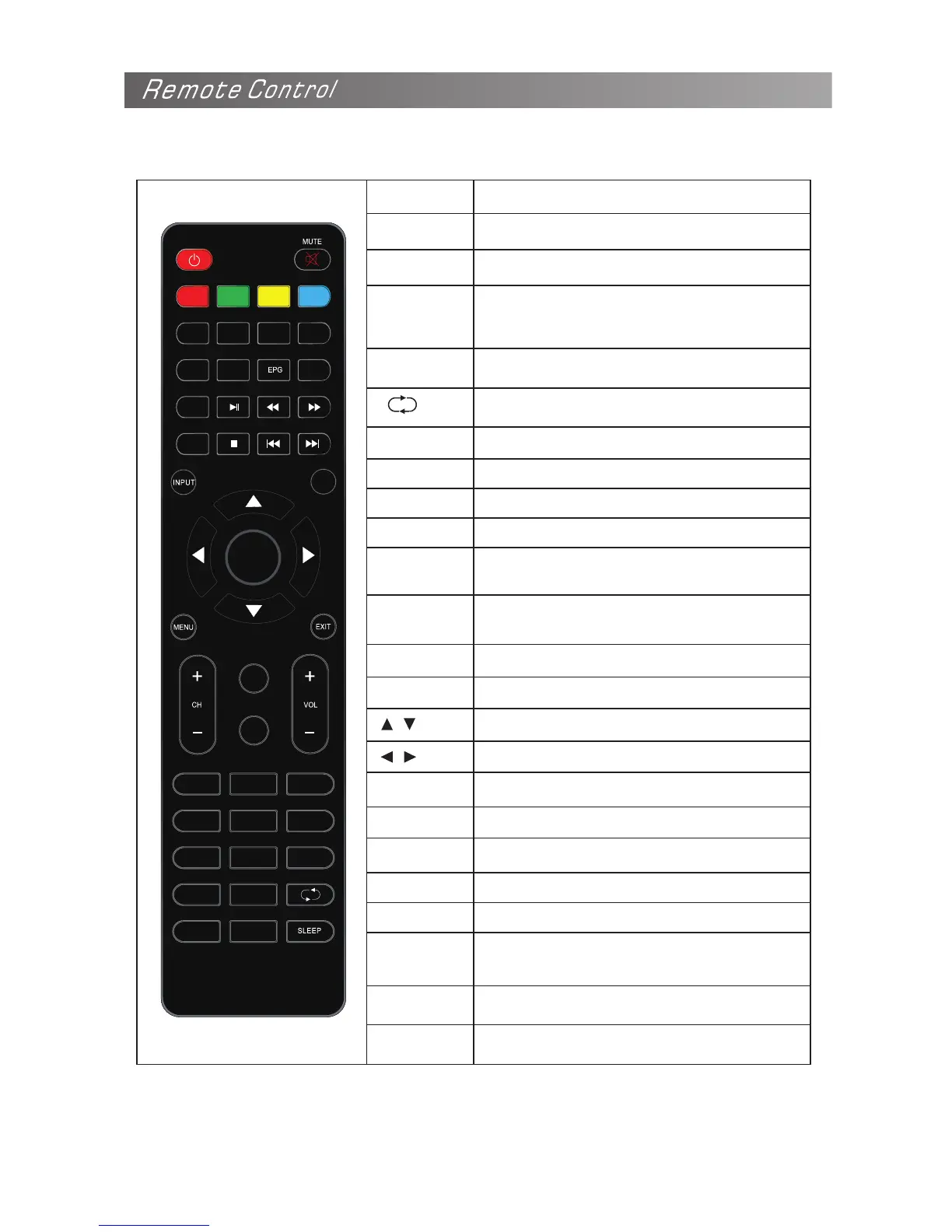
The buttons of the original remote control are as following:
KEY
STANDBY
MUTE
Function
Enter or quit the standby mode
Mute or restore sound
NUMBER
KEYS
Use to choose channels
- / --
Selecting channels above single digits
Return to last viewed program
ASPECT
Adjust displayable aspect ratio
AUDIO
Switch between stereo formats
CH+/CH-
Scroll to next/previous channel
VOL+/VOL-
Increase audio volume
DISPLAY
Display the current program information
on the screen
MENU
Enter the menu screen for various optional
adjustable settings
EXIT
Quit the current interface
OK
Select or confirm menu item
/
/
Select the up/down direction
Select the left/right direction
INPUT
Select signal source
PMODE
Select the picture mode
SMODE
Select the sound mode
SLEEP
Select the sleep timer
FAV
Display the favorites program
EPG
Call up the EPG (Electronic Program
Guide), using in the DTV mode
TEXT
No Function
HOLD
No Function


 To Next Page