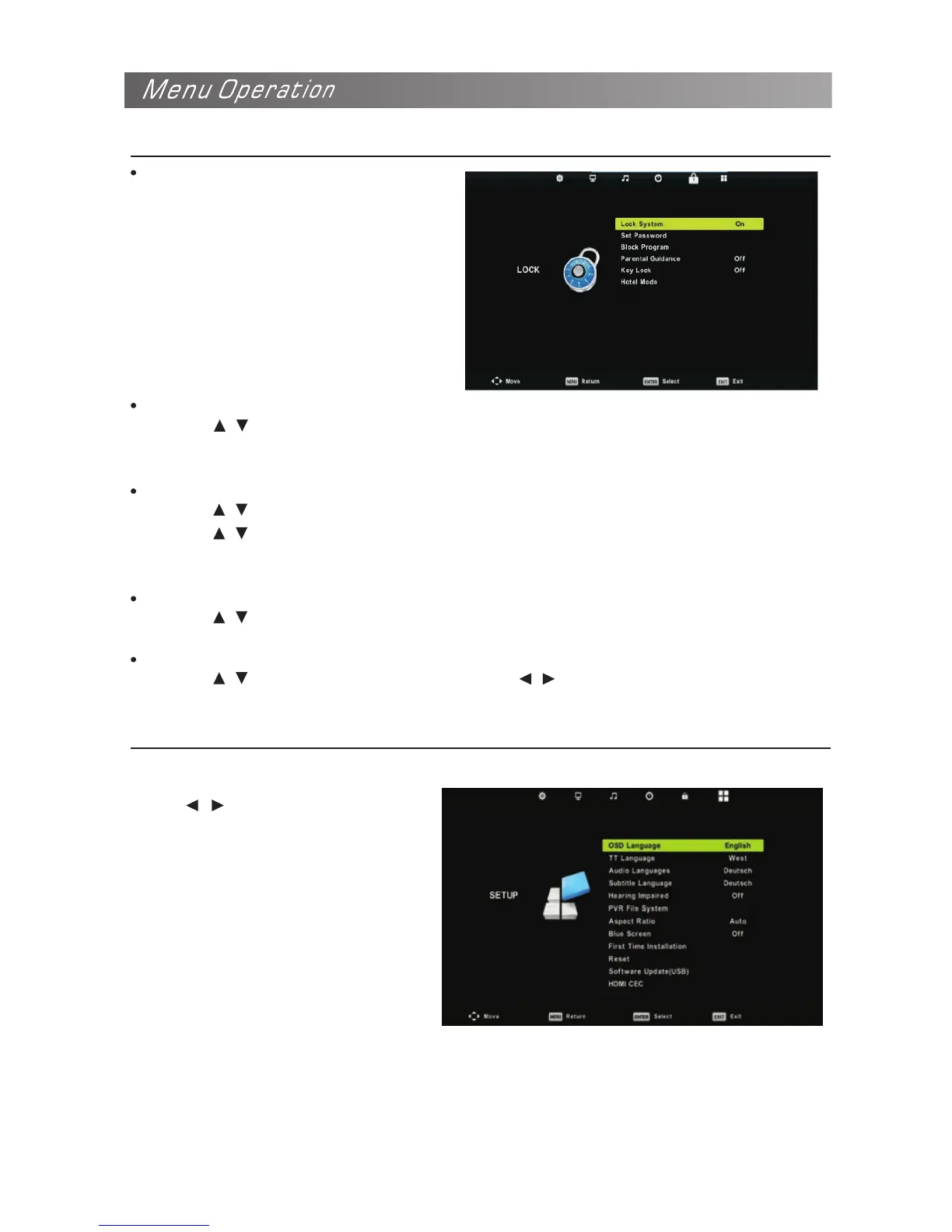
Configuring the Lock Menu
Lock System
The feature can prevent
unauthorized operating the TV set,
unless entering 4-digit, password.
When Lock System is on and the
system is locked, we must input
the system password at Auto Tuning.
Manual Tuning. Program Edit, or Reset.
Press the right number buttons for the
password.
The default password is 0000.
Set Password
Press the / button to select Set Password, then press the OK button to enter sub-menu to set
new password.
NOTE: If you forget, the super password of 4711 still valid.
Block Program(In TV/DTV mode)
Press the / button to select Block Program, then press the OK button to enter sub-menu.
Press the / button to select the Program you want to lock, then press green button on your
remote control.(To unlock program, input the password you set.) Press the button to save setting
and the MENU button to back to the previous menu.
Parental Guidance(In DTV mode)
Press the / button to select Parental Guidance, then press the OK button to enter sub-menu
to select.
Key Lock
Press the / button to select Key Lock, then press / button to select Off or On.
When Key Lock’s statue is on, you can’t use the Key panel button.
Press MENU button to display the
main menu.
Press / button to select SETUP in
the main menu.
Configuring the Option Menu


 To Next Page