4
Chapter 1. Meeting TCL LINKZONE 5G UW
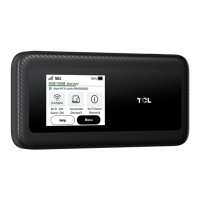
As a 5G mobile hotspot, the LINKZONE 5G UW enables up to 32 Wi-Fi connections at
both 2.4 GHz and 5 GHz. With various features and functions, it is a perfect hub for your
home or business network.
1.1 System requirements
Your LINKZONE is compatible with most browsers, including Firefox, Safari, Internet
Explorer (11.0 or later), Microsoft Edge, Opera, and Google Chrome.
1.2 Overview
3 45
1. Touch screen
Navigate the screen using your finger.
2. Power button
• To turn on, press and hold until screen welcome message appears.
• To turn off, press and hold until Shutdown screen appears. Then tap 'shutdown'.
• Press and release to wake up the display.
3. USB-C port
• Connect to a power supply using the included USB-C 3.0 cable and wall adapter.
• Connect to "On the Go" (OTG) Cable (sold separately) to recharge other accessories
such as a smartphone or bluetooth headset.
• Connect to a computer using the included USB-C 3.0 cable which provides secure
connection.


 To Next Page
 Loading...