EXS
20 User Manual 10H52260UM60 - Rev. 1 - 10/2017
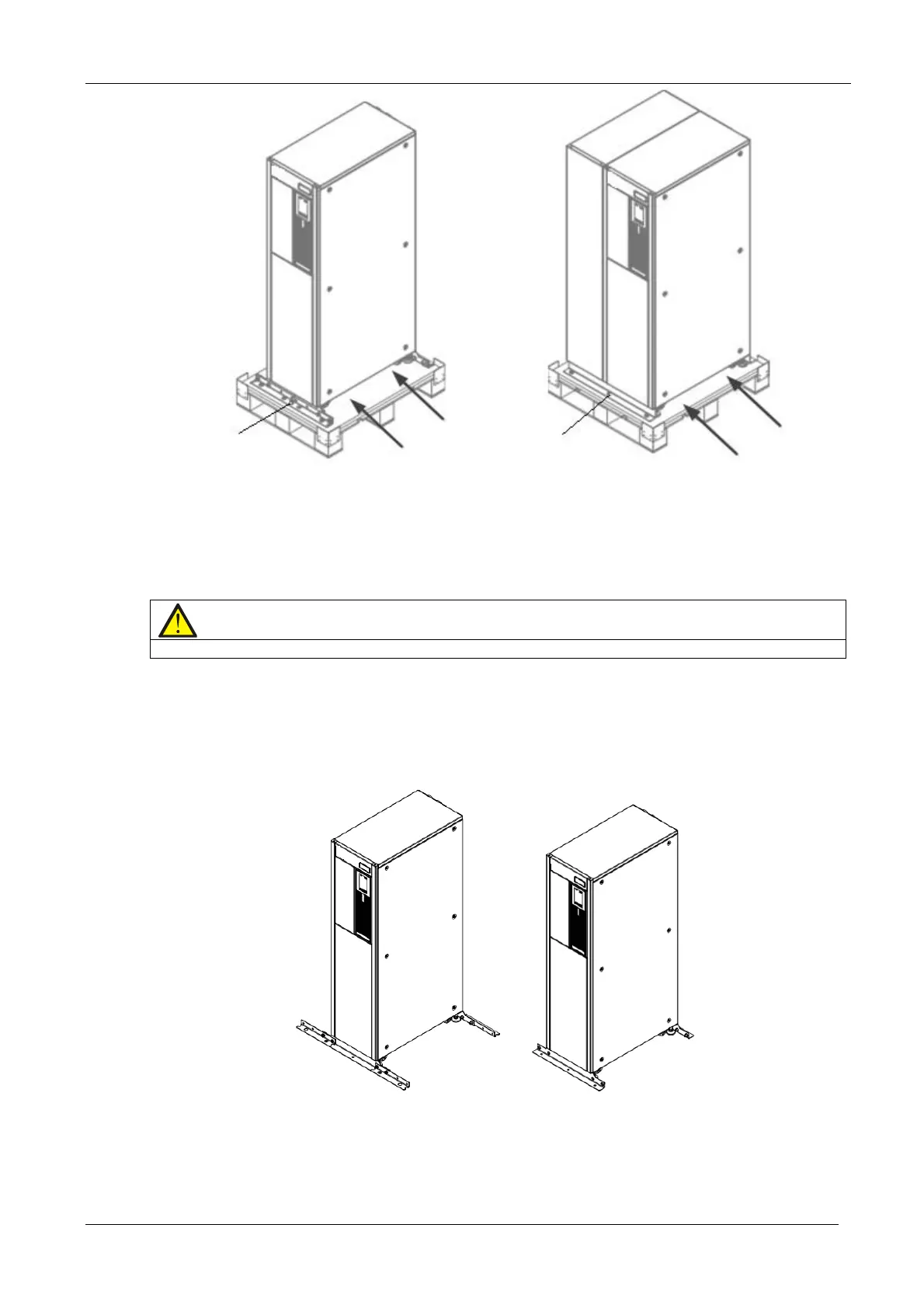
Standard UPS UPS with side cabinet
Figure 2-2 Removing the bottom pallet
3. After moving the cabinet to the installation site, you raise the adjustable feet and use the castors to move the
cabinet to its final installation position, finally, rotate the adjustable feet until they are in contact with the floor. See
Figure 2-3 for the finished installation.
Note
1. It is not necessary to install the fastening structural parts of the bottom pallet in the case of UPS with side cabinet
2. In the case of standard UPS with internal batteries, simply secure the fastening structural parts removed
in step 2 to the cabinet bottom (See right drawing); in the case of standard UPS without internal batteries,
install the fastening structure parts to both the left and right hand sides (See left drawing) based on the
right drawing to avoid tipping.
UPS without internal batteries UPS with internal batteries
Figure 2-3 Completed installation
Remove the fixing
structural parts
Inserting
direction
Remove the fixing
structural parts
Inserting










 To Next Page