EXS
28 User Manual 10H52260UM60 - Rev. 1 - 10/2017
Figure 3-1 RCCB symbols
The UPS is fitted with an internal EMC filter, therefore the protective earth cable leakage current is 0 - 1000mA. We
recommend confirming the RCD sensitivity of the upstream input power distribution and downstream power
distribution (to the load) lines.
External battery
The circuit breaker must be installed in order to protect external battery.
This circuit breaker is extremely important for the battery maintenance, and is generally installed close to the battery.
System output
The UPS output distribution line must be fitted with a protective device. The protective device must be different
from the input distribution protection switch and be able to provide overload protection (refer to Table 10-6 and
Table 10 -7).
Power Cable Connection Steps
For the UPS cable access mode, refer to 2.7.3 .
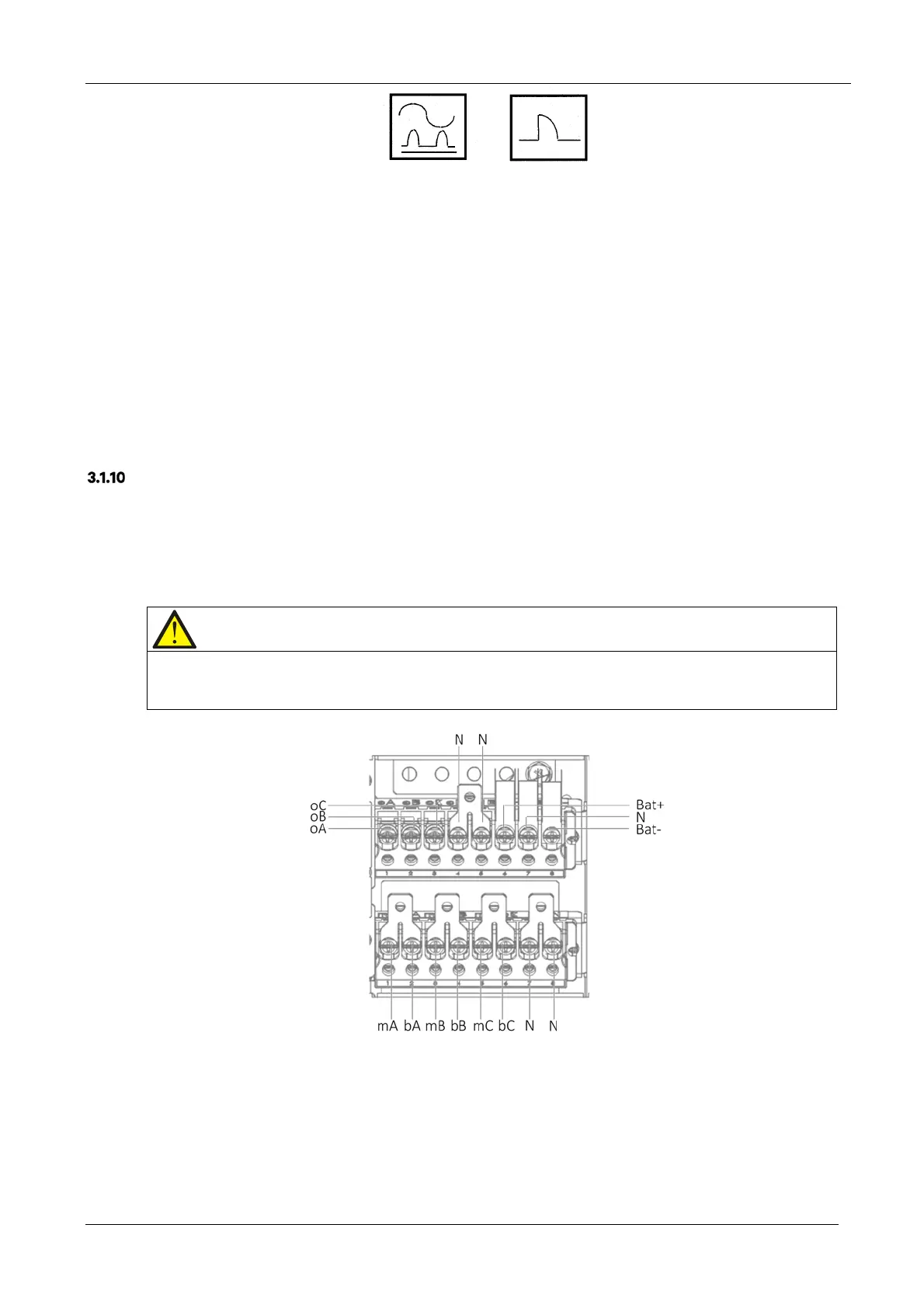
Connection terminals and cable routing method
Figure 3-2 shows the UPS power cable connection terminals. Figure 3-3 shows the power cable entry and routing
methods.
Note
1. Open the appropriate holes on the rear protective cover before routing the power cables. Install cable guards around the
rims of the hole to protect power cables against cutting.
2. Feed the power cables through the holes, then connect them to the corresponding terminals.
Figure 3-2 Power cable connection terminals (rear view)










 To Next Page