12
4. Functions
4.1 Setup and Checking of Functions
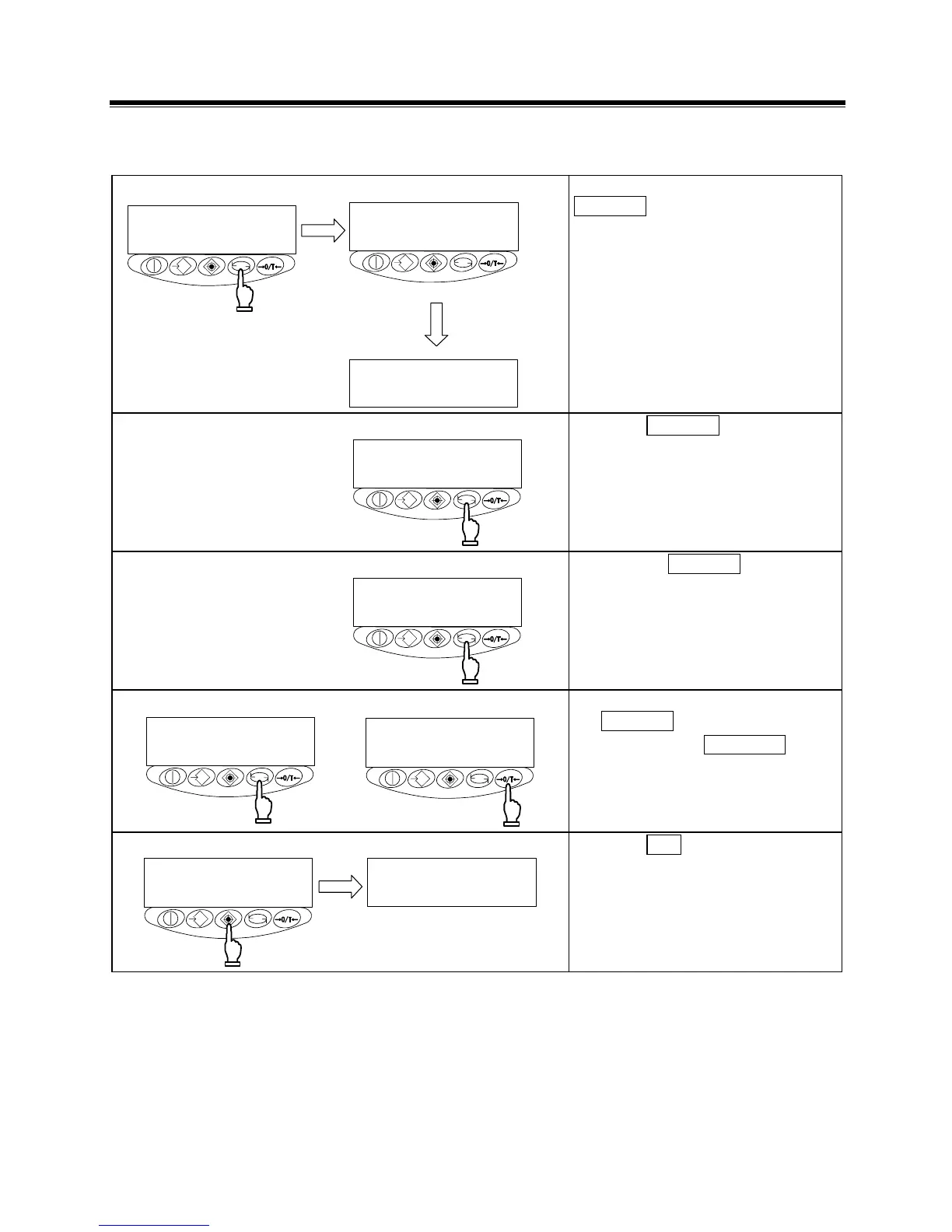
1 Invoking the function
指を離す
長押
し
g
Continuous pressing
Key released
Press and hold down the
Function key until the indicator
changes to “
,” then release
the key.
The function setup mode is activated,
and the first item,
[
(Bar graph) 1] appears.
(See “4.2 Description of Functions”
on page 13.)
2 Selecting the next item
Press the Function key.
The indication changes to the next
item, [
(Limit function)].
3 Selecting an item
Pressing the Function key
advances the function items at the
rate of one item per press.
4 Changing the content of an item
Select the item to be changed with
the Function key.
Each press of the Zero/Tare key
changes the digit on the right end.
Select the desired one.
5 Terminating the function selection
g
Press the Set key.
The balance terminates the function
setup and returns to measurement
mode.



 To Next Page