19
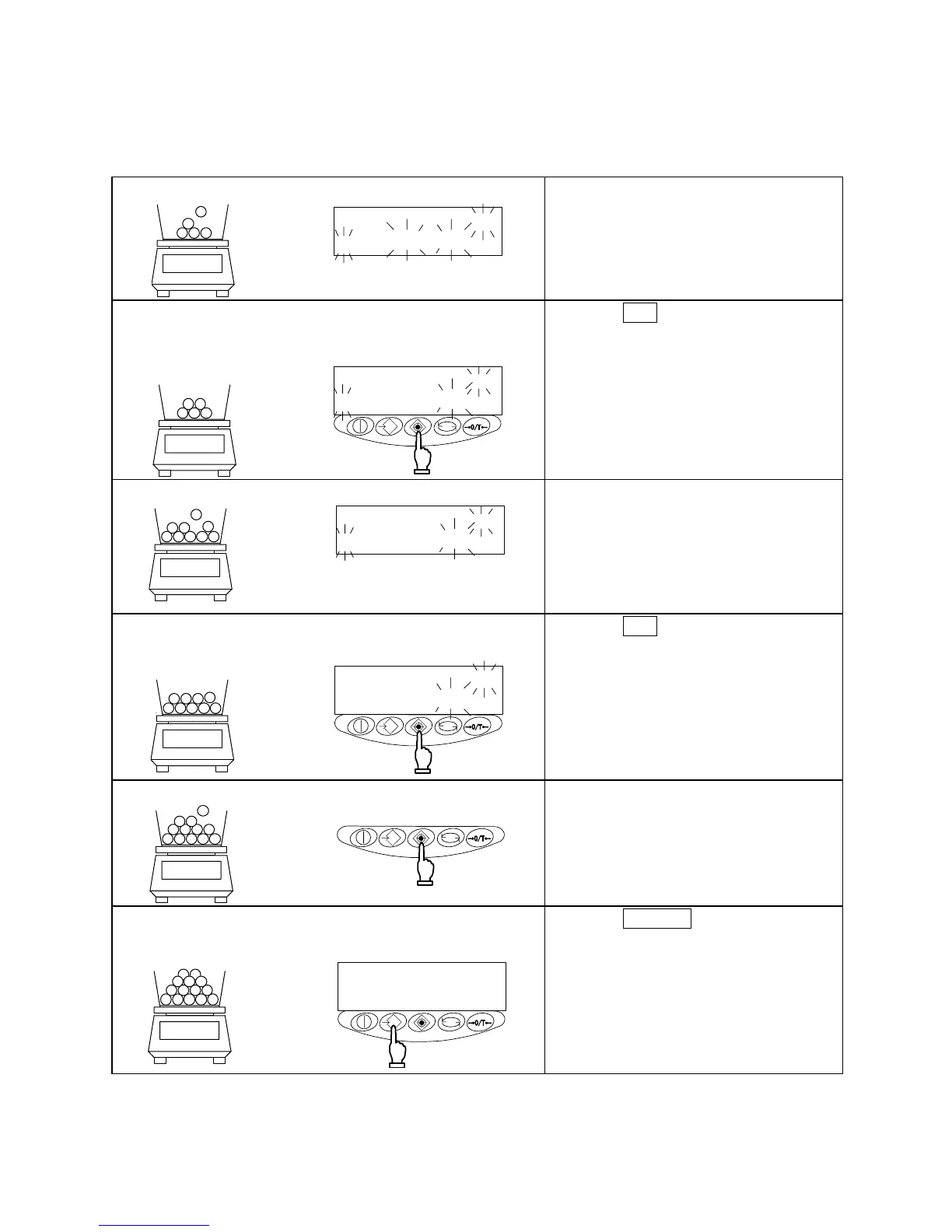
6.2 Increasing the Counting Accuracy (Memory Update Method)
※This procedure is the same as the sampling procedure described on the previous page up, to the point
at which the sampling number is changed.
1 Loading samples
Pcs
M
Load the number of samples displayed.
Count the samples precisely and load
them on to the center of the
measurement pan.
2 Saving the samples
Pcs
M
10個で
記憶
10 pieces saved
Press the Set key.
The unit weight of the samples is saved,
and the display changes to a flashing
value. This flashing value denotes that
the Memory Update Method is currently
active.
3 Adding samples
Pcs
M
Add approximately an equal number of
samples as the number currently
displayed. Add them gradually, in
groups of approximately the same
number, until the number of samples is
approximately double. The additional
samples need not be counted.
4 Saving the samples
Pcs
20個で記憶
20 pieces saved
Press the Set key.
After the unit weight of the samples has
been saved, the display begins to flash,
indicating that the Memory Update
Method is still running.
5 Repeating the addition and saving of samples
Repeat steps 3 and 4. The eventual
total number of samples to be saved
should be approximately 1/5 to 1/2 of the
number of samples to be measured.
6 Terminating the sampling
125個で
記憶
Pcs
125 pieces saved
Press the Memory key.
The balance saves the unit weight and
returns you to measurement mode.



 To Next Page