29
9.2 Calibration of AJH-E Series
Applicable models: AJH-220E, AJH-320E, AJH-420E, AJH-620E, AJH-2200E, AJH-3200E, AJH-4200E
※ Span adjustment should be performed with the balance installed perfectly level and without any load
on the measurement pan.
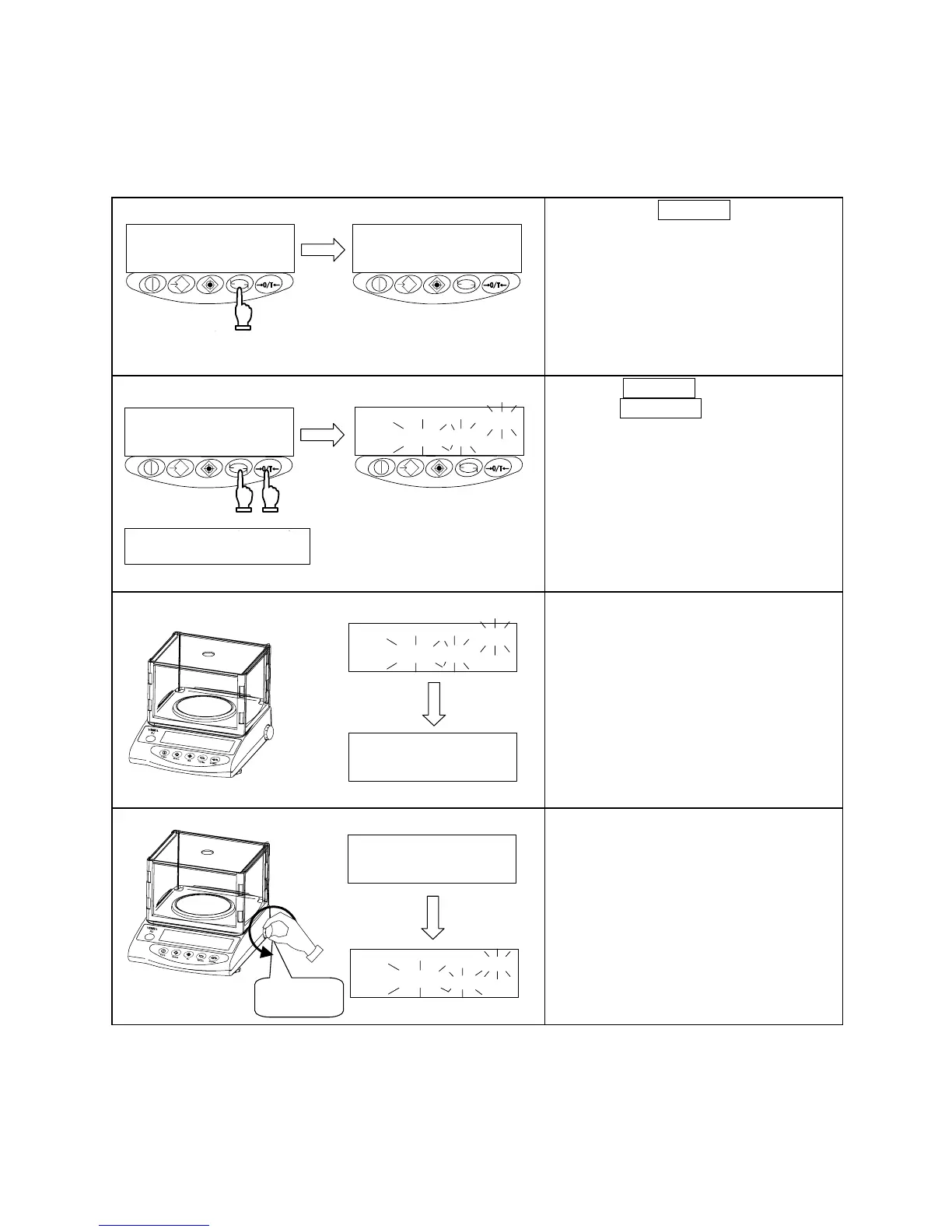
1 Invoke the span-adjustment function.
押し続ける
指を離す
Hold down.
Release your
finger.
Hold down the Function key, then
release your finger when the display
switches from [
] to [
].
2 Start span adjustment.
Zero/Tareキーを押しながら
Functionキーを押す
② ①
同時に離す
CAL
Press the Function key while
holding down the Zero/Tare key.
Release both
fingers at the
same time.
Press the Function key while holding
down the Zero/Tare key, then release
both fingers simultaneously. Display will
change to a flashing [
] and the
zero-point will be calibrated
automatically.
3 Zero-point calibration
CAL
CAL
Once zero-point calibration is
completed, display switches to [
]. Calibration now proceeds to that
of the weighing capacity point.
4 Calibration of weighing capacity point
CAL
CAL
Slowly and fully turn the calibration knob
in the direction of [Calibration].
The balance assumes the state where
the calibration weight is loaded on the
measurement pan.
The display starts flashing and the
balance automatically adjusts the
weighing capacity point.
Calibration



 To Next Page