66251750-EN - V1.0 - 05/06/17
36
4000 Series Vandal Resistant Digital GSM - Technical Manual
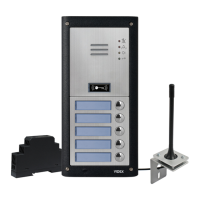
4000 Series Vandal Resistant Digital GSM Audio Intercom with Proximity
Programming Screens
MAIN PROGRAMMING MENU
From the main programming menu (refer to Fig.57) it is possible to access the
following sub menus:
1. Apartment menu
2. Proximity menu
3. General settings menu
4. Code menu
5. Time settings menu
Fig. 57
ADMIN MENU
From the admin menu (refer to Fig.58) it is possible to only access the following two
sub menus:
1. Apartment menu
2. Proximity menu
Fig. 58
Please note that the current rmware version of the digital GSM is shown in the top right corner of both the main programming
and admin menus.
1.1 APARTMENT MENU ADD/MODIFY APT
From the apartment menu (refer to Fig.59) it is possible to edit the following details:
1. Add or modify apartment details
2. Delete apartment details
Selecting option 1 from the apartment menu will rst access the memory location
screen and then from there the apartment information screen (refer to Fig.60).
The apartment information screen has 9 available options that allows the following
information to be entered, enabled and/or assigned:
1. Apartment number (APT)
2. Door/gate access code (CODE)
3. Dial to open number enable (DTO)
4. Timeband assignment (TB)
5. Username (NAME)
6. Primary telephone number (TEL1)
7. First divert number (TEL2)
8. Second divert number (TEL3)
9. Third divert (TEL4)
Fig. 59
Fig. 60
1.1.1 APARTMENT NUMBER APT
The apartment number can be entered on the apartment screen (refer to Fig.61) and
can be made up of a maximum of 6 digits or letters (A - F only) or a combination of
both e.g. apartment 100A, 100B etc.
Fig. 61
PROG. MENU VER DG4.0.1
1:
2:
3:
4:
5:
to exit
PROG. MENU
1:
2:
to exit
VER DG4.0.1
to exit
1. ADD/MODIFY APT
2. DELETE APT
to exit SELECT 1-9
1.APT:
3.DTO:
5.NAME:
6.TEL 1:
7.TEL 2:
8.TEL 3:
9.TEL 4:
2.CODE:
4.TB:
to confirm
to cancel
APT:


 To Next Page