23
Section D – Electrical Components
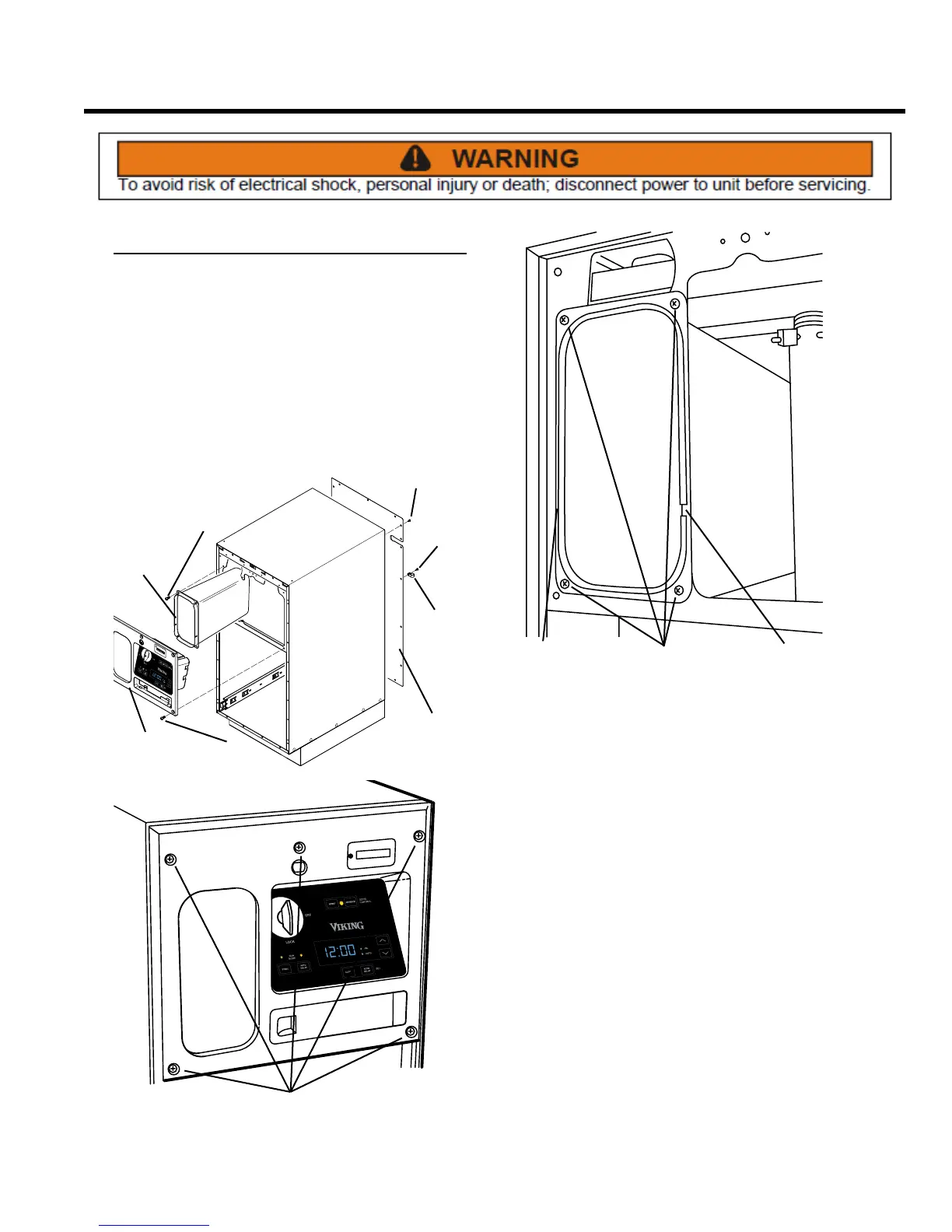
Access to Components
In order to access the electrical components, it is rst
necessary to remove the cabinet cover.
REMOVE CABINET COVER
1. Remove the bucket from the compactor (see Cabinet,
Trash Bucket).
2. Remove the back panel by rst removing the Phillips
head screw that secures the power cord cable clamp
to the back panel, and then removing the 16 screws
that secure the panel to the cabinet.
SCREWS
BAG
STORAGE
SCREWS
CONTROL
PANEL
BACK
PANEL
SCREWS
SCREW
CABLE
CLAMP
SCREWS
3. Remove control panel assembly (see Control Panel
Assembly, Remove and Re-install).
SCREWS NOTCHNOTCH
4. To remove the bag storage, remove four Phillips head
screws that secure it to the cabinet. NOTE: Upon
reassembly, the notches on the right and left sides
must appear on the lower part of the bag storage.



 To Next Page