32
3. Remove two Phillips head screws and wire leads
from the capacitor.
4. Discharge the capacitor (see Warning above).
5. Use an ohmmeter or multi-meter set on the “Ohms
times 1000” scale (if available) to check resistance
across the wire terminals. The needle should jump
toward zero ohms and quickly move back to innity.
(NOTE: Some less-sophisticated meters will only tell
you if the capacitor is good or bad.)
6. If the needle does not move, if the needle reads a
constant value or near zero ohms, or if the needle
jumps toward zero and then moves back to constant
high resistance (not innity), replace the capacitor.
7. Installation is the reverse of removal.
NOTE: On installation, route the wires through the
notches in the shield.
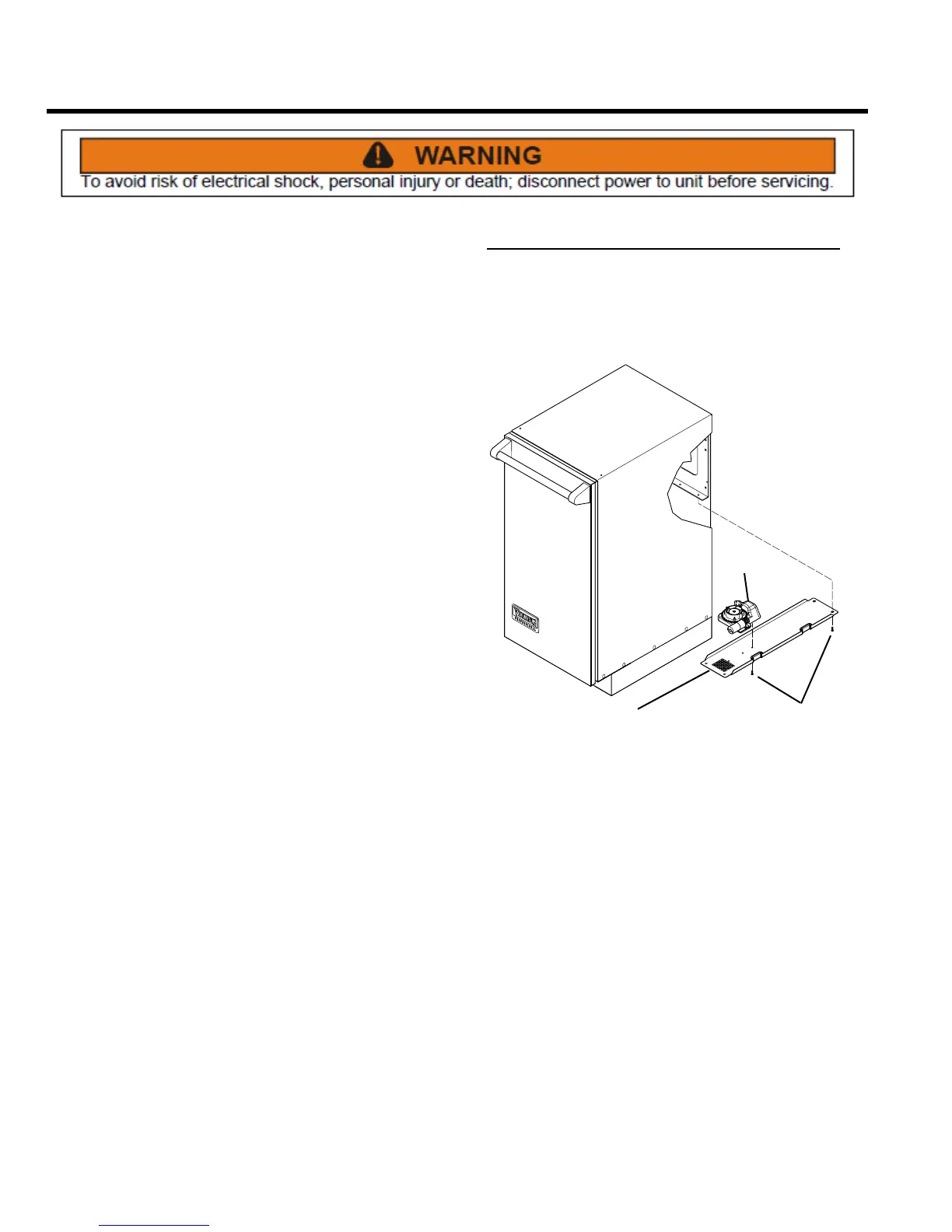
Odor Disk Gear Motor
REMOVE AND REPLACE
It is rare that this motor wears out because it operates
just once a month (more if operated manually). If it should
require replacement, follow the instructions below.
SCREWS
MOTOR
STABILIZER
PLATE
1. Before servicing this item place ram in lowest position
by setting compact mode to hold. Press start button
and close door. Ram will run down and stop. Disconnect
power.
2. Open bucket door.
3. Remove the control panel assembly from the front of
the compactor (see Control Panel Assembly, Remove
and Re-install).
Section D – Electrical Components



 To Next Page