Disassembly
©2009 Viking Preferred Service 37
To avoid risk of electrical shock, personal injury, or death, disconnect electrical power source to unit, unless test
procedures require power to be connected. Discharge capacitor through a resistor before attempting to service.
Ensure all ground wires are connected before certifying unit as repaired and/or operational.
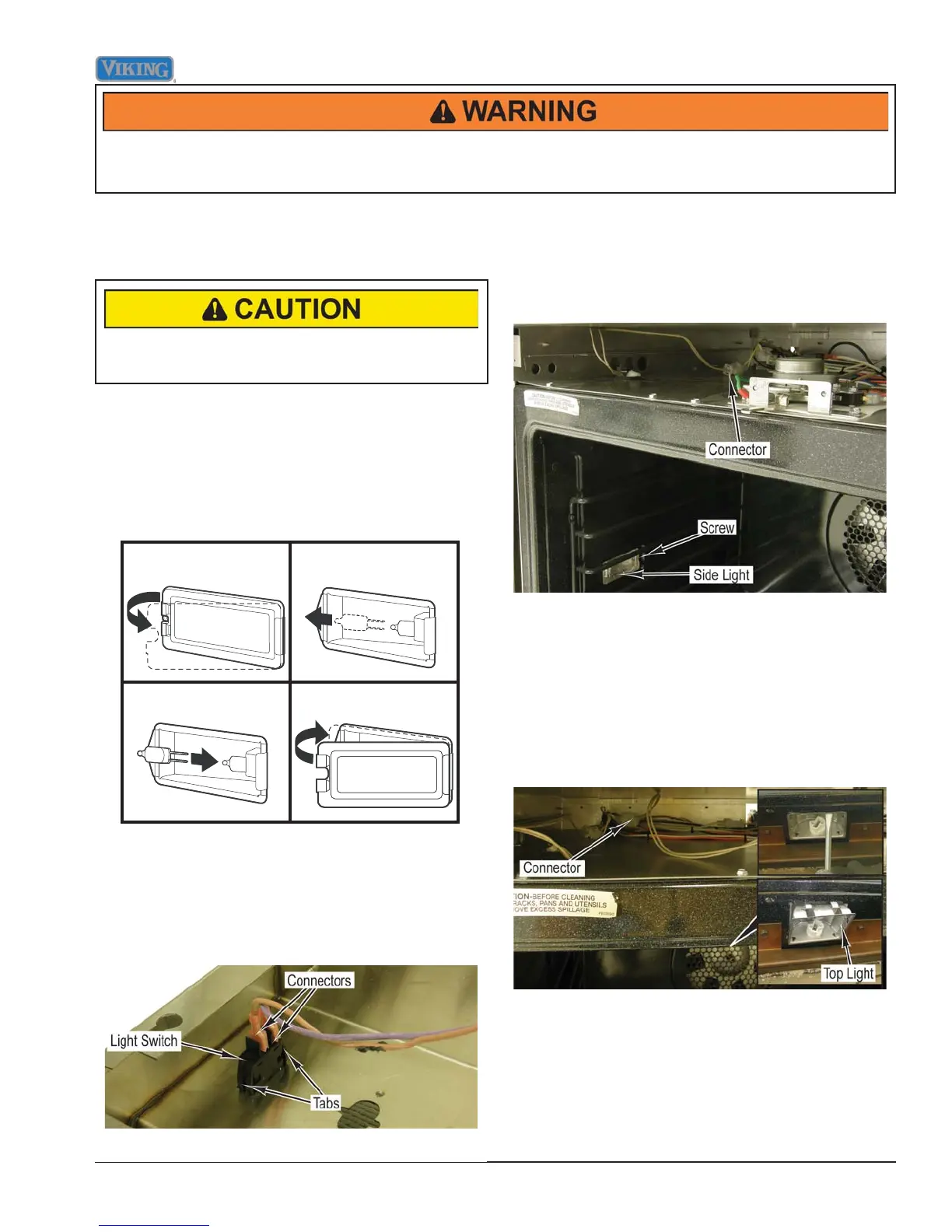
Oven Light Bulb Removal
Condition Requirements:
Door Lowered
DO NOT touch bulb with bare hands. Clean off any
signs of oil from the bulb and handle with a soft cloth.
1. Unsnap glass light cover using a screwdriver in the
access groove.
2. Firmly grasp light bulb and pull out.
3. Replace with halogen bulb using volt and wattage
requirements listed on glass cover.
4. Replace the light cover by snapping glass cover onto
metal box.
12
34
Oven Light Switch Removal
Condition Requirements:
Control Panel Assembly Removed
1. Disconnect two connectors from the light switch.
2. Press tabs on both ends of the switch and push
switch through control panel.
3. Reverse procedure for installation.
Side Light Housing Removal
Condition Requirements:
Door Assembly Removed
Control Panel Assembly Removed
1. Remove screw and side light housing from oven liner.
2. Disconnect connector for side light housing.
3. Reverse procedure for installation.
Top Light Housing Removal
Condition Requirements:
Door Assembly Removed
Control Panel Assembly Removed
1. Remove lens and bulb.
2. Disconnect connector for top light.
3. Use a screw driver to depress two tabs in top light
housing and tilt front of housing down to remove.
4. Reverse procedure for installation.



 To Next Page