22
Contents
Previous
Page
First
Page
Next
Page
Previous
View
9.4 Add four of the large trim weights (1) to the weight tray (3) in the platform.
9.5 Set the column brake (6) to OFF and turn the column friction adjuster (5) to minimum.
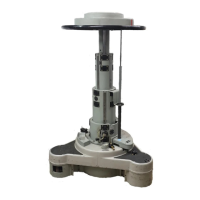
9.6 Using firm hand pressure raise and lower the steering ring to check that the pedestal balance is
approximately correct. As the locking bars (14) are still engaged the steering ring can only be moved up
and/or down about 20 mm (3/4 in.) but this is sufficient to check that the balance is approximately
correct. Only a small amount of effort should be needed to move the column. If it rises when released,
the pressure is too high and if it falls the pressure is too low. If the pressure is incorrect, slowly add or
release nitrogen as required until balance is achieved.
9.7 When balance is correct, depress the steering ring and disengage both platform locking bars
(14). Gently lift the steering ring. The camera platform should rise. Exercise platform over its full height
range at least twice. With platform at its highest position ensure there is no tendency for it to sink, then
move platform to mid-position and release. If platform tends to sink, increase nitrogen pressure.
9.8 Remove charging equipment and fit blanking cap to charging valve.
9.9 The column brake (6) on the fixed section of the column is designed only to hold the column at a
set height during camera operation.
Column locking
10 The column can be locked in its lowest position (whether counterbalanced or not) by means of the two
locking bars (14). This facility should be used whenever a load is being fitted, or when the pedestal is not in
use. The locking bars are attached to the fixed column and both bars can easily be secured by swinging them
upwards to the fixing points on the underside of the inner steering ring.
Operation
Balancing
11 Temperature changes may affect the balance of the pedestal column. These effects can be neutralized
by adding, or removing, trim weights (1).
Manoeuvring the pedestal.
12 The pedestal is steered by mans of the steering ring (16) which always maintains the same position in
relation to the head mounting platform irrespective of column height. When the pedestal is in crab mode, all
three wheel units are locked together; the direction of track being indicated by the red indicators (17) fitted to
the steering ring. When the pedestal is in the steer mode two wheels are locked in the straight-ahead position
and one wheel provides conventional steering. To change steering mode align one of the red indicators on the
steering ring with the datum line on the weight tray (3) and depress the appropriate button.
Column brake
13 The column, when balanced, may be locked in any position by applying the friction brake (6). The brake
is located on the fixed part of the column assembly and is operated by a small lever. The friction brake will not
support an out-of-balance load greater than 9.0 kg (20 lb). DO NOT use the friction brake to hold the column
when fitting or removing equipment – ALWAYS engage the locking bars.
Friction control






 To Next Page