Tips:
1. Do not install / mount the camera in a location that
interferes with the driver’s visibility and safety.
2. Install / mount the camera close to the rearview mirror
so that both sides of the scene being recorded are
equally covered by the camera’s FOV (field of view).
Note:
Do not install / mount the camera or cables near an
airbag panel or within the airbag’s working range.
The manufacturer is not liable for any injury or death
caused by deployment of the airbag.
Front Camera
Interior Camera
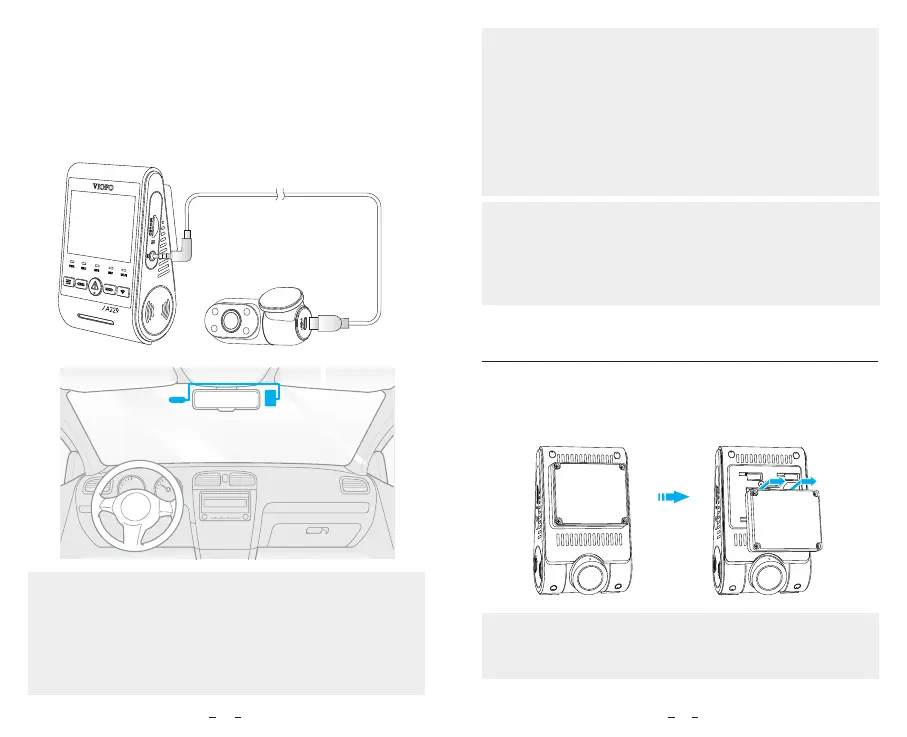
5. Connecting with Interior Camera.
Use the Interior camera cable to connect the two
cameras. Power off the product and connect the
interior camera cable to the front camera (main unit).
Cable routing should be as shown in the following two
diagrams. Use the cable clips to help fix the two cables
conveniently and safely.
To remove the front camera from its bracket, slide the
camera to the right and pull the front camera out of the
mounting bracket.
Note:
When you want to plug and unplug the rear or interior
camera, please turn off the camera first.
Remove Cameras
16 17
Pro
3. To ensure a clear view on rainy days, the lens should
be positioned within the windshield wiper’s sweeping
range.
4. Do not install / mount the camera on or near airbag
panels.
5. Installation / mounting location should not be affected
by sun control film (window tint). There should not be any
other electronic equipment close to the camera for
optimal performance.



 To Next Page