VISUAL
TECHNOLOGY
INCORPORATED,
RAILROAD
AVENUE,
DUNDEE
PARK,
ANDOVER,
MA
01810
respectively, and become
part
of
the
transmitted
data-stream. This
is
referred
to
as
"bracketing"
of
background fields.
(No
bracketing
of
background fields occurs
in
HZ1500+
mode.)
When an area
of
the
screen
containing
a graphic
field
is
transmitted,
bracketing also takes
place, i.e.,_the code sequences
for
entering/exiting
graphic fields are appended
to
the
beginning and end
of
each graphic
field
transmitted.
Unlike
bracketing
of
background
fields, bracketing
of
graphic fields occurs independently
of
emulation
mode selected and
regardless
of
the
status
of
Protect/Unprotect
mode.
The
following
examples
illustrate
the
use
of
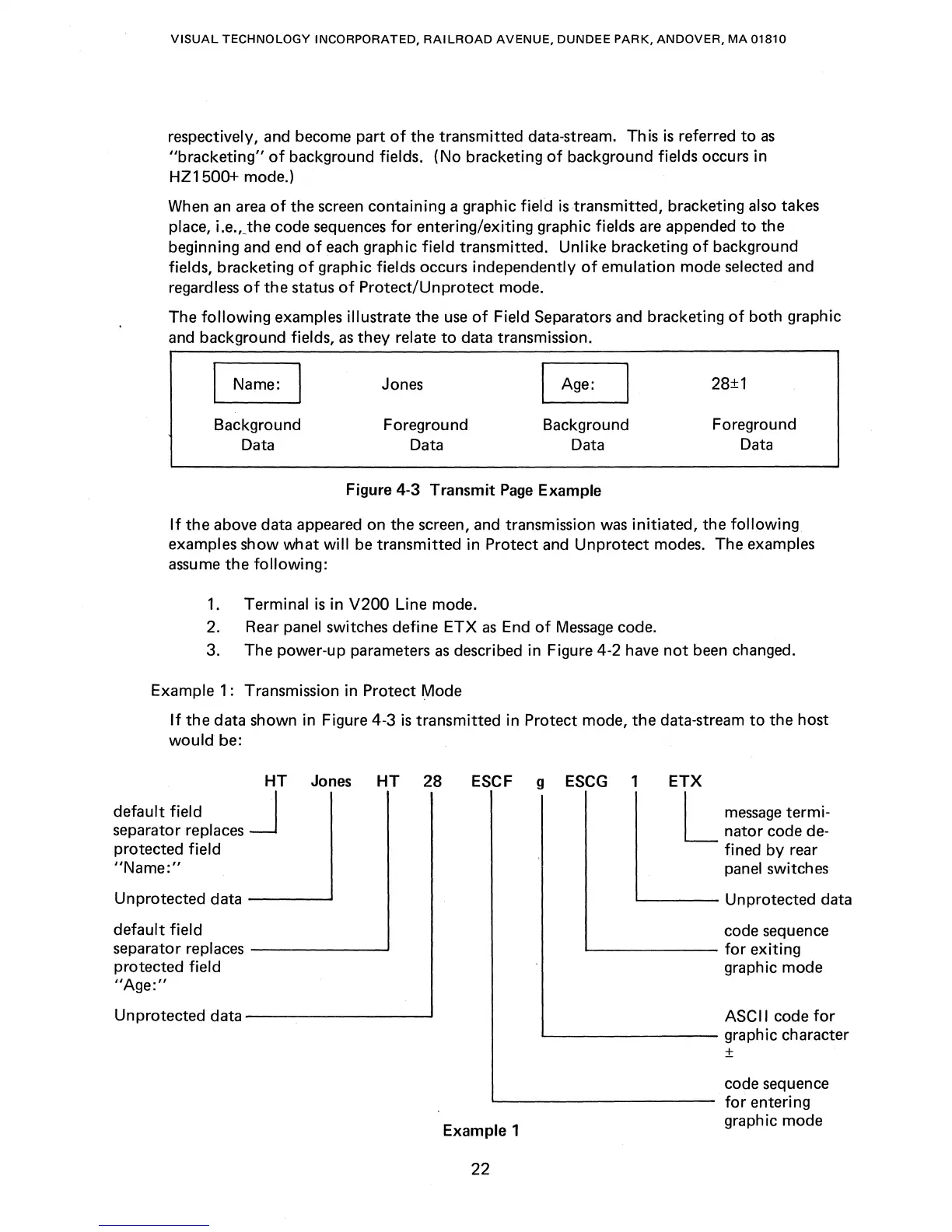
Field Separators and bracketing
of
both
graphic
and background fields,
as
they
relate
to
data transmission.
Name:
Background
Data
Jones
Foreground
Data
I Age:
Background
Data
Figure
4-3
Transmit
Page
Example
28±1
Foreground
Data
If
the
above data appeared on
the
screen, and transmission was
initiated,
the
following
examples
show
what
will
be
transmitted
in
Protect and
Unprotect
modes. The examples
assume
the
following:
1.
Terminal
is
in V200 Line mode.
2.
Rear panel switches
define
ETX
as
End
of
Message
code.
3.
The
power-up parameters
as
described in Figure 4-2 have
not
been changed.
Example
1: Transmission in
Protect
Mode
If
the
data shown in Figure 4-3
is
transmitted
in Protect mode,
the
data-stream
to
the
host
would
be:
HT
Jones
HT
28
default
field
J
separator replaces
protected
field
"Name:"
Unprotected
data
-----'
default
field
separator replaces
------~
protected
field
"Age:"
Unprotected
data
-------------'
ESCF g ESCG 1
ETX
Example 1
22
L
message
termi-
nator
code de-
fined
by
rear
panel switches
L--
____
Unprotected data
code sequence
'--------
for
exiting
graphic
mode
ASCII code
for
L..-
________
graphic character
±
code sequence
for
entering
graphic mode



 To Next Page