VISUAL
TECHNOLOGY
INCORPORATED,
RAILROAD
AVENUE,
DUNDEE
PARK,
ANDOVER,
MA
01810
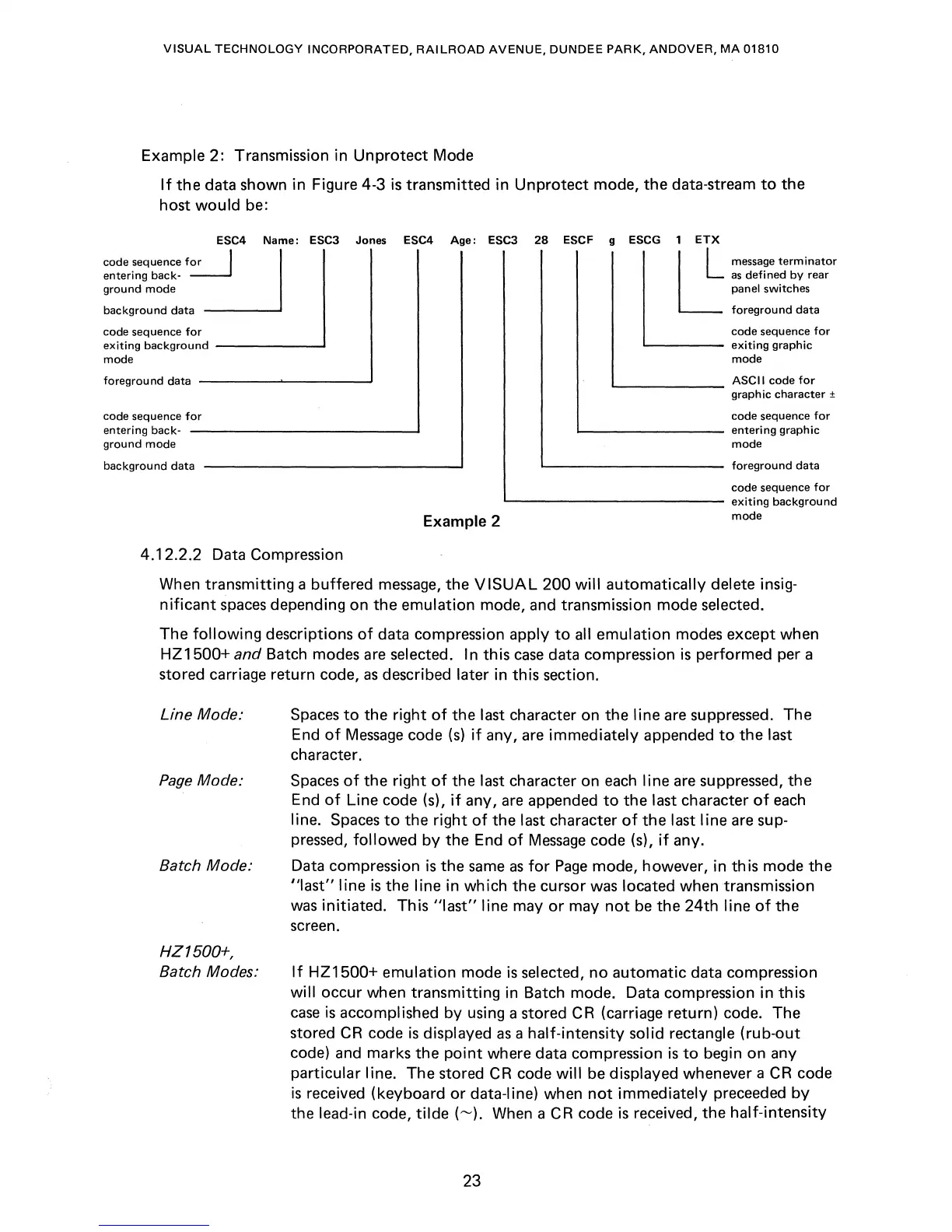
Example 2: Transmission in
Unprotect
Mode
If
the
data shown in Figure 4-3
is
transmitted in
Unprotect
mode,
the
data-stream
to
the
host
would
be:
ESC4
Name:
ESC3 Jones
COdesequencefor:J
1
entering back-
ground
mode
background
data
ESC4
Age:
ESC3
28
ESCF g ESCG 1
ETX
L:
message
terminator
as
defi
ned
by
rear
panel switches
foregrou
nd data
code sequence
for
code sequence
for
exiting
background
_____
---J
'------
exiting
graphic
mode
mode
foreground
data
----~------'
L..-
_____
ASCII
code
for
graph
ic
character ±
code sequence
for
entering back-
ground
mode
background
data
Example 2
code sequence
for
L..-
_______
entering
graphic
mode
'-----------
foreground
data
code sequence
for
'-------------
exiting
background
mode
4.12_2.2 Data Compression
When
transmitting
a buffered
message,
the
VISUAL
200
will
automatically delete insig-
nificant
spaces
depending on the emulation mode, and transmission mode selected.
The
following
descriptions
of
data compression apply
to
all emulation modes except when
HZ1500+
and
Batch modes are selected. In this
case
data compression
is
performed per a
stored carriage return code,
as
described later in this section.
Line
Mode_'
Page
Mode:
Batch
Mode_-
HZ
1500+,
Batch
Modes_-
Spaces
to
the right
of
the last character on the line are
suppressed_
The
End
of
Message
code
(s)
if
any, are immediately appended
to
the
last
character_
Spaces
of
the right
of
the last character on
each
line
are
suppressed,
the
End
of
Line code (s),
if
any,
are
appended
to
the
last character
of
each
line.
Spaces
to
the
right
of
the last character
of
the last line are sup-
pressed,
followed
by
the End
of
Message
code (s),
if
any_
Data compression
is
the
same
as
for
Page
mode, however, in this mode the
"Iast" line
is
the line in which the cursor
was
located when transmission
was
initiated_ This
"last"
line
mayor
may
not
be
the
24th
line
of
the
screen.
If
HZ1500+
emulation mode
is
selected, no automatic data compression
will
occur when transmitting in Batch mode. Data compression in this
case
is
accomplished by using a stored
CR
(carriage return) code. The
stored
CR
code
is
displayed
as
a half-intensity solid rectangle
(rub-out
code) and marks the
point
where data compression
is
to
begin on any
particular
line_
The stored
CR
code
will
be
displayed whenever a
CR
code
is
received (keyboard
or
data-line) when
not
immediately preceeded
by
the lead-in code,
tilde
(~).
When a
CR
code
is
received, the half-intensity
23



 To Next Page