VIVOTEK
34 - User's Manual
Advanced Mode
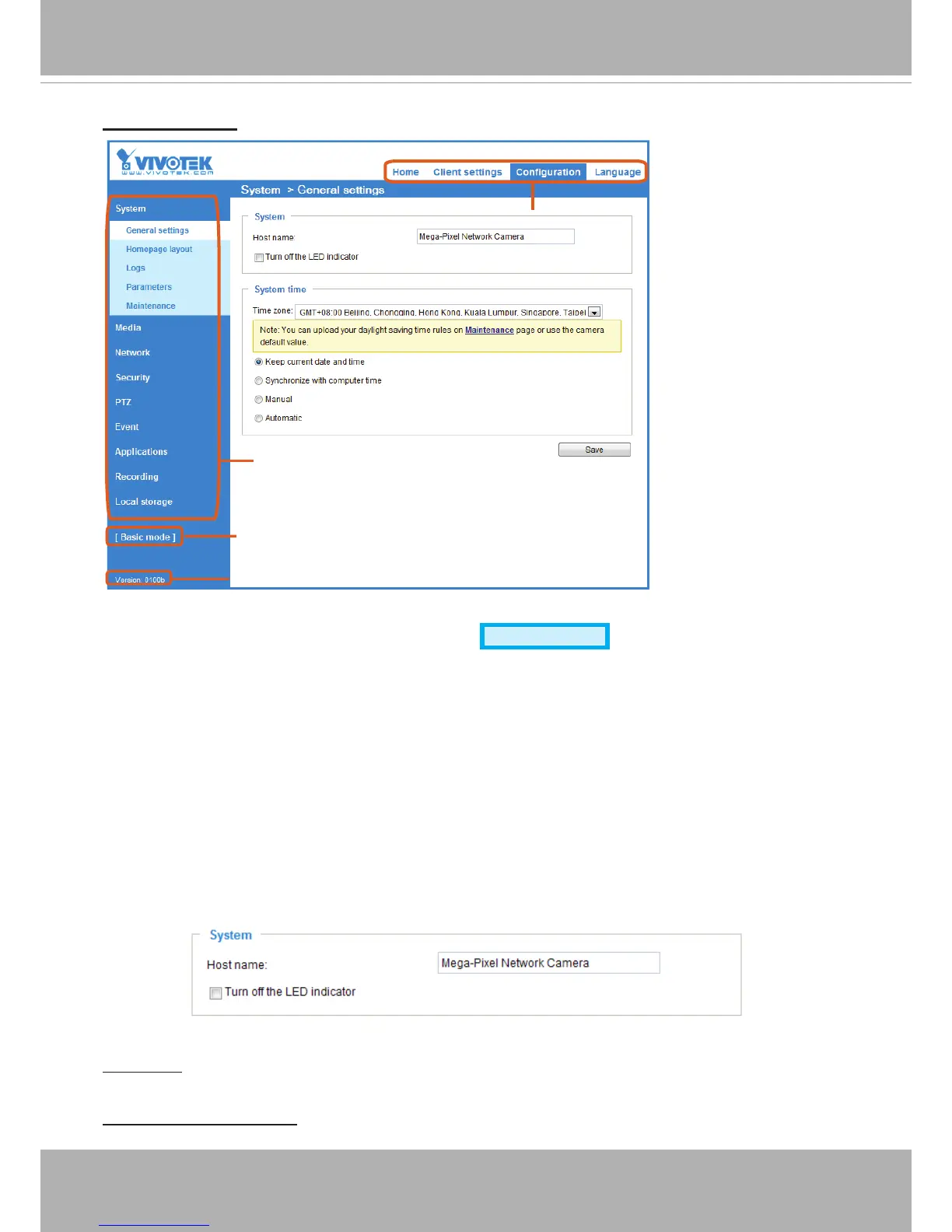
Each function on the conguration list will be explained in the following sections. Those functions that are
displayed only in Advanced Mode are marked with
Advanced Mode
� If you want to set up advanced
functions, please click [Advanced Mode] on the bottom of the conguration list to quickly switch over.
The Navigation Area provides access to the Home page (the monitoring page for live viewing), Client
settings, Conguration
page, and multi-language selection�
System > General settings
This section explains how to congure the basic settings for the Network Camera, such as the
host name and system time� It is composed of the following two columns: System, and System
Time� When finished with the settings on this page, click Save at the bottom of the page to
enable the settings�
System
Host name: Enter a desired name for the Network Camera� The text will be displayed at the top of the
main page, and also on the view cell of ST7501 and VAST management software�
Turn off the LED indicators: If you do not want others to notice the network camera is in operation, you
can select this option to turn off the LED indicators�
Configuration List
Click to switch to Basic Mode
Firmware Version
Navigation Area



 To Next Page