VIVOTEK
User's Manual - 59
Network > General settings
This section explains how to congure a wired network connection for the Network Camera.
Network Type
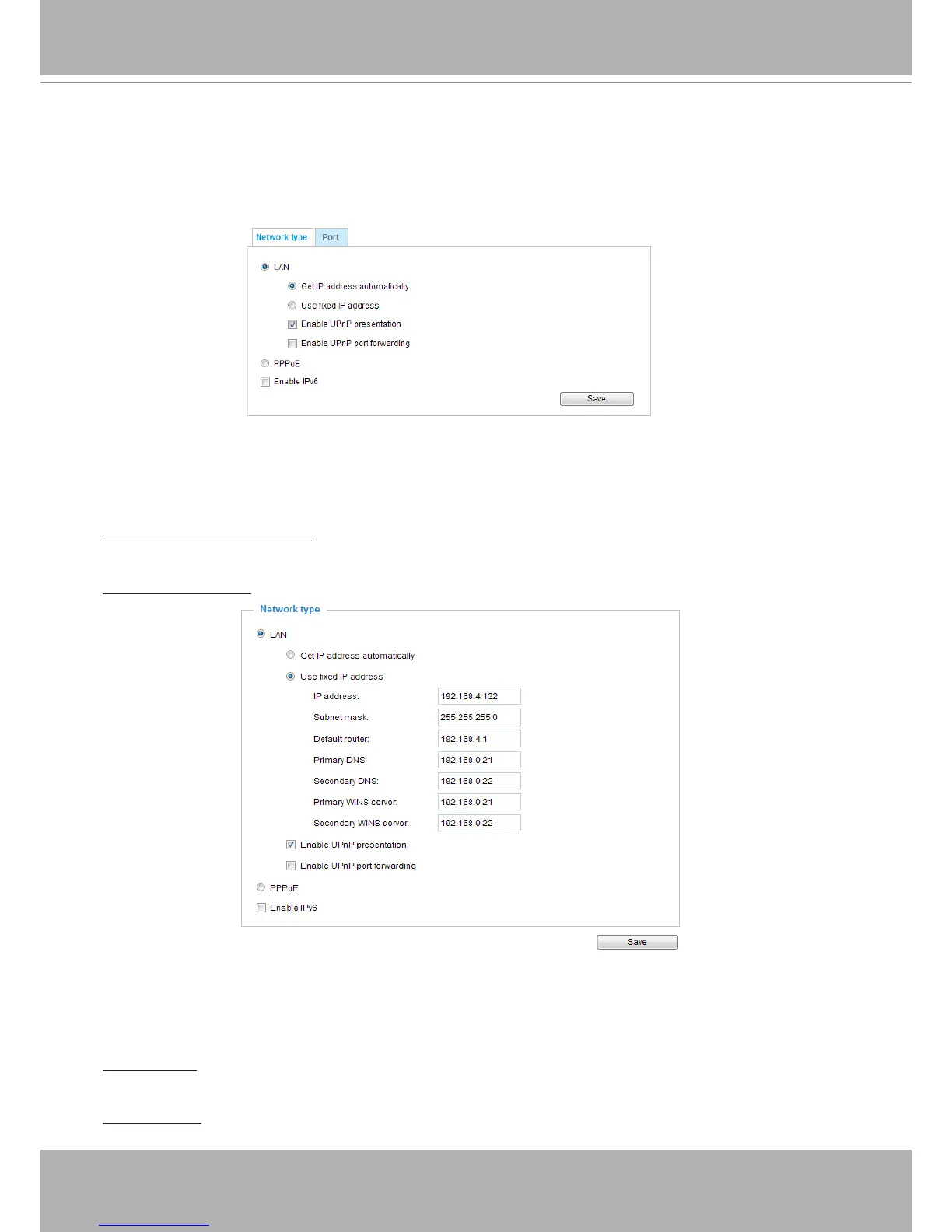
LAN
Select this option when the Network Camera is deployed on a local area network (LAN) and is intended
to be accessed by local computers� The default setting for the Network Type is LAN� Please remember to
click Save when you complete the Network setting�
Get IP address automatically: Select this option to obtain an available dynamic IP address assigned by
the DHCP server each time the camera is connected to the LAN�
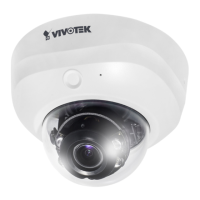
Use xed IP address: Select this option to manually assign a static IP address to the Network Camera�
1. You can make use of VIVOTEK Installation Wizard 2 on the software CD to easily set up the Network
Camera on LAN� Please refer to Software Installation on page 12 for details�
2� Enter the Static IP, Subnet mask, Default router, and Primary DNS provided by your ISP or consult
your network administrator�
Subnet mask: This is used to determine if the destination is in the same subnet� The default value is
“255�255�255�0”�
Default router: This is the gateway used to forward frames to destinations in a different subnet� Invalid
router setting will fail the transmission to destinations in different subnet�



 To Next Page