VIVOTEK - A Leading Provider of Multimedia Communication Solutions
104 - User's Manual
How to Congure Station Server Settings
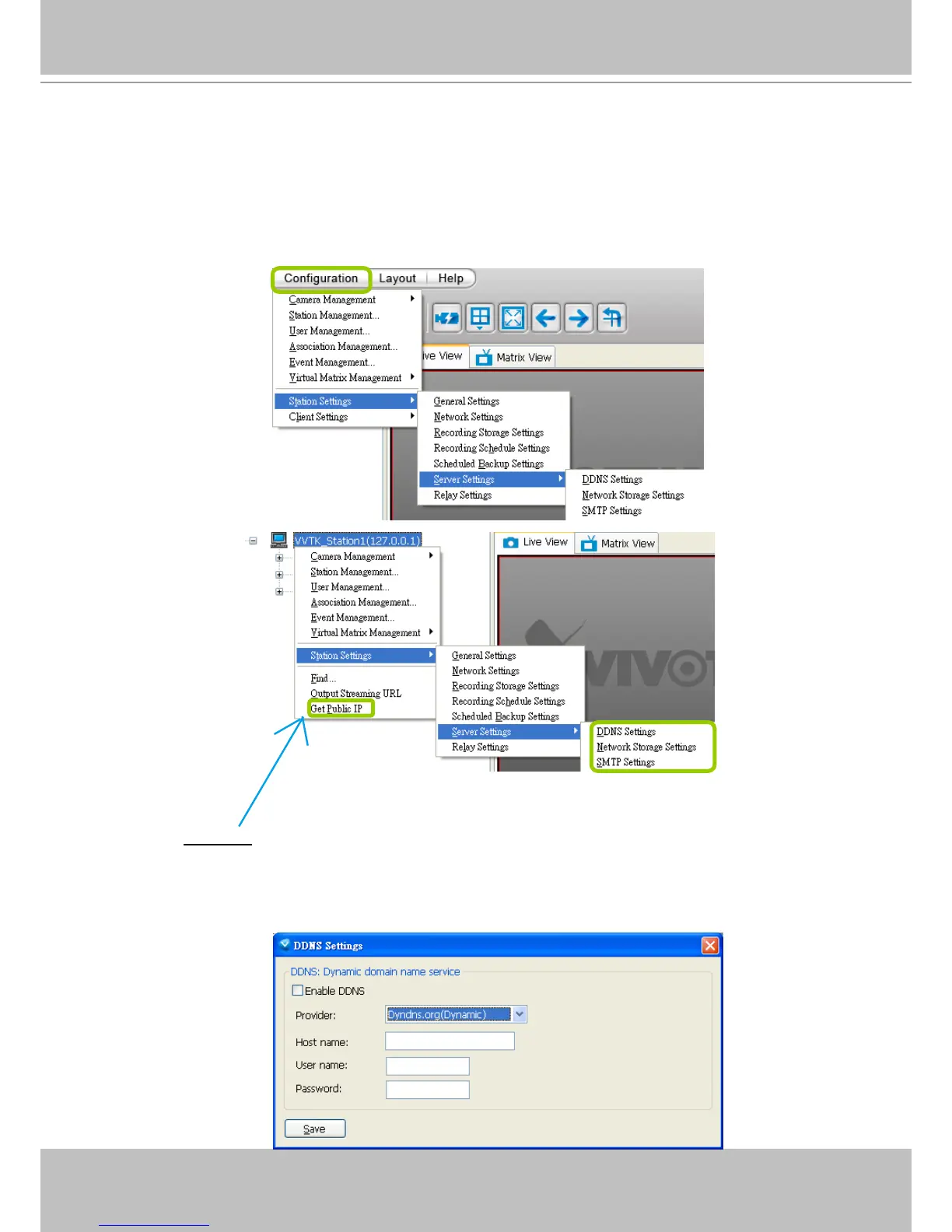
VAST LiveClient supports Server Settings including DDNS Settings, Network Storage Settings,
and SMTP Settings.
Select the station from the hierarchical management tree and click Configuration > Station
Settings > Server Settings to open the page (or right-click the station and select Station
Settings > Server Settings).
DDNS Settings
Since the public IP of VAST Server may be a dynamic IP address, DDNS service will give it a
xed domain name.
Select a DDNS provider from the provider drop-down list. VIVOTEK offers 2bthere.net (Safe100.
net), a free dynamic domain name service, to VIVOTEK customers. Please refer to the user's
manual of VIVOTEK's network camera for detailed DDNS settings.



 To Next Page