Vogels Autogas Systems VGI Hardware Manual System Description and Installation
VGI Technical Manual 2014-01-14.pdf Pagina 41 van 44
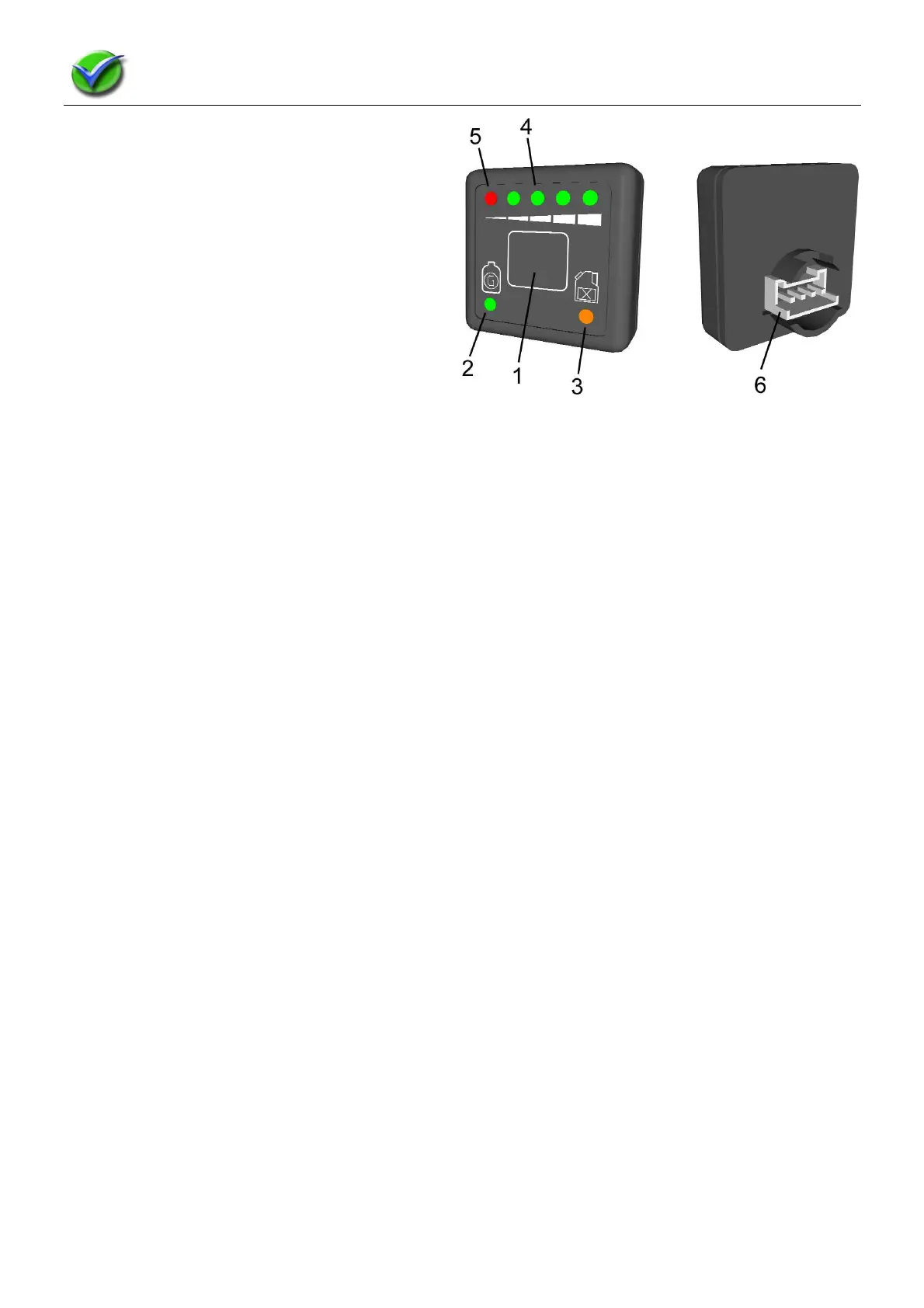
1.15 Userinterface / Gas Switch
The selector switch comprises the following main
functions:
• Fuel selection
• LPG level indication
• Acoustic warning signal (buzzer)
• Error code warning LEDs
Legend:
1. Gas / Petrol Switch. Press to change
2. Green Gas LED:
• On constantly: the vehicle is running on gas;
• Flashes quickly: the system is waiting for the right moment to switch over to gas. N.B.: The vehicle always
starts on petrol;
• Flashes slowly: error code in gas system.
3. Yellow Petrol LED
• On constantly: the vehicle is running on petrol.
4. LED LPG level indication:
• Provides an indication of the LPG level in the tank with a resolution of a ¼ tank; 1 green LED = ¼ tank
• 2 green LEDs = ½ tank
• 3 green LEDs = ¾ tank
• 4 green LEDs = full tank
5. The red LED indicates the reserve tank function.
The fuel selector switch is connected to the wire harness via a 4-pin connector located at the rear of the switch.
The switch and the ECU use serial communication for exchanging information about the fuel selection, fuel level,
tank level and possible error codes in the system.
Emergency start procedure on gas
If the petrol system no longer works, due to an empty petrol tank, for example, the vehicle can be started directly
on LPG.
Emergency start procedure:
• Switch on the ignition without starting the engine (the LEDs on the switch will illuminate);
• Keep the switch pressed for over 5 seconds (the green LED on the switch will now illuminate constantly);
• Now start the engine, which will start directly on LPG. (If the engine is cold, this may prove difficult due to the
lack of heat energy for the gas that has to be evaporated.)



 To Next Page