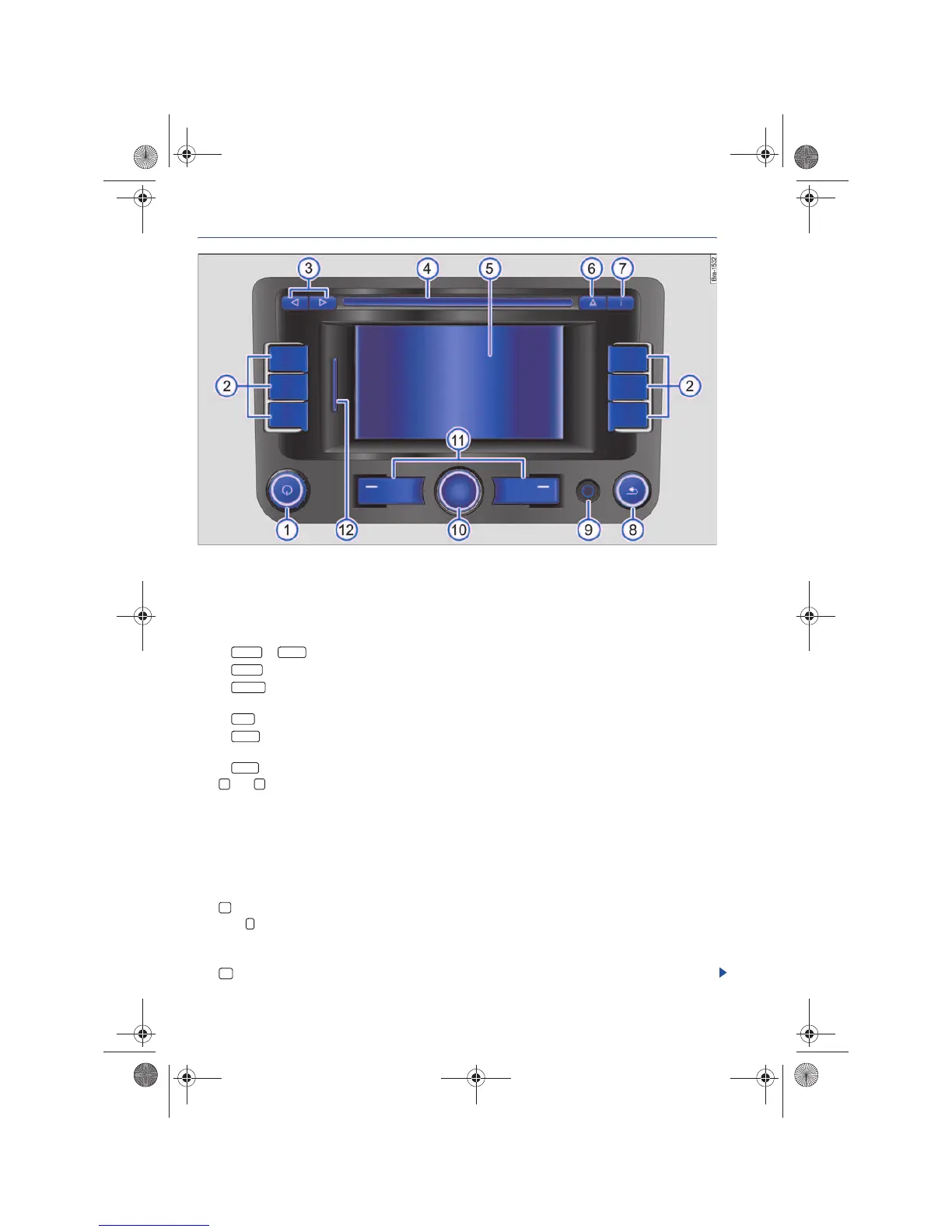
RNS 310, RNS 315
Device overview
Fig. 1 Overview of the controls.
Rotary and push button.
− Press to switch on or off ⇒ page 8.
− Turn to adjust the volume ⇒ page 8.
Press to open a function area. Labeling and functions depend on the specific device.
− or : Switch to Radio mode and change frequencies ⇒ page 12.
− : Switch to Media mode ⇒ page 21.
− : Start Telephone mode ⇒ page 58. OR: Mute the audio source if a mobile phone package has
not been installed ⇒ page 8.
− : Open Navigation main menu ⇒ page 37.
− : Opens sound or system settings and a context-based setup menu for the selected device
mode ⇒ page 67.
− : Mute the device ⇒ page 8.
and arrow buttons always work for the active audio source, regardless of the menu being dis-
played.
− To change the station or channel in all Radio modes, briefly press (and, if necessary, pay attention
to the display) ⇒ page 12.
− To change the chapter or track in Media mode, briefly press or hold to rewind or fast forward
⇒ page 21.
CD slot ⇒ page 21.
Touch screen ⇒ page 8.
CD eject button ⇒ page 21.
Press the Info button to display additional menu-related information:
− Display additional track information (location) in Media mode ⇒ page 21.
− Show the current vehicle position and/or destination during Navigation ⇒ page 37.
Press Return in order to close menus and pop-up windows.



 To Next Page