Navigation 41
111.5U6.N31.23
Destination input
Introduction
In this section you’ll find information on the fol-
lowing:
Selecting a destination address or intersection . . . .
Selecting stored destinations . . . . . . . . . . . . . . . . . . .
Selecting a point of interest . . . . . . . . . . . . . . . . . . . .
Details view of a destination . . . . . . . . . . . . . . . . . . .
Supplementary information:
• Safety instructions ⇒ page 3
• Device overview ⇒ page 6
• Introduction to navigation ⇒ page 37
Selecting a destination address or intersection
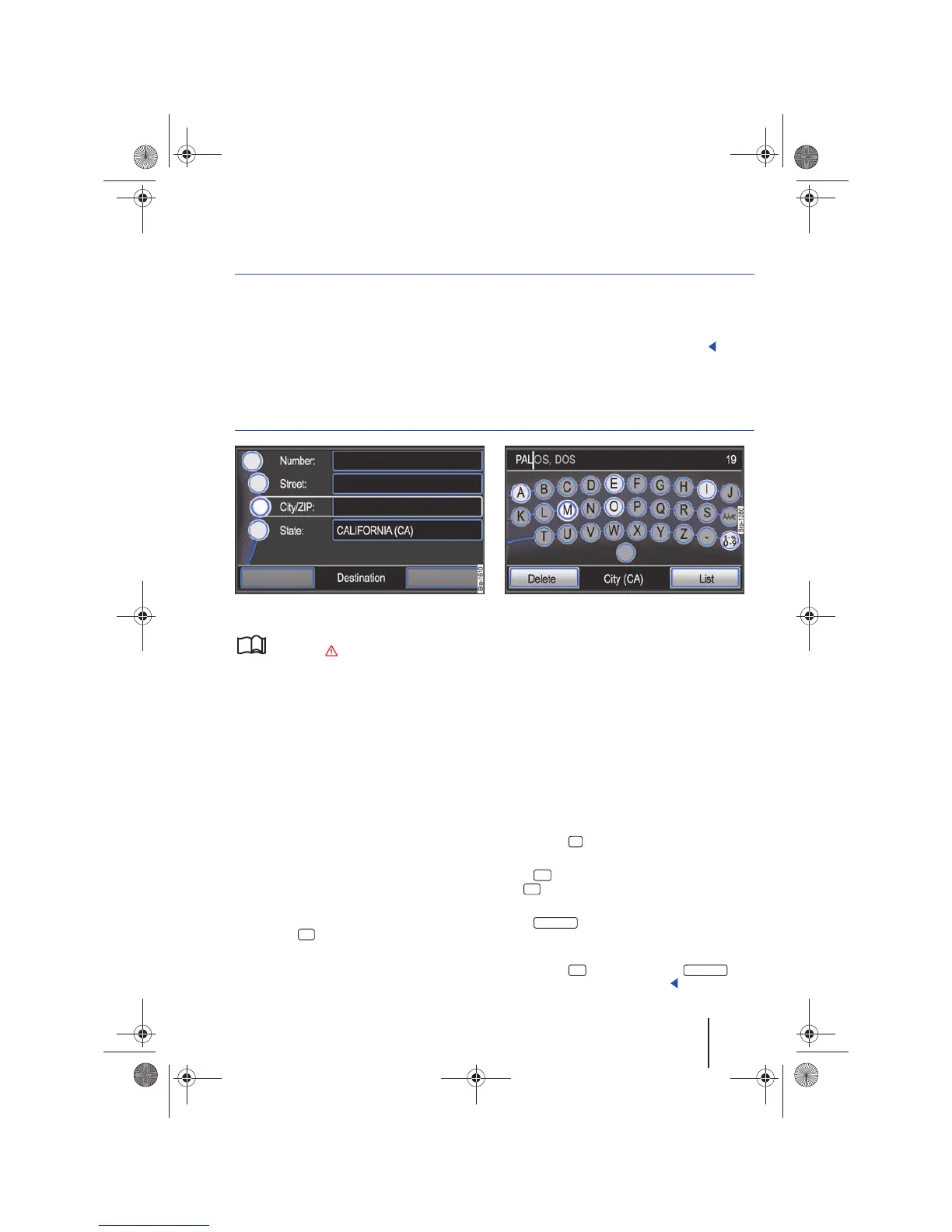
Fig. 46 Address entry window.
Fig. 47 Input screen for selecting a destination.
Please first read and observe the safety in-
structions on page 3 and the introduc-
tory information on page 41.
• Open an address or intersection from the Navi-
gation main menu ⇒ page 37.
• Press one of the function buttons on the left
hand side ⇒ fig. 46 to open the appropriate screen
⇒ fig. 47.
The destination address or intersection can be
narrowed down through series of windows
⇒ page 40.
After selecting a state or province, the following
destination details can be entered in any order,
first the city or postal code, then the street name
and street number or the other way around.
If fewer than 99 destinations can be selected based
on the displayed character sequence, the number
of possible remaining destinations is indicated be-
hind the input line (in fig. 47: 19).
• Press the function button to open the list of
possible destinations. If fewer than six destina-
tions are selectable, the list is opened automati-
cally .
• Selecting a desired list entry ⇒ page 8.
When composite terms are entered, the space
character must be entered as well, e.g. “San
Fernando”.
A “City” is a locality or a postal code area and can
also be chosen by entering the relevant postal
code.
When narrowing down a destination address keep
in mind that each entry narrows down subsequent
selection options. For example, if a searched street
is not located in a previously entered postal code
area, it cannot be found in the subsequent street
selection.
• Press the button to undo entered destina-
tion details.
If the function button is displayed instead of
the function button, it means that the destina-
tion details are sufficient for directions to be given.
If the function button is displayed at the
bottom left of the screen, you can receive direc-
tions directly to the city center.
• Press the function button or to
open the Details view ⇒ page 44.
41
42
42
44
List
OK
List
Downtown
OK Downtown
40
Navigationssystem_111.5U6.N31_23.book Seite 41 Donnerstag, 22. April 2010 5:16 17



 To Next Page