Audio mode 19
111.5U6.N31.23
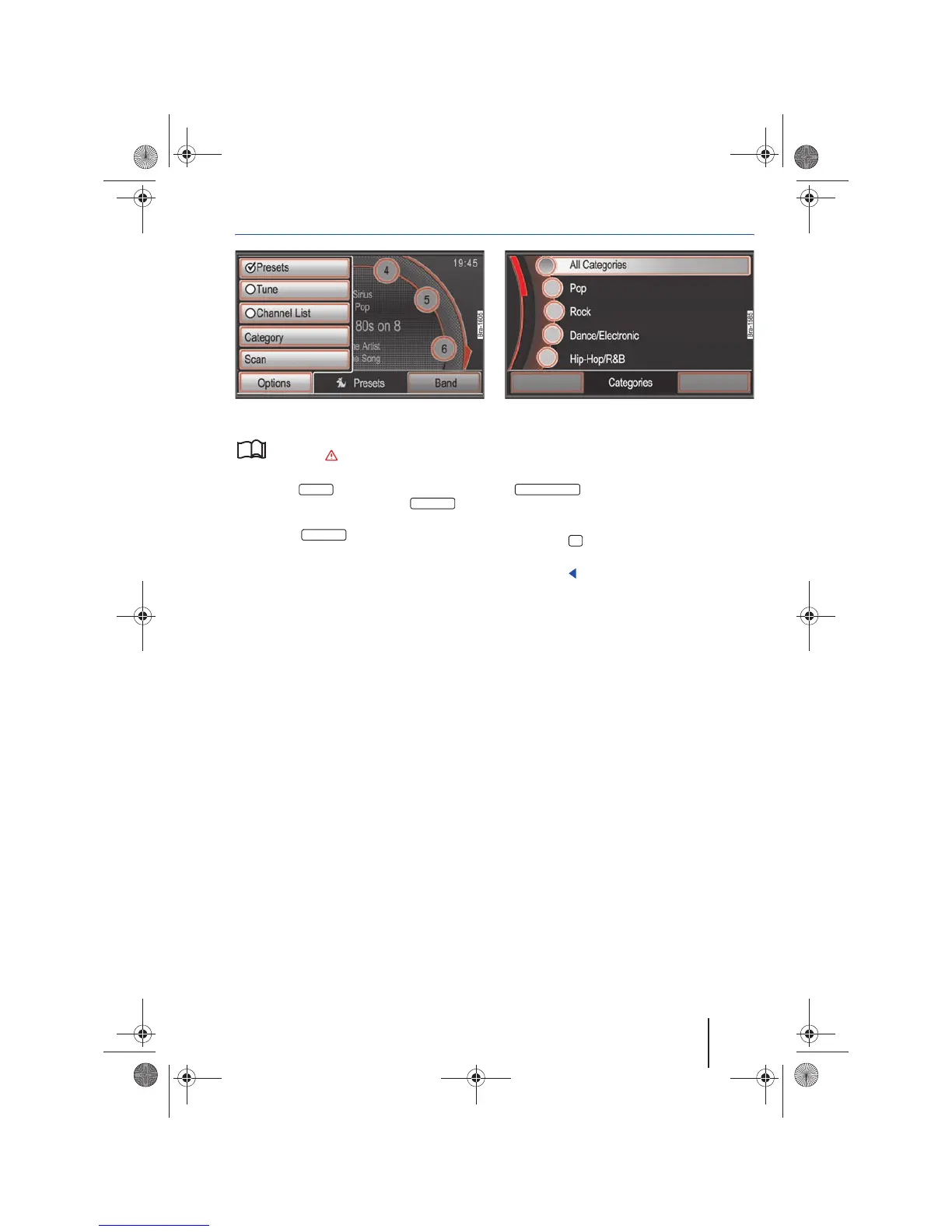
Selecting stations from a particular category
Fig. 17 Station selection options. Fig. 18 Select a category.
Please first read and observe the safety in-
structions on page 3 and the introduc-
tory information on page 12.
• Press the function button in the Satel-
lite radio main menu and press the func-
tion button in the in the pop-up window ⇒ fig. 17.
• OR: Press function button in the sta-
tion list view ⇒ page 18, fig. 16
Opens the list of available categories ⇒ fig. 18.
• Open the desired category by marking it (by
turning the tuning knob) and selecting it (by
pressing the knob) ⇒ page 8
The station list corresponding to the chosen cate-
gory will be opened. Only the stations in the se-
lected category will be displayed.
If is selected, stations of all catego-
ries will be displayed ⇒ page 18, fig. 16.
• Access stations as described ⇒ page 18.
• Press the button to close a list.
The list view will close automatically after a period
of inactivity.
Options
Categories
Categories
All Categories
18
Navigationssystem_111.5U6.N31_23.book Seite 19 Donnerstag, 22. April 2010 5:16 17



 To Next Page