40
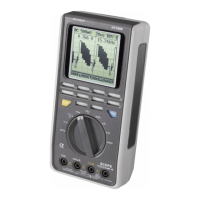
Proceed as follows to measure resistance and for the acoustic continuity test:
- Switch on the power unit on the operating switch (3).
- Select DMM mode with the MODE button.
- Connect the black measuring line with the COM socket
and the red measuring line with the VΩHz socket till
they are plane at the measuring instrument.
- Set the rotary selection switch (3) to Ω.
- Check the measuring leads for continuity by connec-
ting both measuring prods to one another. After that
the resistance value must be approximately 0 Ohm.
- Now connect the measuring prods to the object to be
measured. As long as the object to be measured is not
high-resistive or interrupted, the measured value will be indicated on the display (1).
- As soon as „O.L“ (overflow) appears on the display, you have exceeded the mea-
suring range or the measuring circuit has been interrupted.
- Automatic range selection is activated as default value.
☞
If you carry out a resistance measurement, make sure that the measu-
ring points which you contact with the test prods are free from dirt, oil,
solderable lacquer or the like. An incorrect measurement may result
under such circumstances.
Function buttons F1 – F4
F1 ( ): Switching from resistance measuring ( ) to diode test ( )
or acoustic continuity check ( )
F2 (REL): Relative measuring function – The measuring value is set to 0.000
after pressing the button; now only the relative value to the pre-
vious measuring value is displayed. Press F2 again to deactivate
the relative function.
F3 (RANGE ): Manual range selection - increasing the measuring range. The set
measuring range is indicated on the display. Press AUTO to reac-
tivate the automatic range selection.
F4 (RANGE ): Manual range selection - decreasing the measuring range.
To activate the acoustic continuity tester function, press F1 until ( ) appears. A
measuring value of less than 100 Ohm is identified as continuity; in this case a beep
sounds. Make sure that the beep function is activated (see basic setting).


 To Next Page