INFOTAINMENT
* Option/accessory, for more information, see Introduction.
28
Infotainment – operating the system
The infotainment system can be operated from
the center console and certain functions can
also be operated from the steering wheel key-
pad or by using voice commands.
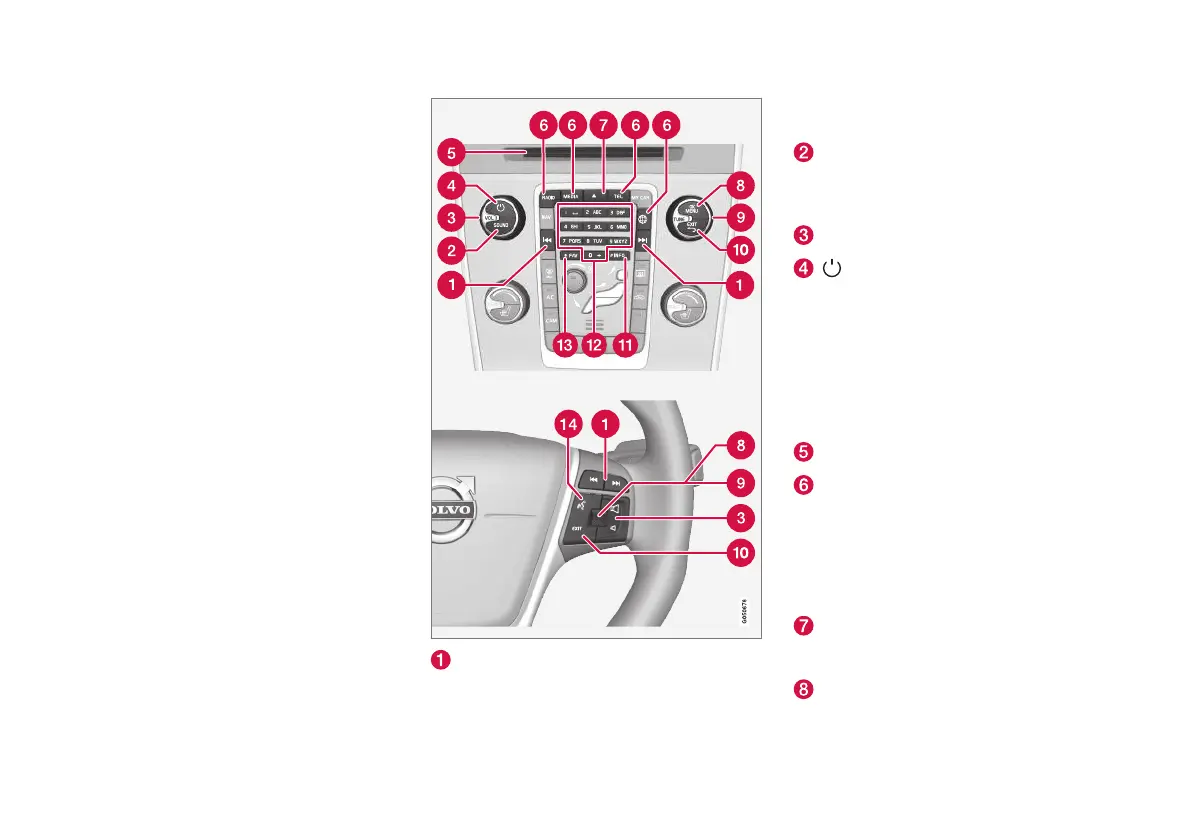
Left/right arrow keys – short press moves
between preset radio stations, tracks on a
disc or chapters on a DVD. Press and hold
to search within tracks or to tune to the
next/previous available radio station.
SOUND – press to access the menu for
adjusting bass, treble, etc. For additional
information, see general sound set-
tings (p. 34).
VOL – turn to raise or lower the volume level.
ON/OFF/MUTE – short press - switch
the system ON. Press and hold (until the
screen turns black) - switch the system
OFF. A short press when the infotainment
system is on will mute/unmute the sound.
The entire infotainment system, including the
navigation* and telephone functions, is
switched on/off at the same time by using
this button.
CD/DVD* slot.
Mode buttons – press to select a mode
(e.g., RADIO, MEDIA, TEL, etc.) by pressing
its button on the center console. The most
recent source in the selected mode (e.g., FM
in RADIO mode) will be displayed. From a
mode, pressing its mode button will display a
shortcut menu.
Eject a disc. An ejected disc that is not
removed from the slot after approx. 12 sec-
onds will be drawn back into the player.
OK/MENU – press the thumb wheel on the
steering wheel keypad or this button on the
center console to confirm a menu selection



 To Next Page