INFOTAINMENT
* Option/accessory, for more information, see Introduction.
32
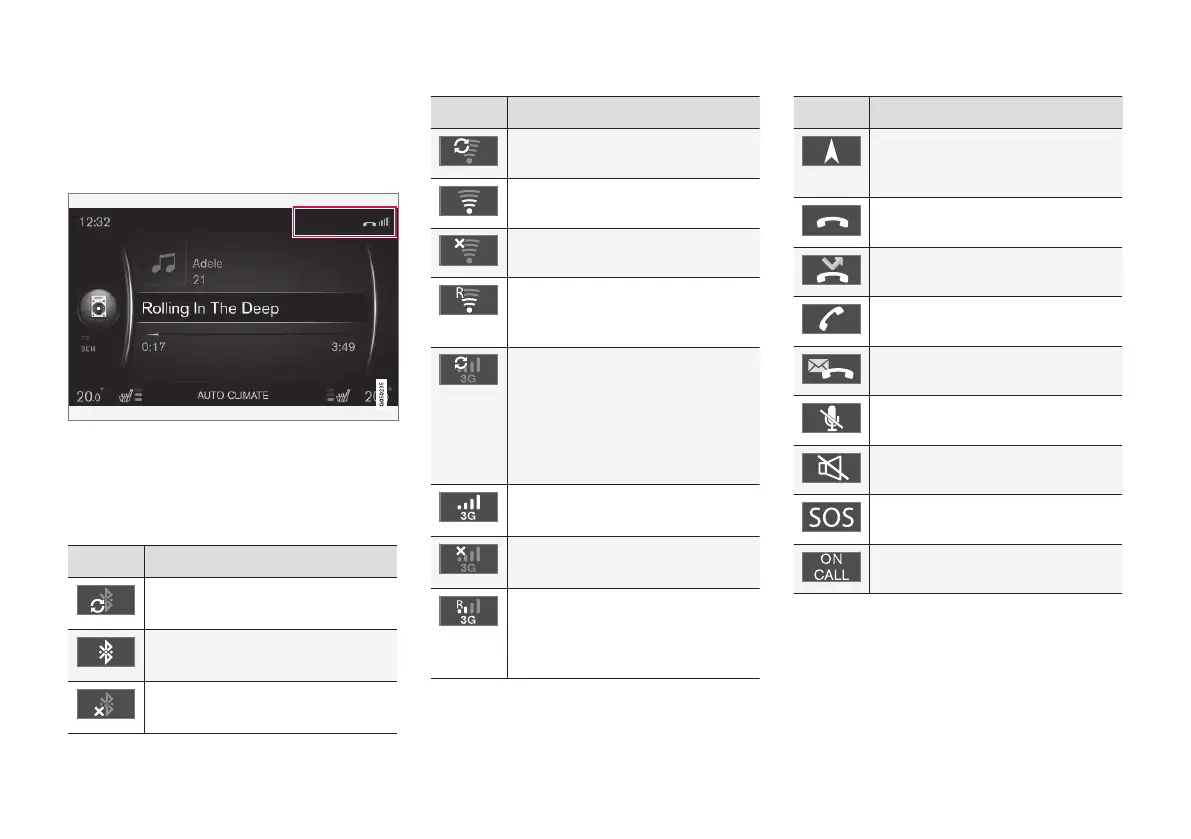
On-screen symbols
The following is an overview of the symbols that
may be displayed in the screen's activity/status
field.
Activity/status field
Active current functions and in certain cases,
their status, are displayed in the activity/status
field. Due to limited space, not all activity/status
symbols will be displayed at all times.
Symbol Explanation
Connecting to the Internet via
Bluetooth
®
.
Connected to the Internet via
Bluetooth
®
.
No Internet connection via
Bluetooth
®
.
Symbol Explanation
Connecting to the Internet via Wi-
Fi.
Connected to the Internet via Wi-Fi.
No Internet connection via Wi-Fi.
Connected to the Internet via Wi-Fi
via roaming (for connections in
other countries).
Connecting to the Internet via the
integrated modem*
A
.
The number of bars illuminated
indicates the strength of the signal.
The type of connection is indicated
under the bars.
Connected to the Internet via the
integrated modem*
A
.
No Internet connection via the inte-
grated modem*
A
.
The integrated modem*
A
is con-
nected to the Internet via roaming
(for connections in other coun-
tries).
Symbol Explanation
This symbol is displayed when the
vehicle's position is being transmit-
ted.
Cell phone connected.
Missed call(s).
Call in progress.
Unread text message.
Microphone muted.
Audio muted.
SOS service
A
active.
ON CALL service
A
active.
A
Models with Volvo On Call only.
Related information
•
Internet connection (p. 73)
•
Bluetooth
®
hands-free system (p. 62)



 To Next Page