INFOTAINMENT
}}
67
Button Function
+ 0 p w
# *
Related information
•
Infotainment – operating the system (p. 28)
•
Bluetooth
®
hands-free system (p. 62)
Searching for phone book contacts
The following is the procedure for searching for
contacts in you're your phone book
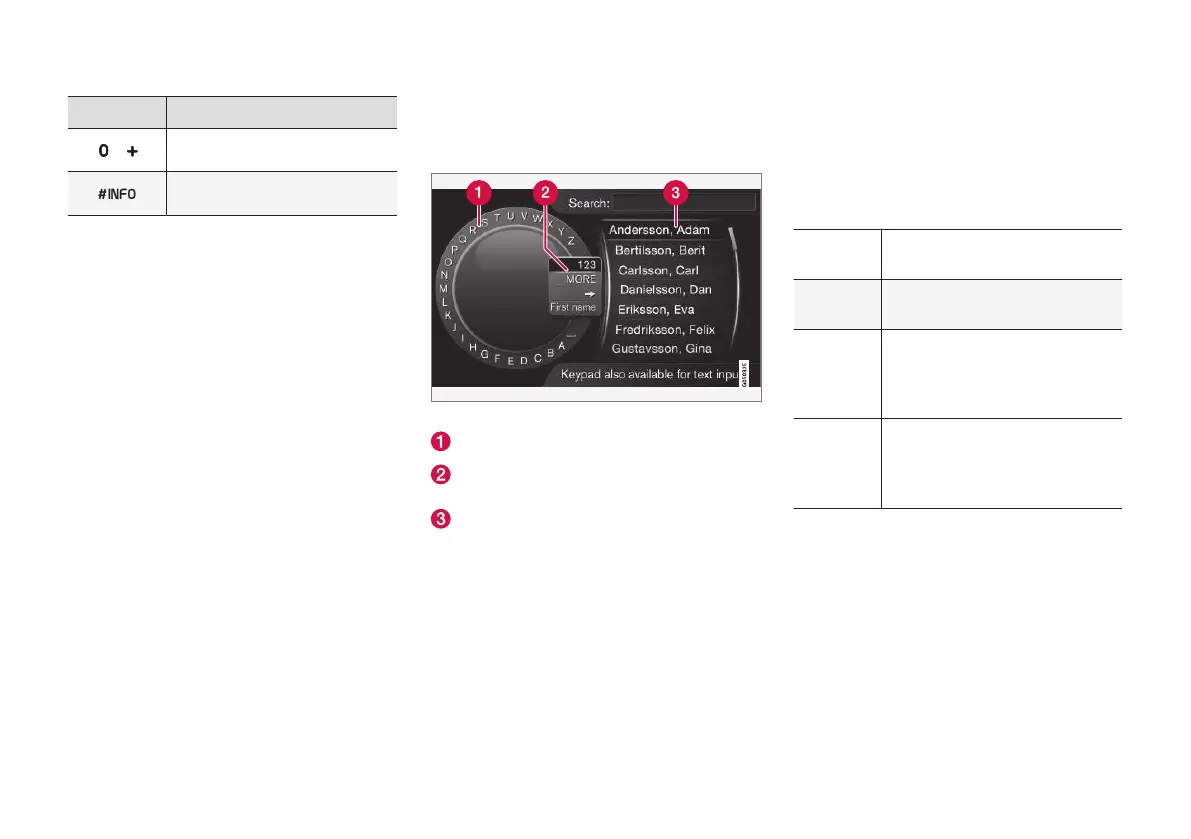
Search using the text wheel
Character list
Switch between character entry modes (see
the following table)
List of phone book contacts
To search for contacts in telephone´s normal
view, press OK/MENU and select
Contacts.
1.
Turn TUNE to the desired letter and press
OK/MENU to confirm. The number/letter
keys on the center console can also be used.
2. Continue with the remaining characters in
the contact's name. The search results will
be listed in the phone book (3).
3. To switch from letter entry mode to the entry
mode for numbers or special characters, or
to go to the pone book, turn TUNE to one of
the selections (see the explanation in the fol-
lowing table) in the list for switching charac-
ter entry mode (2) and press OK/MENU.
123/ABC
Toggle between letters and num-
bers by pressing OK/MENU.
MORE
Switch to special characters by
pressing OK/MENU.
=>
This leads to the phone book (3).
Turn TUNE to select a contact
and press OK/MENU to display
the contact's information.
First
name/
Last
name
Toggle between first-/last name
sort order in the phone book.
Press EXIT briefly to erase a single character.
Press and hold EXIT to erase all of the charac-
ters that have been entered.
If a number key on the center console is pressed
while the text wheel is displayed (see the previ-
ous illustration), a list of characters will be dis-
played. Press repeatedly on the key to access the
desired letter. Continue with the next letter, etc.
When a key has been pressed, this will be con-
firmed when the next key is pressed.



 To Next Page