||
05 Daisy wheel
05
28
More options
NOTE
Faded characters cannot be selected in
combination with the currently input char-
acters.
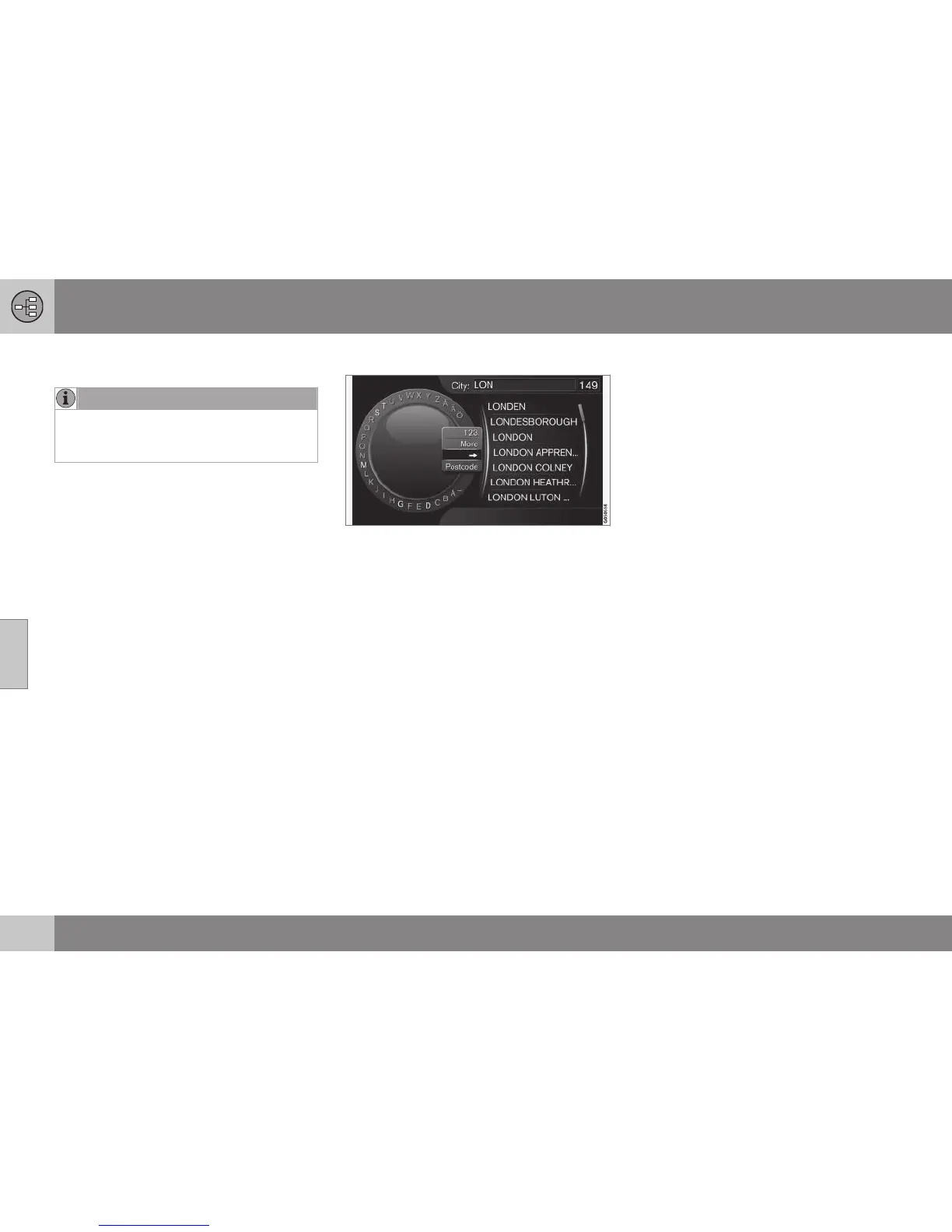
In the daisy wheel's inset menu there are fur-
ther options that have more characters and
digits:
•
123/ABC + OK - the daisy wheel
switches between numbers and charac-
ters.
•
MORE + OK - alternative characters are
shown in the wheel.
•
=> + OK - the cursor moves to the list on
the right-hand side of the screen, where
selections can be made using OK.
•
Postcode + OK - the cursor moves to
the list on the right-hand side of the
screen, where OK can be used to select
options, see (p. 47).
List of options
List that matches entered characters.
A search will list the possible options based
on input information.
The digit "
149" in the screen's top right-hand
corner means that the list contains 149 possi-
ble options that match the entered letters
"LON".
No list
An empty list and the characters "***" in the
screen's top right-hand corner mean that the
number of available options with current
entered characters is greater than 1000 -
when the amount is less, the current options
are shown automatically.
To reduce the number of options in the list:
•
Enter more characters on the text line.
Related information
•
Controls - general (p. 18)



 To Next Page