08 Specify a destination
08
}}
47
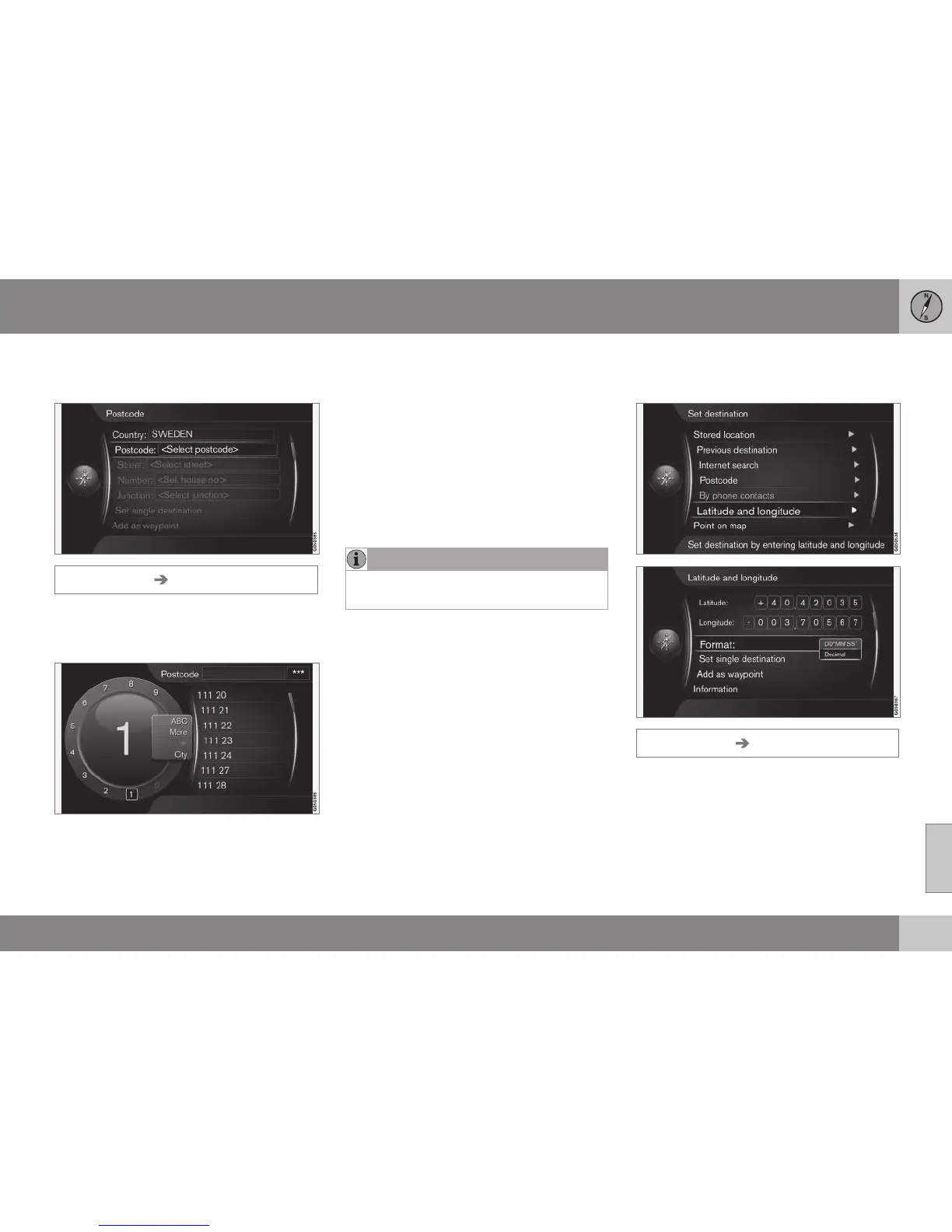
Search via Postcode
Enter destination via search of postcodes.
Set destination Postcode
Search destination by postcode:
1.
Highlight
Postcode OK + to call up the
daisy wheel.
2. Select characters with the TUNE knob
and type/enter them by pressing OK - or
type/enter characters using the centre
console's numerical keys (p. 27).
•
ABC/123 + OK - the daisy wheel
switches between characters and num-
bers.
•
MORE + OK - alternative characters are
shown in the wheel.
•
=> + OK - the cursor moves to the list on
the right-hand side of the screen, where
selections can be made using OK.
•
City: + OK - cursor changes menu and
enables selection of another search area
for postcodes.
NOTE
Presentation of post code may differ
between different markets/areas.
Related information
•
General information about entering a des-
tination (p. 41)
Search via Latitude/Longitude
Enter destination with GPS coordinates.
Set destination Latitude and longitude
First decide which method to use to enter the
GPS coordinates by highlighting
Format: +
OK. Then highlight one of the following
options + OK:
•
DD°MM'SS'' - position with Degrees,
Minutes and Seconds.
•
Decimal - position with Decimals.



 To Next Page