12 vwr.com I Instruction manual VWR
®
PCR Cycler XT
96
Status LED:
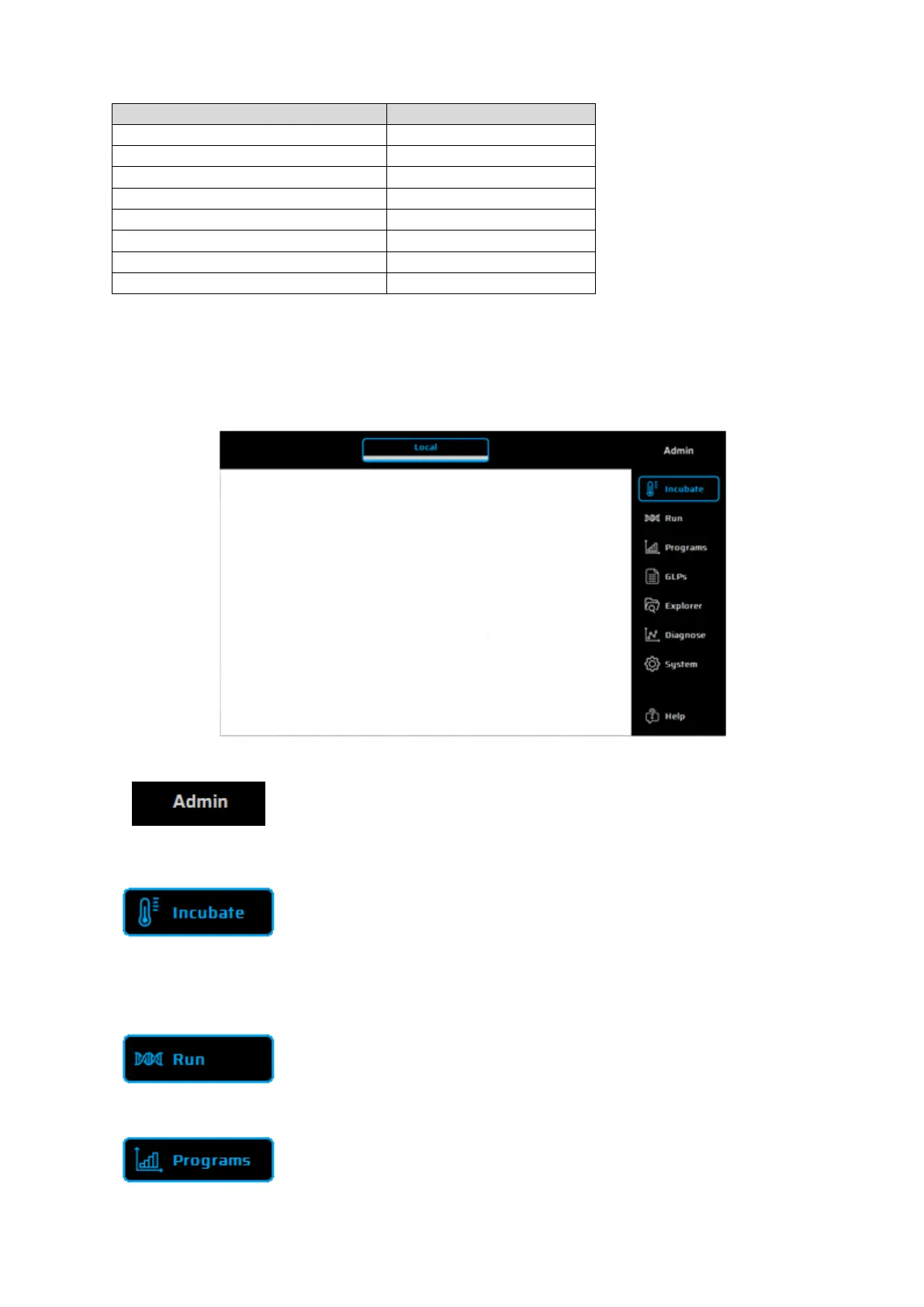
Main Menu
The main menu consists of seven dialogues, which can be selected via tabs at the right side of the
screen. Each dialogue contains a help button for direct help function. The functions of the individual
dialogues are explained below.
This dialogue is used for selecting a User.
The user account management, user groups or single users can be configured in
the System dialogue (see page 11).
Incubate
This dialogue is used for selecting and executing the incubation mode. It can be
activated to manually program temperatures of the thermal plate and heated lid.
This is useful for fast and easy incubations similar to a digital dry bath. Further
instructions for the Incubation Mode are given on page 13.
This dialogue is used for selecting, executing
and monitoring existing PCR
protocols. A detailed description of the 'Run' dialogue is given on page 14.
This dialogue is used for creating, editing and organizing PCR protocols (see page
20).


 To Next Page