22 vwr.com I Instruction manual VWR
®
PCR Cycler XT
96
Program Dialogue
The 'Programs' dialogue serves for generating and editing PCR protocols (programs). This is a list of
commands, which the thermal cycler performs in sequence after starting the program. The 'Programs'
dialogue provides an editor for this purpose.
Operating elements of the 'Programs' dialogue
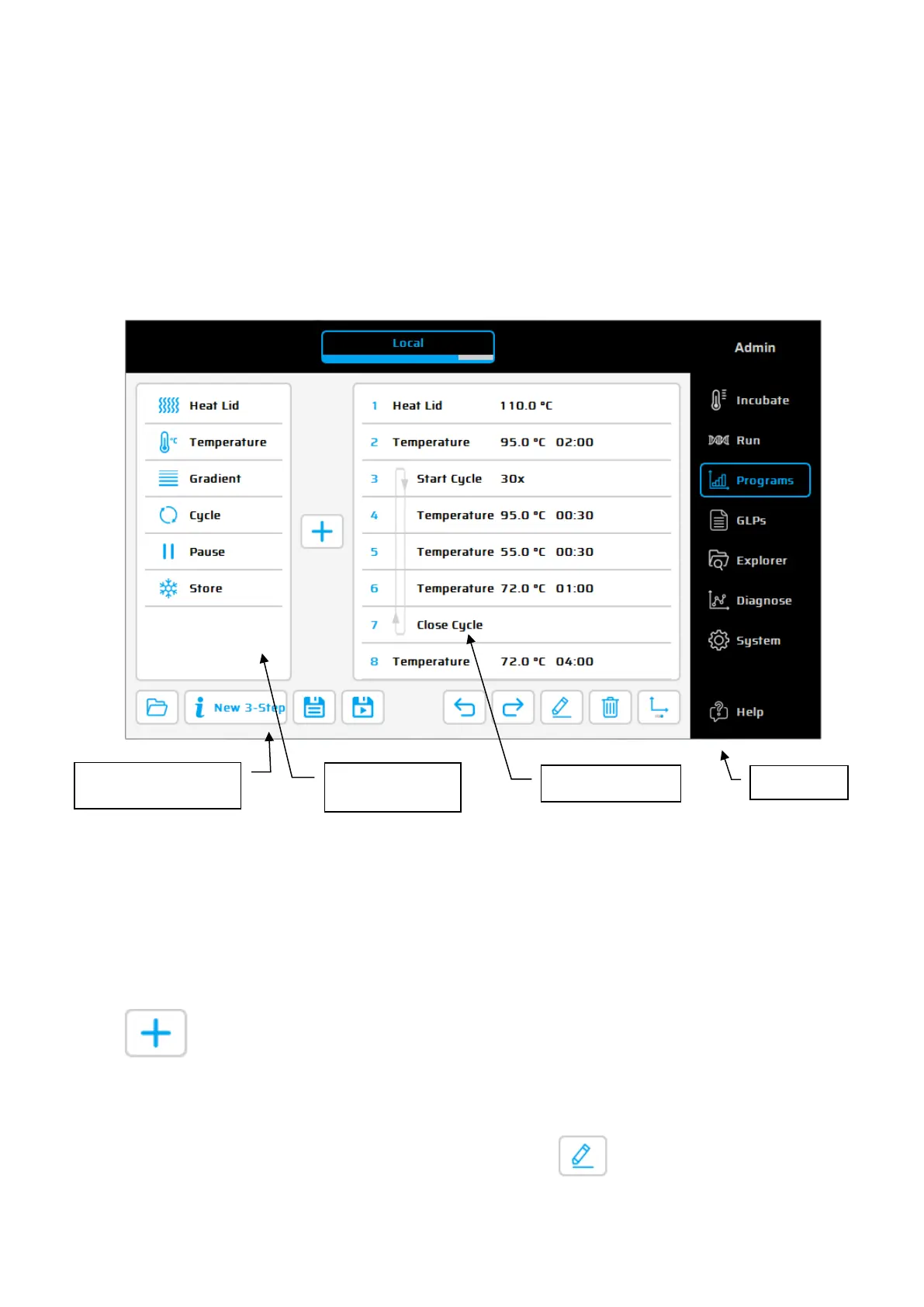
The 'Program window' displays the list of commands (steps) the program is composed of. The 'List of
available commands' displays all steps which can be entered into a program. The meanings of the
individual commands are explained in this chapter. The
function buttons serve for editing of programs
(see following section).
Function buttons of the 'Programs' dialogue:
Entering a command
To enter a new command into a program the desired line has to be selected. After selecting
the program command from the list in the left window it can be inserted above
place via the '+' button. Alternatively, the command can be inserted by the
function of the screen or by
double clicking on the program command. Once a command is
added the corresponding parameters will need to be adapted
. To enter a parameter the
desired input field has to be selected and click on or by double click.
List of available
commands
program and Settings


 To Next Page