33 vwr.com I Instruction manual VWR
®
PCR Cycler XT
96
System dialogue
In this dialogue the configuration and settings of the general parameters of the device can be carried
out.
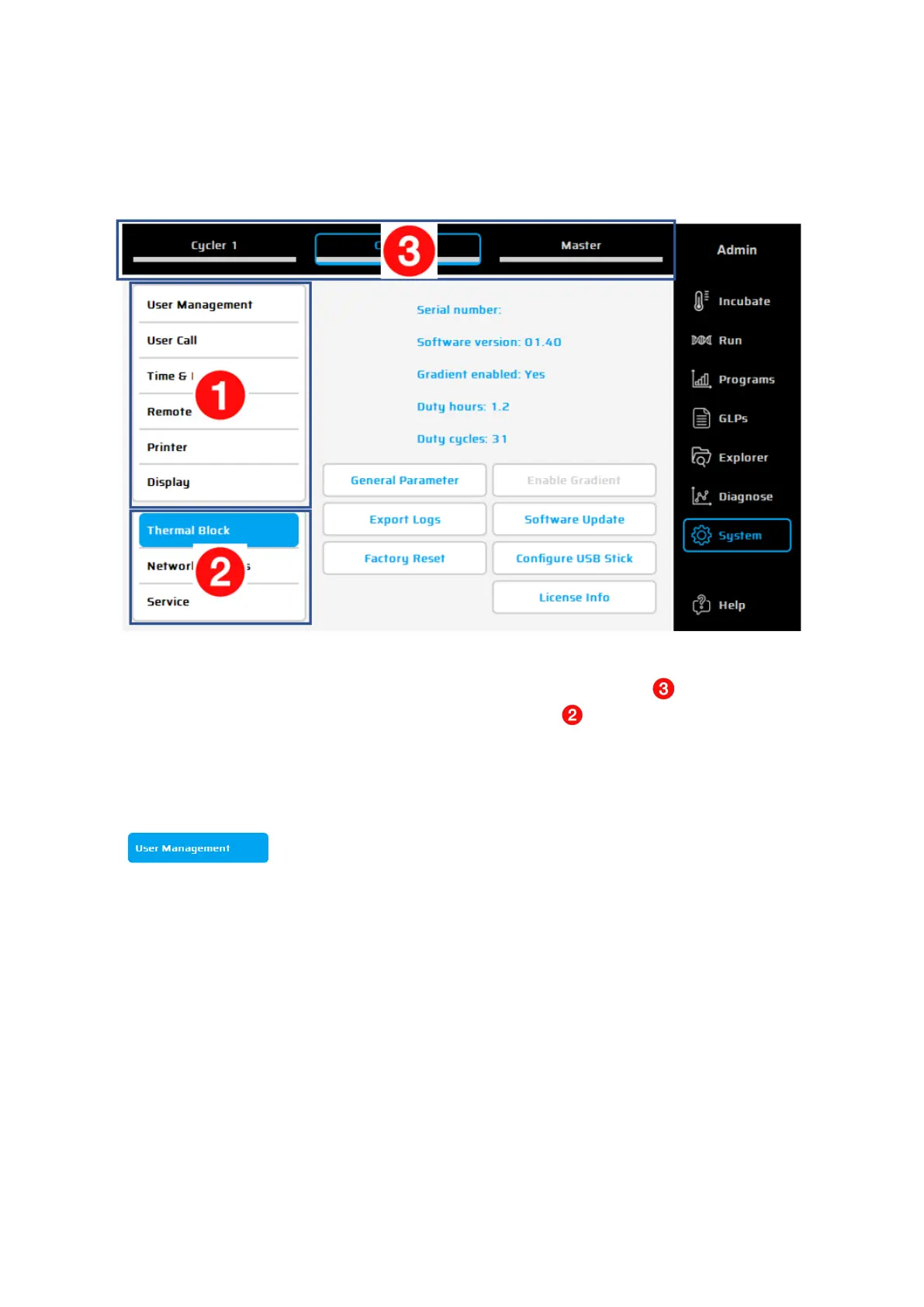
The main menu of this dialogues consists of 3 areas
1) Parameters of the XT
96
Cycler
2) Parameters of the active Cycler or connected cycler – selected in section
3) Select a Cycler – before modifying the parameters in section
Having selected one of the symbols the function is called up and the corresponding settings can be
executed or changed as explained in the following dialogue.
In the user accounts management, user groups or single users can be configured
and their settings e.g. right of access (reading programs, edit programs etc.)
administered. The users are assigned to given or predefined user groups to
which are assigned rights of access.
Important: the thermal cycler supports the assignment of rights of access to
certain user groups. This means that rights for the operation of functions are
given or refused to certain user groups. In the user administration, user groups
are configured and equipped with rights. Single users of those groups are limited
to the appropriate rights.
Rights are not assigned to single users but user groups. Users of a certain user
group inherit the rights of that group.
The name of a user appears i
n the program header of a program generated by
the user as well as in the GLP report of a program run by the user.


 To Next Page