34 vwr.com I Instruction manual VWR
®
PCR Cycler XT
96
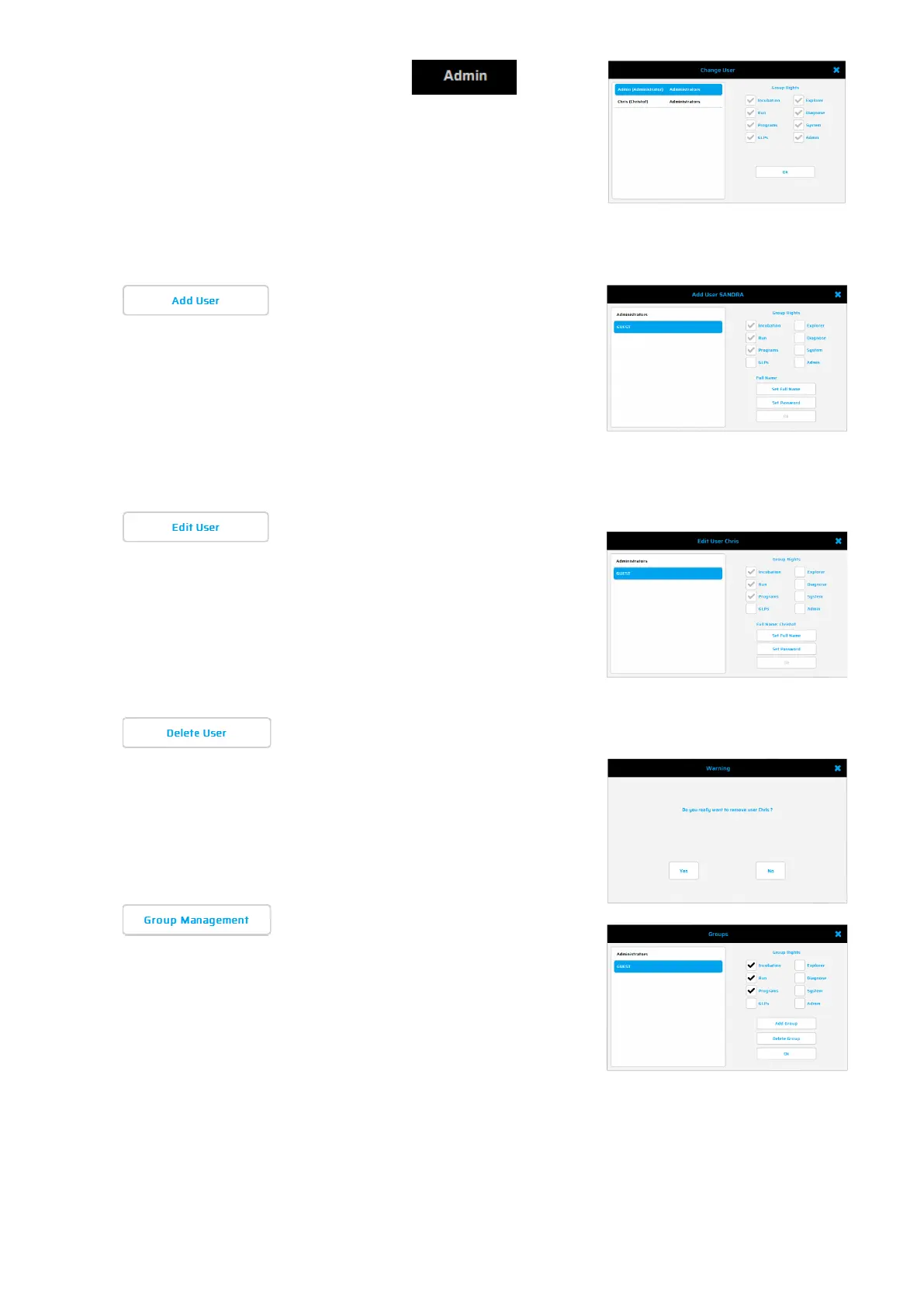
After pressing the button the
adjoining dialogue appears:
To change a user, please select a user click
on OK and enter the appropriate password.
The thermal cycler is delivered with
Administrator access preconfigured.
The factory-set password for the Administrator is admin.
In this dialogue,
single users can be added.
Add a Username
, select a Group (Admin or
Guest are default groups). With the button
'Group Management'
added.
Set a password for the new user.
In this
dialogue, single users can be a,
changed/edit
. Select the user from the list
and click on 'Edit User' The adjoining
dialogue window appears where
appropriated group, the username and
password can be changed.
In this dialogue, single users can be deleted.
Select the user from the list and click on
'Delete User' The adjoining dialogue window
appears to confirm the step.
In this dialogue, Groups can be added,
changed or deleted
. The adjoining dialogue
window appears where user details can be
added.
Save the data with the OK button
. To add a user to the relevant user group,
select a user from the list and click on 'Edit User'.
Important: If a new user should only have limited rights, it might be useful to set
up a new user group with the appropriate rights to access.


 To Next Page