12 13
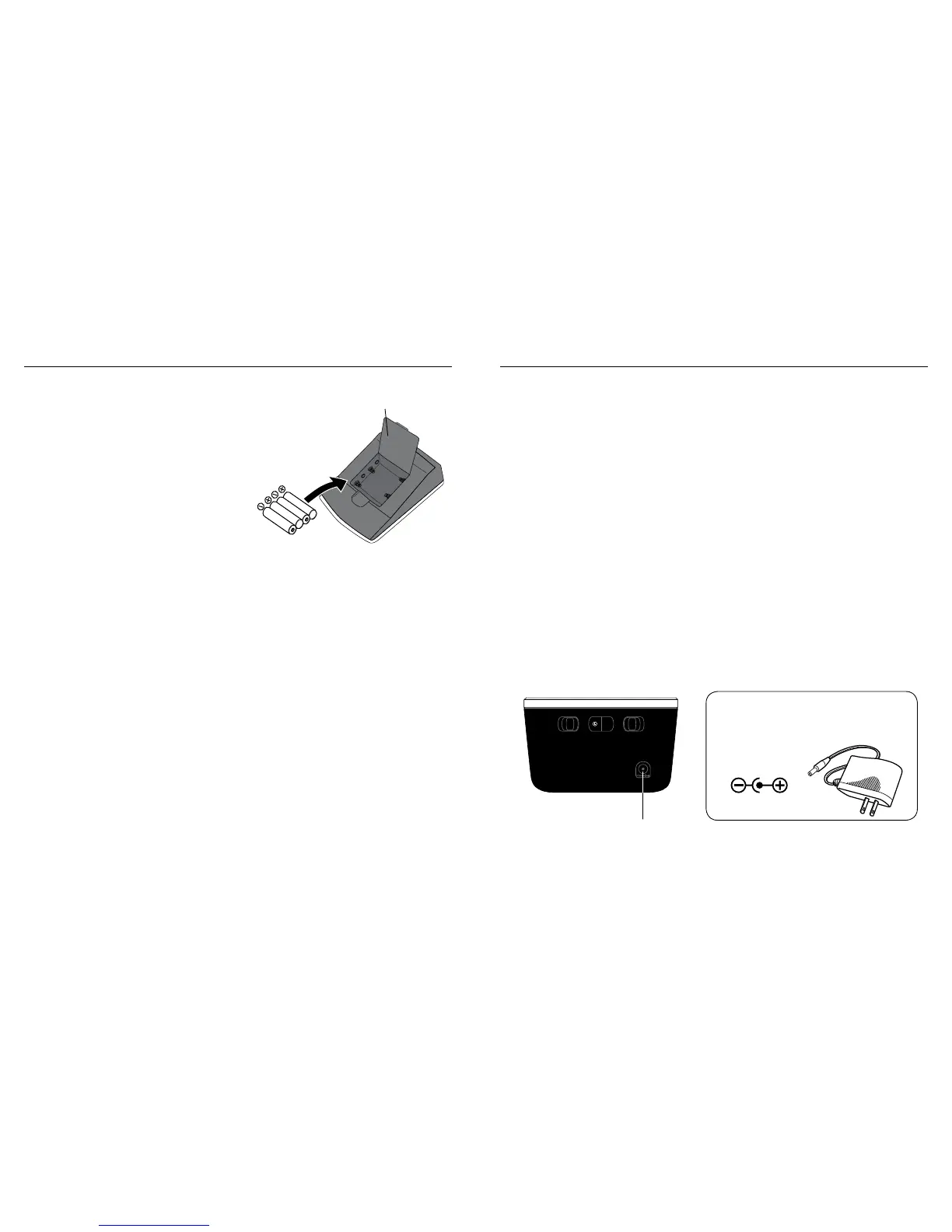
USING THE AC ADAPTER
1. Connect the AC adapter with the AC adapter jack as shown
below.
2. Please use only the AC adapter included with this monitor.
Note:
• Date and time will need to be reset if AC adapter is
unplugged and unit is without batteries.
•WhentheACadapterisyourmainpowersupply,makesure
the adapter plug can be easily removed from the unit.
• Please unload the batteries when operating with an AC
adapterforanextendedperiodoftime.Leavingthebatteries
in the compartment for a long time may cause leakage,
which may lead to damage to the unit.
• NobatteriesareneededwhenoperatingwithanAC
adapter.
INSTALLING BATTERIES
1.Press down on latch and lift
the battery cover to open the
battery compartment.
2. Install or replace 4 “AA ” sized
alkaline batteries in the battery
compartment according to
the indications inside the
compartment.
3. Close the battery cover by
pushing in the top end of the
battery door.
Replace the batteries if:
•Theweakbatterysymbolappearsonthedisplay.
•Whenanybuttonispressedandnothingisdisplayedonthe
screen.
Note:
• Dateandtimewillneedtoberesetifbatteriesareremovedor
replaced.
•Replaceallbatteriesatonetime(assimultaneousset).Use
only1.5V“AA”alkalinebatteries.
•Thesuppliedbatteriesarefortestonly,theymaybedischarged
earlier than batteries you buy in stores.
•Removebatterieswhenunitisnotinuseforextendedperiods
of time.
•Cleancontactsonbatteryandinbatterycompartmentwitha
soft dry cloth each time you install batteries.
•Batteriesarehazardouswaste.Donotdisposeofthemtogether
with the household garbage.
Battery
Cover
AC Adapter
Input:100-240V~0.18A-0.20A50/60Hz
Output:6VDC1A6WMax
Triple Check Rest Assure
ON ONAM/PMOFF OFF
Connect AC
adapter here




 To Next Page