Service and Maintenance
FX85, FX110, FX140
Skidding Winch
48
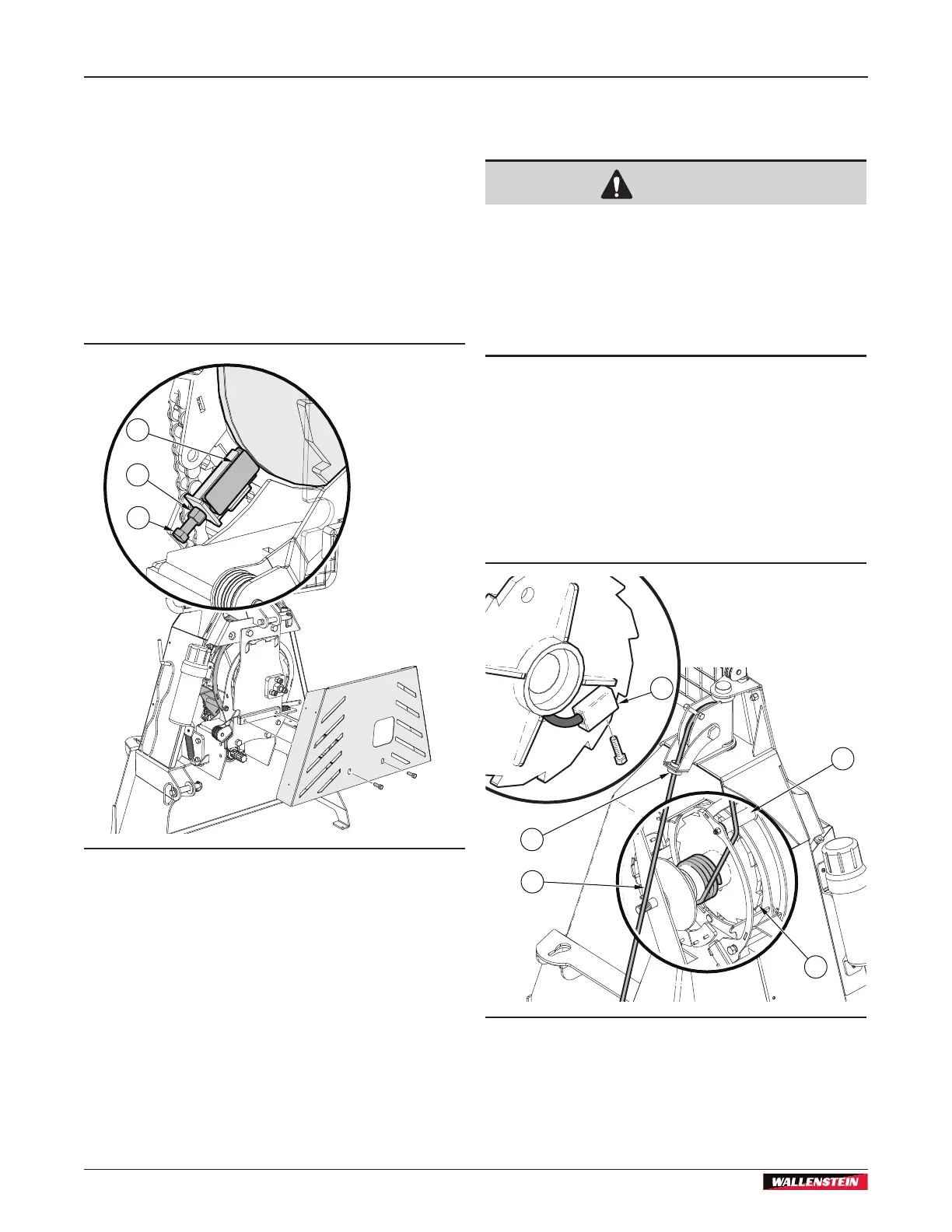
9.8.2 Adjust the Drum Brake
1. On the front of the machine, remove the bottom guard.
2. On the adjustment bolt, loosen the jam nut.
3. Tighten the adjustment bolt until the brake block contacts
the winch drum.
4. Tighten the jam nut.
5. Install the bottom guard and fasteners.
6. Use a calibrated torque wrench to torque the fasteners to
33 lbf•ft (45 N•m).
1
2
3
Figure 56 – Adjust the drum brake
1. Drum-brake block
2. Jam nut
3. Adjustment bolt
9.9 Replace a Steel Cable or Winch
Rope
CAUTION!
Replace a synthetic winch rope with the correct
type of synthetic rope. Use of an incorrect type
of synthetic rope can result in the rope breaking
and causing personal injury. For information
about the correct replacement synthetic winch
rope, see the Wallenstein Equipment Parts
Manual.
W094
1. Guide the cable or winch rope through the eye of the cable
guide (2) and over the pulley into the drum.
Before feeding a synthetic winch rope, wrap the end of the
winch rope with electrical tape to hold the ends of the winch
rope together.
2. Route the cable or winch rope over the roller (3) onto the
drum-band coiler.
3. Insert the cable or winch rope through the hole in the drum
into the anchor (5).
1
2
3
4
5
Figure 57 – Installing the Synthetic Winch Rope or Steel Winch Cable
1. Cable or winch rope
2. Cable guide
3. Drum-brake roller
4. Winch drum
5. Anchor


 To Next Page