Quick Guide
9
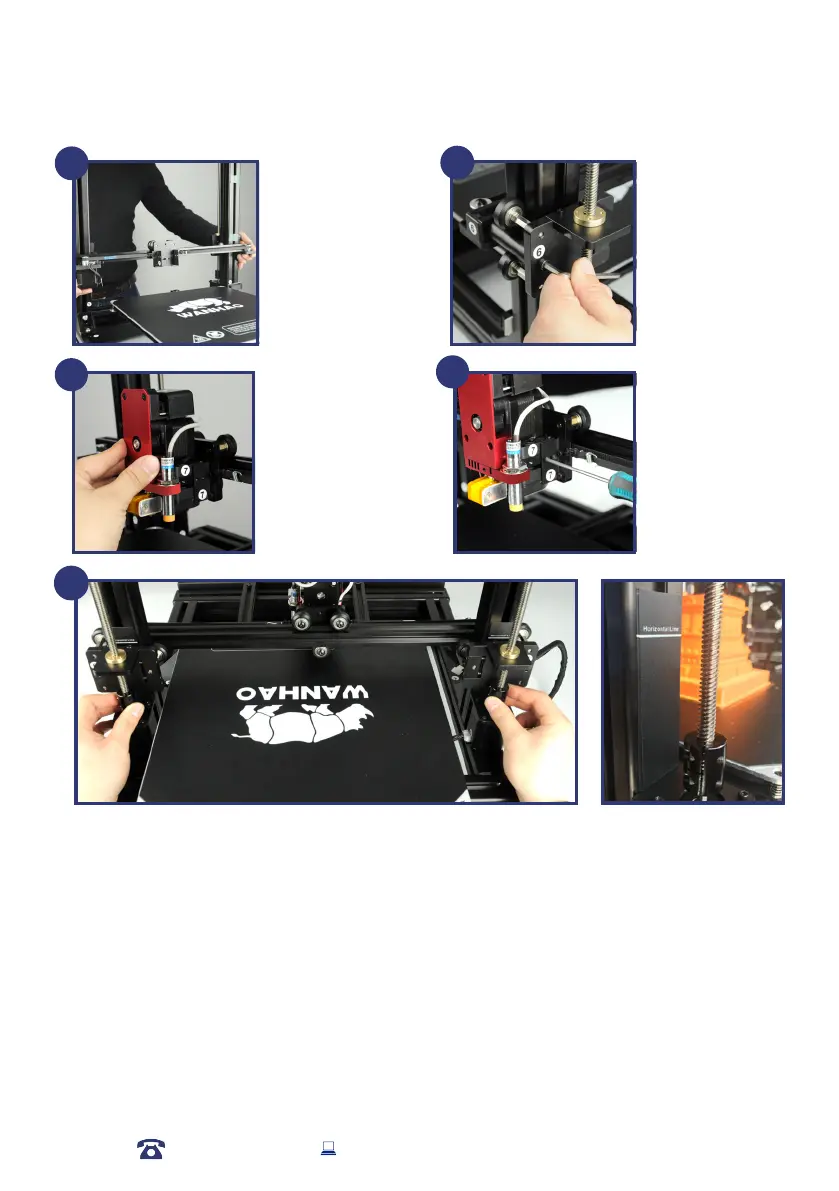
Mount the X axis rail.
Align the right and left
side holders rst. Please
make sure the rail is
located in the middle
of the X axis. You may
need to adjust the
distance to both ends
through the cylinder
holders.
Then tighten the bolts
on both end of No.5 and
No.6.
10
11
Mount the MK12
extruder onto the
X axis holder. Make
sure the locking holes
match to the holder
holes.
A total of 4 bolts need
to be tightened, but the
rst bolt should not be
too tight until the other
three bolts are mounted,
then tighen all the bolts
together.
12
13
Turn the couple to lower the two Z axis in order to level the two Z axis at same height.
Note: The ruler or height gauge(Horizontal line) would provide more accurate height for both two Z axis. The two
axis leveling base need to be at same height to match the horizontal line marked on the both Z axis Pilar.
13
AFTER SALES SUPPORT
86-571-23290996
support@wanhao3dprinter.com
Model : Duplicator 9














 To Next Page