Quick Guide
Unboxing and Assembly
1
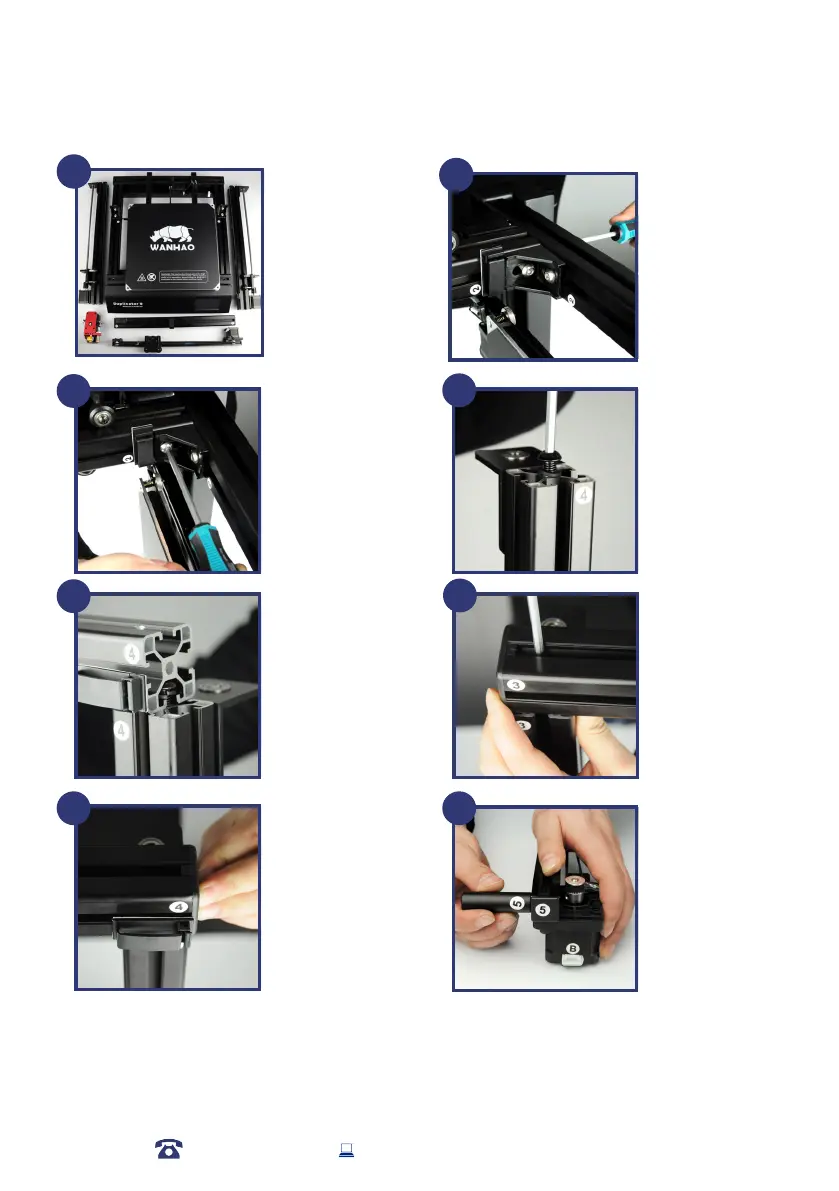
Take out all components
from the box and
place them on the at
ground.
1-Base
2-Z axis Tower Pillar*2
3-X axis rail
4-X axis gantry
5-MK12 Extruder
Place the Base on
it’s side. Find the Z
axis pillar with sticker
No.2. Slide the No.2
pillar into the base
vertical locker. Then
tighten the bolt at
bottom of base.
2
3
Tighten the locking
bolt clockwise. Then
install the other Z
axis pillar onto the
Base.
Loose the two locking
bolt on No.3 and No.4
Z axis pillar by around
5mm. So there will be
sufcient space for X axis
pillar to slide in.
4
5
Slide the X axis pillar into
the No.3 and No.4 bolts. If
there’s not enough space,
you may need to re-loose
the locking bolt.
To tighten the locking
bolt through the hole on
top of the X axis pillar.
Lock both No.3 and No.4
pillar.
6
7
Insert the plastic cover
onto the two ends of X
axis pillar.
Note: Please double
check the Z axis and X
axis pillars. If any bolt
not secured. You need
to secure the screws to
ensure the gantry are
steady and tight.
Rotate the cylinder holder
for a bit but not too close.
Tight enough that can not
slide into pillar freely.
This is also same to the
other side with stickers
No.6.
8
12
AFTER SALES SUPPORT
86-571-23290996
support@wanhao3dprinter.com
Model : Duplicator 9














 To Next Page